
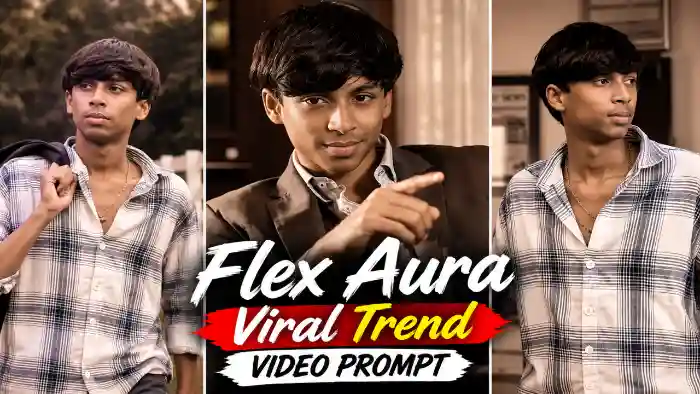
The Flex Aura AI video is a viral Instagram Reels trend where a young guy shows pure rich-boy energy in a few fast cinematic cuts: walking past a white ranch fence with a jacket over the shoulder, a slow-motion close-up, chilling on a leather sofa, pointing at the camera in a blazer with a confident smirk and standing in a luxury office. Everything is in a classy warm black-and-white aura grade, the same smooth Patrick Jane style that made aura edits blow up on Instagram.
In this post you get the original viral video, the muted reference video, the trend audio and a simple Google Flow prompt to make the same Flex Aura AI video with your own face. You only need one clear photo.
Watch the Flex Aura AI Video Trend
The download folder has the muted reference video for Google Flow and the original trend audio, so you can add the same flex sound after generating.
Flex Aura AI Video Prompt for Google Flow (Free)
Before You Paste This Prompt, Check These 4 Things
- Muted reference video: upload the muted video from the download folder as your reference video.
- Clear photo: a sharp, front-facing photo in good light, no sunglasses or heavy filter. Only your face is replaced, so the face must be clearly visible.
- Settings: Ingredients mode, 16:9 landscape, the shortest duration, 1 output. Turn ON “Return silent video” in Flow settings.
- Add the sound: after generating, add the trend audio from the folder in CapCut or VN, or pick the trending audio while uploading on Instagram.
Keep all six shots in the same order and length as the reference video, and in every shot the face is my face from the uploaded photo:
0.0-1.25s: walking past the white fence with a jacket over the shoulder, my face clearly visible from frame 1.
1.25-2.0s: slow close-up, head turned, looking down, my face and my hair, never the bowl haircut.
2.0-2.7s: close-up looking to the side, my face and my hair, never the bowl haircut.
2.7-3.4s: sitting on the brown leather sofa with an arm on the backrest, my face and my hair.
3.4-4.2s: in a dark blazer, smirking and pointing at the camera. IMPORTANT: the person in the blazer is the SAME person as in all the other shots, so it is me: my face and my hair from the photo. In the reference this shot shows a slim young face with a dark bowl haircut - replace that face and that haircut completely with my face and my hair. Keep only the blazer, the smirk, the pointing hand and the background.
4.2-5.15s: standing in the office with framed pictures behind, one arm stretched to the side, wearing the same white checked shirt as in the reference (not a blazer), my face. This last shot must be in the video.
Only change the face and hair. The same person (me) appears in all six shots, the blazer shot and the office shot included. Make it ultra-realistic, seamless and consistent in every frame. No face distortion or flickering. No original face in any shot.
How to Make the Flex Aura AI Video in Google Flow
- First, download the folder above and keep the muted video and the audio on your phone or PC.
- Next, open Google Flow, start a new project and choose Ingredients mode, 16:9 and 1 output.
- Then upload the muted reference video and one clear photo of your face.
- After that, copy the prompt from the box above, paste it and click Generate.
- Finally, add the Flex Aura trend audio in CapCut or VN and post your Reel.
Why the Flex Aura Trend Is Going Viral
Aura edits are one of the biggest formats on Instagram right now. This one sells a luxury lifestyle in seconds: a ranch, a leather sofa, a blazer, a CEO-style office and a cool attitude, all in a premium black-and-white grade. Viewers instantly read it as rich, confident and successful, which is exactly why people replay it, share it and want their own version. With this prompt you only swap the face, so your Reel looks like a high-budget luxury edit without any shoot.
Patrick Jane Style Aura Edit Explained
Patrick Jane is the charming, ultra-confident fictional detective from the TV series The Mentalist, and his calm smirk, relaxed walk and effortless style became the template for a whole wave of Instagram aura edits. The Flex Aura AI video uses the same editing language: short slow-motion cuts, confident eye contact, a jacket over the shoulder, a luxury office and a soft monochrome grade. With this prompt you get that premium Patrick Jane aura edit with your own face, without filming anything.
Best Free AI Video Generator for Face Swap Edits
Google Flow runs on the Veo video model. In reference-video mode it keeps the original movements, outfits, locations, camera angles and timing, and replaces only the face with yours. That makes it one of the best free AI video generator options for face swap aura edits, with no editing software, green screen or paid face swap app needed.
Tips for the Best Result
- Use a recent daylight photo with your full face visible and no heavy filter.
- Do not edit the prompt. It already locks your face and keeps everything else from the original.
- Generate two or three times and keep the result where your face matches best.
- Post it with a flex caption like “Aura level: CEO” to get more comments and shares.
Frequently Asked Questions
Is the Flex Aura AI video prompt free?
Yes. The prompt, the muted reference video and the audio are completely free. You only need a Google Flow account to generate the video.
Will my clothes change in the video?
No. This prompt changes only the face. The outfits, locations and moves stay exactly like the original Flex Aura video.
Why is the reference video muted?
A reference video with music can make Google Flow fail. Upload the muted file and add the trend audio afterwards.
Is this the Patrick Jane aura edit trend?
Yes. It follows the same Patrick Jane style aura edit format: confident moves, luxury locations and a black-and-white grade, now with your own face through Google Flow.
Can girls make this trend?
Yes, the face comes from your photo. For the best match, use a photo where your face is clearly visible from the front.
Want more trends like this? Try the Luxury CEO Entry Video, the Luxury Mafia Viral Trend and the Turn Around Transition Viral Trend prompts.