
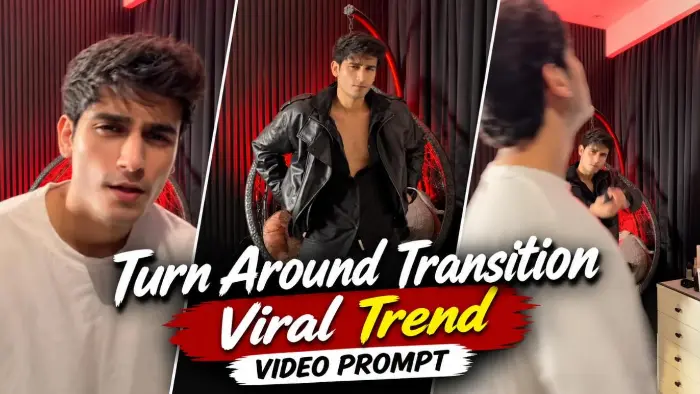
The Turn Around Transition Viral Trend is the new outfit-change trend on Instagram Reels. A person starts in a dark red-lit room in a casual look, talks to the camera, turns around, and after a quick walk-away transition appears in a black leather biker jacket with a cool, confident music-video attitude.
Now you can make the same leather jacket transition with your own face using Google Flow. In this post you get the original video, the exact prompt and simple steps. You only need one clear photo of yourself, and your own clothes from the photo are used for the first look.
Watch the Turn Around Transition Viral Trend
Tap the button below to download the muted reference video and the audio file.
Turn Around Transition Viral Trend Prompt for Google Flow (Free)
Before You Paste This Prompt, Check These 5 Things
- Muted reference video: download the muted 10-second reference video and upload it in Flow. It keeps the same shots and the same transition as the original.
- One clear photo: a sharp, front-facing photo with your face, hair and beard or moustache clearly visible, good light, no sunglasses or heavy filter. A boy photo works best for this trend.
- First look: the clothes you wear in your photo are used for the first look. The black leather jacket look is added automatically after the transition.
- Settings: choose Ingredients mode, 9:16, 10 seconds and 1 output. If you get an audio error, select “Return silent video”.
- Tags and retry: tag your photo as @image1 and the muted video as @video1. Flow changes a little every time, so generate two or three times and keep the best one.
Replace ONLY the person in @video1 with the person in @image1. @image1 is the ONLY source of identity.
IDENTITY LOCK (most important rule): in every frame, in both looks, the face is 100% @image1's face: same face shape and width, cheeks, eyes, eyebrows, nose, lips, jawline, chin, skin tone and skin texture, and the same facial hair as @image1 exactly (same moustache or beard if @image1 has it, clean-shaven only if @image1 is clean-shaven). The hair is exactly @image1's hair: same length, texture, curls and hairline. Take NOTHING of the face from @video1: @video1 gives only movement, camera and timing. Never the original person's face, face shape or hair, not even for one frame, not even in the close-ups at the end.
TWO LOOKS of the SAME person:
LOOK 1 (casual, 0.0-4.5s): the person wears exactly the clothes shown in @image1 (same top, same colours). If the clothes in @image1 are not clearly visible, a plain casual t-shirt with short sleeves and a round neck. Shoulders and chest always covered. Never the original white t-shirt from @video1.
LOOK 2 (leather, from 3.6s to the end): oversized black leather biker jacket with wide collar and silver zips, worn open, over a black shirt that is fully on and covers the chest, top button open at the collar only; black jeans; a silver watch on one wrist. Same face and same hair as @image1. Look 2 stays exactly the same until the end.
In EVERY shot it is @image1, never the original person:
0.0-1.0s: SHOT 1, handheld selfie close-up in a dark room with vertical red-lit wall panels and a pink-red ceiling light. LOOK 1. The person talks to the lens with a confident look, one hand gestures towards the camera, then a relaxed palm wave.
1.0-1.7s: head turns to the right with a cool smirk, shoulders start turning.
1.7-3.1s: the person turns fully around, back to the camera. The camera is extremely close behind: the back of the head and the top fill the WHOLE frame, only the red wall panels show at the edges. Nobody else is in the room: no head, face or shoulder of anyone peeks out at the sides of the back. The person walks slowly forward, still blocking the view.
3.1-3.6s: still with the back to the camera, the person twists the shoulders and raises the right arm forward over the right side, making a playful finger-gun hand gesture (index finger pointing forward, thumb up) towards the back of the room with a quick flick of the wrist.
3.6-4.5s: TRANSITION. Right after the gesture, the person turns the head to the left in profile and leans out of frame to the left. Only now, as the body moves aside, the SAME person in LOOK 2 is revealed for the first time, standing at the back of the room in front of a hanging round egg chair, next to a white chest of drawers, reacting to the gesture with a playful jolt, hands at the chest, then straightening up. Both looks have the same face from @image1. After 4.5s only LOOK 2 is in frame.
ACTING IN LOOK 2: cool, smouldering, confident attitude like a music video. Lips move silently in sync with the beat exactly as in @video1 (no sound, no speech). Mostly serious and intense, only a small confident smirk; no wide grin until the very end.
4.5-5.3s: SHOT 2, wide full-body shot, camera still, LOOK 2. The person stands with feet wide apart, arms hanging loose near the hips, rolls the shoulders back, chin up, sways the upper body with swagger, glances to the side and then down into the lens.
5.3-6.9s: SHOT 3, close handheld selfie, slightly low angle, LOOK 2. Both hands grab the two front edges of the jacket and pull it wide open in one strong move (the black shirt stays on and covers the chest), then hold. Head tilts slightly back, intense smouldering stare into the lens, lips moving silently.
6.9-8.5s: SHOT 4, medium close-up, LOOK 2. The right hand comes up close to the lens and the index finger points straight at the camera, lips moving silently with attitude, then the hand slowly drops out of frame. No hand on the chest.
8.5-10.0s: SHOT 5, medium close-up, LOOK 2. Both hands come up loose with fingers spread and relaxed, waving slowly in front of the chest in a cool 'chill' gesture (not flat stop palms), then the arms fold across the chest, small confident smirk into the lens.
Keep the original room, red-lit wall panels, hanging egg chair, white drawers, red lighting, camera angles, shot order and the walk-away transition from @video1. Change only the person's face, hair and the outfits above.
NEGATIVES: constant wide smiling, closed still mouth in the close-ups, stiff posture in the wide shot, hand on chest in shot 4, flat stop-sign palms, face drifting towards the original person in the close-ups, different facial hair from @image1, slimmer or different face shape, the second look visible before 3.6s, anyone visible behind the person during the walk, missing hand gesture, original person's face, original hair, original white t-shirt, bare chest, open shirt showing skin, bare shoulders, missing clothes, two copies of the person in the wide shot, identity swaps, mixed facial features, appearance drift, altered actions, extra people, distorted face, extra fingers, flickering, outfit changing within a look, jump cuts, new scenes, subtitles, text, logos, watermarks, sound from the video.
How to Make the Turn Around Transition Viral Trend in Google Flow
- Download the muted 10-second reference video from the download button above.
- Open Google Flow, choose Ingredients mode and set the video to 9:16 and 10 seconds.
- Upload your clear photo and the muted reference video.
- Tag your photo as @image1 and the video as @video1.
- Copy the full prompt from the box above, paste it in Flow and generate.
- If you see an error, generate once more. Then add the trending audio in CapCut or VN and post your Reel.
Why the Turn Around Transition Trend Is Going Viral
The outfit change happens in a single smooth move, so viewers stay to see the reveal. The dark red room, the leather jacket and the silent lip-sync attitude give the video a music-video feel, while the casual first look makes the change feel bigger. It is easy to copy with your own face, which is why creators keep making new versions.
Tips for the Best Turn Around Transition Result
- Use a recent photo in good light with your face looking straight at the camera and your beard or moustache clearly visible.
- Wear or choose a photo with a normal casual top, because that is used for the first look.
- Avoid group photos, sunglasses, masks or heavy beauty filters.
- Do not edit the prompt. It already locks your face, both looks and the transition.
- Generate two or three times and keep the best result, because Flow can change slightly every time.
Frequently Asked Questions
Is the Turn Around Transition prompt free to use?
Yes. The prompt is completely free. You only need a Google Flow account to generate the video.
Do I need a leather jacket in my photo?
No. The prompt adds the black leather biker jacket, black shirt and black jeans automatically after the transition. Only your face, hair and first-look clothes come from your photo.
Why did my face change a little in Flow?
Flow can vary from run to run. Use a sharp front-facing photo, do not edit the prompt and generate two or three times to get the best match.
Can a girl use this Turn Around Transition prompt?
The prompt takes the face and hair from your photo, so it can work for a girl photo too, but the original video is a boy trend and the result looks best with a boy photo.
Want more trends like this? Try the Metro Walk AI Video and the Candle Transition Viral Trend prompts.