
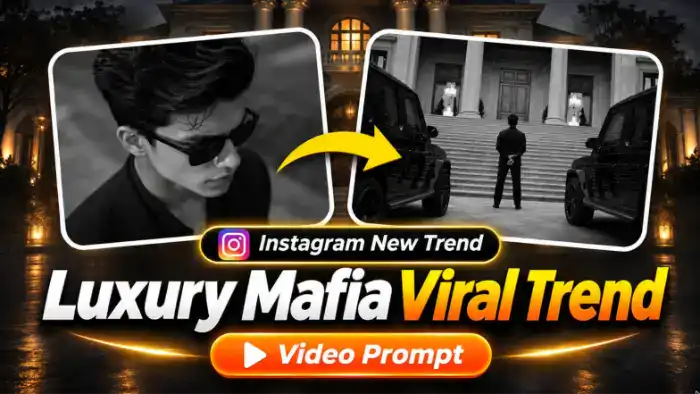
The Luxury Mafia Viral Trend is the new black and white cinematic edit taking over Instagram. In just 10 seconds you see polished shoes walking on stone, a close-up of the wrist, a slow back view in front of a grand mansion, a sharp face reveal, and finally you walk between two black luxury SUVs like a billionaire boss.
The best part is that you do not need any reference video for this one. Just upload one clear photo of yourself in Google Flow, paste the master prompt below, and Flow creates the full luxury cinematic video with your own face and outfit.
Watch the Luxury Mafia Viral Trend Video
This is the result video made with the prompt below. You can create the same black and white luxury edit with your own photo.
Luxury Mafia Viral Trend Prompt for Google Flow (Free)
Copy the master prompt below and paste it in Google Flow together with your photo. Do not change the prompt; only your photo should change.
Before You Paste This Prompt, Check These 5 Things
- No reference video: this trend needs only ONE photo. Do not upload any video in Flow.
- One clear photo: a sharp, full-body or half-body photo where your face, hair and outfit are clearly visible. Your outfit, shoes and watch come from this photo.
- Dress the part: a black suit or dark outfit, formal shoes and a watch give the best mafia look, because the prompt keeps your exact outfit.
- Settings: 16:9 ratio, 1 output. Add your photo as the image ingredient before you paste the prompt.
- Add music later: the result is a silent cinematic video. Add a trending mafia or attitude song in CapCut or VN before posting.
BLACK & WHITE LUXURY MAFIA CINEMATIC | 10 SECONDS | GOOGLE FLOW / VEO
SETTINGS: Exactly 10 seconds | 16:9 | Ultra-realistic 4K | Luxury Mafia / Billionaire Cinematic | ONE uploaded reference image only.
1. ABSOLUTE REFERENCE IMAGE PRESERVATION – HIGHEST PRIORITY
Use the uploaded reference image as the ONLY and EXACT source for the main character. Do not redesign, reinterpret, replace, regenerate or modify any part of the person’s appearance. The reference image is the final authority.
STRICT FACE IDENTITY LOCK: Preserve the exact original face and identity, including face shape, eyes, eyebrows, nose, lips, mouth, jawline, chin, cheeks, forehead, facial proportions, hairstyle, hairline, hair texture, skin tone, natural skin texture and age. Never generate a different face. No face swapping, face morphing, facial reconstruction, beauty filters, artificial enhancement, de-aging or identity drift.
STRICT OUTFIT LOCK: Preserve the complete original outfit exactly as visible in the reference: same clothing, colours, fabric, texture, patterns, prints, buttons, collar, sleeves, stitching, trousers, footwear, watch, jewellery, glasses and every accessory. Do not add, remove, replace, recolour or redesign any clothing or accessory. Do not introduce a new suit, sunglasses, watch or jewellery unless it already exists in the reference.
COMPLETE CHARACTER CONSISTENCY: Face, outfit, hairstyle, accessories and body proportions must remain identical in every scene and frame. Only camera position, camera movement, framing, environment and lighting may change. If any cinematic instruction conflicts with the reference, always preserve the original appearance.
2. EXACT 10-SECOND SCENE SEQUENCE
SCENE 1 – SHOES WALKING CLOSE-UP (0.0–1.5s): Extreme low-angle close-up of the person’s original footwear and lower clothing walking slowly on grey stone pavement. Smooth backward tracking. Preserve exact shoes and trousers.
SCENE 2 – ACCESSORY CLOSE-UP (1.5–2.7s): Cinematic close-up of the original wrist, hand and clothing details. Show a watch/accessory only if it exists in the reference; preserve its exact design. Slow push-in, shallow depth of field.
SCENE 3 – BACK VIEW (2.7–4.0s): Same person from behind, wearing the exact original outfit, in front of a grand European luxury mansion. Medium-wide symmetrical composition and slow push-in. Do not invent a different back design or hairstyle.
SCENE 4 – FRONTAL FACE REVEAL (4.0–5.5s): Front close-up of the same original face. Preserve facial identity and features exactly; no reconstruction or enhancement. Slow cinematic push-in and softly blurred background. Do not add sunglasses unless present in the reference.
SCENE 5 – HIGH-ANGLE PORTRAIT (5.5–6.8s): High-angle three-quarter portrait of the same person. Preserve original face, hair, outfit, accessories and body proportions. Only the camera angle changes.
SCENE 6 – TWO BLACK LUXURY SUVs (6.8–8.4s): Wide frontal cinematic shot. The same person walks confidently between two identical black Mercedes-Benz G-Class luxury SUVs. Exact same reference appearance and outfit. Camera tracks backwards smoothly.
SCENE 7 – FINAL MANSION SHOT (8.4–10.0s): Ultra-wide rear view of the person standing in the centre, with two black G-Class SUVs symmetrically parked on both sides and a grand European mansion behind. Preserve original outfit, hair and body proportions. Slow cinematic camera pullback.
3. CINEMATIC COLOR GRADING
Apply premium black-and-white monochrome grading: deep blacks, detailed grey midtones, soft highlights and cinematic contrast. Keep facial and clothing details realistic. Grading must not alter outfit design or facial features.
4. CAMERA & TRANSITIONS
Use the specified low-angle tracking, accessory close-up, rear medium-wide, frontal face close-up, high-angle portrait, wide frontal SUV shot and symmetrical ultra-wide mansion shot. Use clean cinematic cuts at the specified timestamps. Do not merge all scenes into one continuous shot.
5. FINAL NON-NEGOTIABLE RULES
ONE reference image only. No face change. No outfit change. No clothing colour/design change. No hairstyle or accessory changes. No body-proportion changes. No identity replacement or duplicate character. No invented accessories. No text, subtitles, logos or watermark. Maintain the same original person and complete appearance from first frame to last frame.
ULTIMATE PRIORITY: COMPLETE REFERENCE APPEARANCE PRESERVATION. If any scene, styling, lighting or camera angle conflicts with the reference, ALWAYS preserve the original face, outfit, hairstyle, accessories and body appearance. Create a photorealistic 10-second luxury cinematic video with professional camera angles, smooth cuts, two black luxury SUVs and a grand mansion. Only the environment and camera work should change—not the person.
How to Make the Luxury Mafia Viral Trend in Google Flow
- First, open Google Flow and sign in with your Google account.
- Create a new project and set the ratio to 16:9.
- Upload one clear photo of yourself as the image ingredient.
- Copy the master prompt above and paste it in Flow.
- Tap Generate and wait for the 10-second video.
- Download the result, add a mafia or attitude song in CapCut or VN, and post it as a reel.
Why the Luxury Mafia Viral Trend Is Going Viral
Everyone loves a main character moment, and this edit delivers it in 10 seconds. The black and white grading, the slow camera moves and the step-by-step reveal from shoes to face feel like the opening of a big-budget mafia film. As a result, viewers watch it till the end and replay it.
Also, the final shot with two black SUVs and a grand mansion gives a strong billionaire attitude. Moreover, it needs only one photo and no editing skills, so anyone can make it. That is why the Luxury Mafia Viral Trend keeps spreading across Instagram Reels.
Tips for the Best Luxury Mafia Result
- Use a sharp photo with good light. A blurry selfie gives a weak face match.
- Wear a black or dark outfit in your photo. The prompt keeps your exact clothes, so a suit looks the most cinematic.
- If you want sunglasses or a watch in the video, wear them in your photo. The prompt does not add accessories that are not in your photo.
- If the face changes in one shot, simply generate again. Flow gives a slightly different result each time.
- Use a caption like “Silent moves, loud results” or “Boss mode on” to get more comments.
Frequently Asked Questions
Do I need a reference video for this trend?
No. This Luxury Mafia Viral Trend works with only one photo and the master prompt. There is nothing to download.
Will my outfit change in the video?
No. The prompt locks your face, hair, outfit and accessories from your photo, so you look the same in every shot. Only the camera, the location and the lighting change.
Can a girl use this Luxury Mafia prompt?
Yes. The prompt takes the face, hair and outfit from your photo, so it works for both boys and girls.
Why is the video black and white?
The black and white grading is part of the trend. It gives the classic, premium mafia film look while keeping your face and clothes realistic.
Is this prompt free to use?
Yes. The master prompt is completely free. You can also try the Candle Transition Viral Trend prompt on this site for another viral Google Flow edit.