
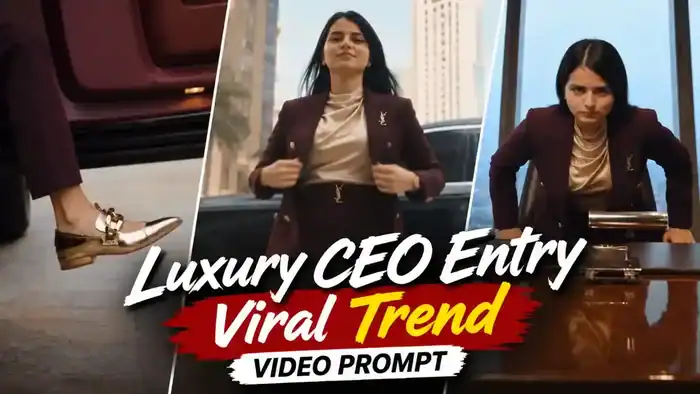
The Luxury CEO Entry Video is the new Instagram trend where a boss steps out of a black luxury car, walks into a glass tower and takes the CEO chair, all in just 10 seconds. You see a gold shoe leave the car door, a confident walk, a warm smile in the lobby and a powerful final stare from the head of the desk.
The best part is that you do not need any reference video. Upload one clear photo of yourself in Google Flow, paste the master prompt below, and Flow creates the full Rolls Royce style car entry with your own face. It works for both boys and girls.
Watch the Luxury CEO Entry Video
This is the original trend video. Play it first so you know exactly what you are going to create. The original sound is available in the download button below, so you can add it to your video later.
Luxury CEO Entry Video Prompt for Google Flow
Copy the master prompt below and paste it in Google Flow together with your photo. Do not change the prompt; only your photo should change.
Before You Paste This Prompt, Check These 5 Things
- No reference video: this trend needs only ONE photo. Do not upload any video in Flow.
- One clear photo: a sharp photo where your face and hair are clearly visible. Use a clear selfie, never a blurry one. Boy or girl, both work.
- Outfit is fixed: the prompt gives you the maroon suit look. Only your face, hair and body come from your photo.
- Settings: 9:16 ratio, 1 output. Add your photo as the image ingredient, then type @ in the prompt and select it where it says @image1.
- Add the sound: the generated video is silent. Download the original sound above and add it in CapCut or VN after generating.
LUXURY CEO ENTRY CINEMATIC | 10 SECONDS | GOOGLE FLOW / VEO
SETTINGS: Exactly 10 seconds | 9:16 vertical | Ultra-realistic 4K | Luxury Corporate Cinematic, warm golden-hour look | ONE uploaded reference image only (@image1, boy or girl). No reference video.
1. ABSOLUTE REFERENCE IMAGE PRESERVATION – HIGHEST PRIORITY
Use @image1 as the ONLY and EXACT source for the main person's face, hairstyle, skin tone, body proportions, gender and age. Do not redesign, reinterpret, replace or modify any part of the person's appearance. Hair stays exactly as in @image1 (same length, style, colour), also in the back views. Never generate a different face. No face swapping, face morphing, beauty filters, de-aging or identity drift.
STRICT OUTFIT LOCK: In EVERY scene and frame the main person wears exactly this look and nothing else: a deep maroon double-breasted formal blazer with gold buttons over a champagne satin top or shirt, matching dark maroon formal trousers with a plain gold belt buckle, gold-tone formal shoes, a small plain gold pin on the blazer lapel and a thin gold wristwatch. The outfit never changes, including the back views, close-ups and the final scenes. Only the face, hair, skin tone and body come from @image1; the outfit does NOT come from @image1. No text, letters or logos on any clothing or accessory.
SUPPORTING CAST (generic, never the main person): ONE man in a black suit, white shirt and black tie who follows the main person (Scene 8 only); TWO receptionists standing in the lobby, one in a navy suit with a white bow blouse and joined hands, one in a navy dress hugging a black folder (Scene 10 only). Nobody else has a face on screen.
COMPLETE CHARACTER CONSISTENCY: face, hair, outfit and body identical in every scene. Only camera, framing, environment and lighting change.
2. EXACT 10-SECOND SCENE SEQUENCE (every scene is a separate quick shot joined by clean hard cuts, no dissolves)
SCENE 1 – CAR FRONT (0.0–0.6s): Very low camera near the ground, a black luxury sedan seen from the front-left, its rear door already open, a sand-coloured hotel with palm trees behind, golden daylight. No number plate, no badges.
SCENE 2 – WHEEL AND DOOR (0.6–1.1s): Low close view of the front wheel and the open rear door showing a deep red leather interior.
SCENE 3 – FOOT STEPS OUT (1.1–1.6s): Low wide side view of the car, the door swings open and the main person's foot in a gold-tone formal shoe steps out onto the stone paving.
SCENE 4 – HOOD ORNAMENT (1.6–1.9s): Close-up of a small gold winged figurine hood ornament on the car, dark blurred background.
SCENE 5 – SHOE LANDS (1.9–2.4s): Very low close-up of the gold-tone shoe and maroon trouser leg landing on the grey stone floor and walking forward.
SCENE 6 – WALK TOWARD CAMERA (2.4–2.9s): Medium shot, the main person walks straight toward the camera with a calm confident face, one hand smoothing the blazer, green trees and golden glass towers softly blurred behind.
SCENE 7 – LOW WIDE ADJUST (2.9–3.5s): Low-angle wide full-body shot, the main person walks toward the camera and adjusts the blazer buttons, the black car parked behind, tall golden tower and blue sky above.
SCENE 8 – WITH THE MAN BEHIND (3.5–3.9s): Close medium shot, the main person walks toward the camera, the man in the black suit follows just behind one shoulder, glass doors and palm trees blurred behind.
SCENE 9 – LOBBY SHY SMILE (3.9–4.8s): Close-up inside a bright glass lobby with steel pillars blurred behind, the main person walks toward the camera looking down with a small shy smile.
SCENE 10 – RECEPTIONISTS (4.8–5.2s): Two receptionists stand smiling in a warm lobby with wooden shelves behind them.
SCENE 11 – SHY WAVE (5.2–6.0s): Close-up of the main person, a shy smile, head tilting slightly down, one hand giving a light small wave beside the body, glass lobby blurred behind.
SCENE 12 – BACK VIEW IN HALL (6.0–6.6s): The main person seen from behind walking down a grand hall with a warm wooden slat ceiling and bright vertical light strips, elevator doors ahead.
SCENE 13 – PEEK THROUGH PANELS (6.6–7.2s): Tall wooden panels fill the frame, the main person's serious face appears in the gap between them, warm lights behind.
SCENE 14 – OFFICE FROM ABOVE (7.2–7.7s): High wide shot looking down into a dark luxury office with a polished wooden desk, leather chairs and a bookshelf, a tiny figure stands in the far doorway.
SCENE 15 – WALK TO THE CHAIR (7.7–8.4s): Medium shot through glass doors, the main person walks toward the camera with a serious face and eyes slightly down, wooden slat ceiling lights behind, one arm reaching out to the side.
SCENE 16 – HAND ON CHAIR (8.4–8.8s): Close-up of the hand sliding across the top of a black leather office chair, soft blue window light behind.
SCENE 17 – AT THE DESK (8.8–9.2s): Front view, the main person sits behind a long polished desk leaning forward with both palms flat on it, a big window with a city skyline behind, the desk reflecting them.
SCENE 18 – FINAL STARE (9.2–10.0s): Close-up of the main person's face looking straight into the lens, serious and powerful, very slow push-in, soft blue sky behind. Hold on this frame.
3. LOOK AND LIGHT
Warm golden-hour outdoors (Scenes 1–8), bright airy glass lobby (Scenes 9–11), warm amber hall (Scenes 12–13), moody dark office with cool blue window light (Scenes 14–18). Shallow depth of field, soft film grain, realistic skin and cloth physics. Grading must not change the outfit or the face.
4. CAMERA
Smooth, stabilised, fast and confident like a luxury brand film. Low ground-level angles in Scenes 1–5 and 7, eye-level in Scenes 6, 8–13 and 15, top-down in Scene 14, frontal in Scenes 17–18. Clean hard cuts only.
5. AUDIO
Silent, soft cinematic instrumental only. No speech, no singing, no lip-sync, mouth closed.
6. FINAL NON-NEGOTIABLE RULES
ONE reference image only. No face change, no gender change, no outfit change, no hairstyle change, no body-proportion change, no duplicate main person. No extra people beyond the man and the two receptionists. No text, subtitles, watermarks, logos, badges, number plates or brand emblems anywhere.
ULTIMATE PRIORITY: if any scene or lighting conflicts with @image1, ALWAYS keep the face, hair and body from @image1 and the maroon outfit as specified.
How to Make the Luxury CEO Entry Video in Google Flow
- First, open Google Flow and sign in with your Google account. Create a new project and set the ratio to 9:16.
- Next, upload one clear photo of yourself as the image ingredient.
- Then, copy the master prompt above and paste it in the prompt box. Type @ where the prompt says @image1 and select your photo.
- After that, set 1 output and press Generate.
- Finally, download the video and add the original sound in CapCut or VN. Generate 2 or 3 times and keep the best one.
Why the Luxury CEO Entry Video Is Going Viral
This is a new Instagram trend and it is getting millions of views. Everyone loves a main character moment, and this edit gives you one in 10 seconds: a luxury car, a gold shoe, a confident walk through a glass lobby, and a final stare from the CEO chair.
The quick cuts keep people watching to the very end, and the Rolls Royce style car entry makes the video feel rich and powerful. So you can make it too with only one photo and a free prompt, and post it before the trend slows down.
Tips for the Best Luxury CEO Entry Video
- Use a clear front-facing photo with good light. Your face decides how good the result looks.
- Do not edit the prompt. The scene timing is already set for 10 seconds.
- Generate more than once. Flow gives a slightly different result each time, so pick your favourite.
- If the car shows a logo or number plate, simply generate again.
- Add the original sound and post it as a Reel with the trending audio.
Frequently Asked Questions
Do I need a reference video for the Luxury CEO Entry Video?
No. You only need one clear photo of yourself and the prompt above. Do not upload any video in Google Flow.
Can boys and girls both make this trend?
Yes. The prompt keeps your gender, hair and face exactly from your photo, so it works for both.
Why is my generated video silent?
Google Flow returns this prompt without music. Download the original sound from the button under the video and add it in CapCut or VN.
Is the Luxury CEO Entry Video prompt free?
Yes, the prompt is completely free. You only need access to Google Flow.
Want more trends? Try the Luxury Mafia Viral Trend or the Stone Castle Viral Trend next, and keep checking Ye Technical for the latest free AI video prompts.