
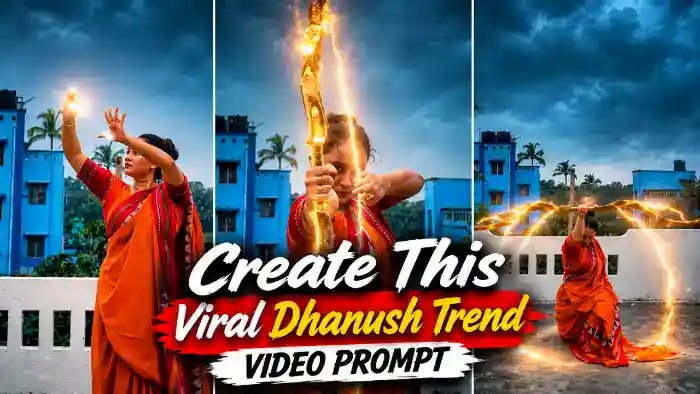
The viral Dhanush trend AI video is a new cinematic VFX trend that is going viral on Instagram Reels. A woman in a red saree stands on a rooftop under a stormy sky, a golden glow lights up in her hand, an energy trail circles around her, lightning rings the rooftop, and finally a tall glowing divine bow rises up in front of her.
In this post you get the original viral video, the muted reference video and a free Google Flow prompt to make the same Dhanush AI video with your own face. You only need one clear photo, and it works for both girls and boys.
Watch the Dhanush AI Video Trend
The video is about 20 seconds long, so it is made in 2 parts. The download folder has the Part 1 and Part 2 muted reference videos, the full trend audio and a short PDF guide that explains every step.
Dhanush AI Video Prompt for Google Flow (Free)
Before You Paste This Prompt, Check These 5 Things
- Two muted reference videos: use Part 1 muted video with the Part 1 prompt and Part 2 muted video with the Part 2 prompt.
- Clear photo: a sharp, front-facing photo in good light, no sunglasses or heavy filter. Girls and boys can both use it.
- Settings: Ingredients mode, 9:16 vertical, the longest duration Flow allows, 1 output. Turn ON “Return silent video” in Flow settings.
- Same photo in both parts: use the exact same photo in both parts, and in Part 2 also upload a screenshot of the last frame of your Part 1 video, so your face and outfit match when you join them. Outfit: your clothes come from your photo. If the photo does not show a clear outfit, the prompt gives you a red and orange saree.
- Add the sound: join Part 1 and Part 2 in CapCut or VN and add the trend audio from the folder, or pick the trending audio while uploading on Instagram.
Part 1 Prompt (Golden Energy and Lightning Circle)
Upload the Part 1 muted video and your photo, then paste this prompt.
Completely replace the original female character in the reference video with the person from my uploaded reference image. Recreate the entire video while preserving the original video's exact choreography, body movements, gestures, timing, camera framing, camera perspective, environmental interaction, physics, and VFX sequence.
The uploaded reference image must be the ONLY source for the replacement character's identity.
1. CHARACTER IDENTITY – STRICT PRESERVATION
Use the uploaded reference photograph to reproduce the person accurately.
Preserve:
- Exact facial identity and facial structure.
- Eyes, eyebrows, nose, lips, jawline and facial proportions.
- Original skin tone and natural skin texture.
- Hairstyle, hairline, hair length and hair texture.
- Body proportions, height appearance and natural anatomy.
- Age appearance and distinctive facial features.
The replacement must remain visually identical to the uploaded reference person throughout the entire video.
Do not blend the original actress's face with the reference person. Do not retain any original character facial features.
Maintain consistent identity across every frame, including close-ups, fast movements, motion blur and changing lighting.
2. CLOTHING AND APPEARANCE
Completely replace the original character's clothing with the outfit specified by the uploaded character reference.
If the reference image does not clearly establish the desired outfit, use a realistic, elegant traditional Indian saree in deep red and orange tones with natural fabric texture.
Clothing must remain consistent throughout the video.
No random outfit changes, accessories, jewellery, logos or additional objects.
3. EXACT ORIGINAL BODY CHOREOGRAPHY
Follow the original video's movement frame by frame.
Do not create new choreography or improvise movements.
00:00–00:01.00 – Initial hand gesture
- Begin with the same hand position and camera composition as the original.
- Reproduce the exact finger extension and wrist orientation.
- Gradually raise the hand with natural shoulder and elbow movement.
- Maintain the original head direction and posture.
00:01.00–00:02.00 – Arm elevation
- Reproduce the original transition of both arms.
- Raise and extend the arms with matching shoulder rotation.
- Preserve elbow angles, wrist rotation and finger positioning.
- Keep the torso and head movements synchronized.
00:02.00–00:04.00 – Energy rotation
- Reproduce the original arm trajectory.
- Move the arms outward and around the body following the reference choreography.
- Maintain accurate angular movement of shoulders, elbows and wrists.
- Reproduce the original torso rotation and body balance.
- Energy trails must follow the actual hand trajectory.
00:04.00–00:05.50 – Body descent
- Gradually lower the body into the same crouching or kneeling position.
- Reproduce the original hip displacement and knee flexion.
- Maintain realistic weight transfer and centre-of-mass movement.
- Preserve natural foot contact with the rooftop.
- Do not allow the body to float, slide or penetrate the ground.
00:05.50–00:08.00 – Low-position hold
- Match the original final crouching posture.
- Maintain the original torso inclination and arm positioning.
- Keep the character physically stable.
- Allow the saree and hair to settle naturally.
- Reproduce the original energy effects around the character.
00:08.00–00:10.90 – Vertical energy release
- Reproduce the original transition into the final pose.
- Match the exact hand and arm positioning around the vertical energy formation.
- Preserve the original body posture and movement.
- The vertical magical formation must rise with the same timing, orientation and screen position as the reference.
- Finish with the same final composition and pose.
4. REALISTIC HUMAN PHYSICS
Human animation must follow believable biomechanics.
Apply:
- Natural joint articulation.
- Realistic angular velocity and acceleration.
- Smooth acceleration and deceleration.
- Proper shoulder, elbow and wrist coordination.
- Natural hip and knee flexion.
- Correct centre-of-mass displacement.
- Ground contact and friction.
- Realistic body inertia.
- Natural secondary movement of hair and clothing.
Avoid robotic movements, sudden position jumps, unnatural joint bending, floating feet, body deformation and inconsistent limb lengths.
5. SAREE AND CLOTH DYNAMICS
Simulate realistic fabric physics.
- Fabric follows body movement with natural delay.
- Loose fabric responds to acceleration and deceleration.
- Gravity pulls hanging fabric downward.
- Natural folds and wrinkles change during movement.
- Fabric must not pass through the body or limbs.
- Preserve consistent saree design and colour in every frame.
Hair must also respond naturally to head movement and body acceleration.
6. MAGICAL ENERGY VFX – EXACT REFERENCE MATCH
Recreate the original magical energy effects without changing their visual sequence.
Initial activation:
A bright localized golden-white glow develops around the raised hand.
Horizontal energy movement:
A luminous energy trail follows the original arm and hand trajectory. Maintain the same direction, curvature, timing, thickness and intensity.
Circular energy formation:
Recreate the expanding circular energy effect around the character and rooftop. Maintain its original size, orientation and timing.
Energy particles:
Use small glowing particles, sparks and fine luminous trails with natural movement and fading.
Vertical energy formation:
Reproduce the final tall, glowing, bow/staff-like energy structure. It must emerge and rise at the same location and speed as the reference video.
Energy must appear integrated into the environment rather than pasted over the footage.
7. LIGHTING AND ENVIRONMENT
Preserve the original rooftop environment.
Maintain:
- Same buildings and background.
- Same sky and clouds.
- Same camera perspective.
- Same environmental lighting.
- Same depth and spatial relationships.
Golden energy must illuminate the character's face, hands, saree and nearby surfaces realistically.
Use physically believable light falloff, reflections, shadows, bloom and exposure.
8. CAMERA AND VIDEO CONSISTENCY
Strictly preserve:
- Original camera angle.
- Original camera distance.
- Original framing.
- Original perspective.
- Original camera movement.
- Original scene composition.
- Original sequence duration.
Maintain vertical 9:16 composition, 1080 × 1920 output and 30 FPS.
No unnecessary zooms, cuts, camera shakes, reframing or new shots.
9. STRICT NEGATIVE INSTRUCTIONS
DO NOT:
- Change the replacement person's identity.
- Retain the original actress's face.
- Mix two different faces.
- Change the person's hairstyle or skin tone.
- Change the selected outfit.
- Alter original choreography.
- Add extra hand gestures.
- Change the original VFX sequence.
- Add new characters or objects.
- Distort hands, fingers, arms, legs or facial anatomy.
- Generate duplicate limbs.
- Create unnatural body movements.
- Change the background or rooftop.
- Add subtitles, text, watermarks or logos.
- Make the video look animated, cartoonish or artificial.
FINAL OUTPUT REQUIREMENT
Create a photorealistic cinematic character-replacement video.
The replacement person must remain completely consistent with the uploaded reference photograph.
The original video must remain the master reference for all movement, timing, choreography, camera behaviour, physics, environment and magical VFX.
Priority order:
1. Exact character identity replacement.
2. Original frame-by-frame body movement.
3. Accurate human anatomy and physics.
4. Original clothing-independent choreography.
5. Exact VFX timing and trajectory.
6. Realistic cloth and hair dynamics.
7. Original camera and environment preservation.
The final result should look like the original scene was filmed with the replacement person physically present from the beginning, not like a face swap or AI-generated overlay.
Part 2 Prompt (Bow and Arrow Draw)
Before Part 2, take a screenshot of the LAST frame of your Part 1 video. Then make a new generation with the Part 2 muted video, the same photo and this Part 1 last-frame screenshot, and paste this prompt. The screenshot keeps your face, outfit and lighting the same, so both parts join smoothly.
Completely replace the original female character in the reference video with the person from my uploaded reference image. Recreate the entire video while preserving the original video's exact choreography, body movements, gestures, timing, camera framing, camera perspective, environmental interaction, physics, and VFX sequence.
The person's photo and the Part 1 last-frame screenshot are the ONLY sources for the replacement character's identity and outfit.
CONTINUITY WITH PART 1 (MOST IMPORTANT):
Two images are uploaded: the person's photo, and a screenshot of the LAST FRAME of the person's own Part 1 video.
The Part 1 last-frame screenshot is the master reference for continuity. The person in Part 2 must look exactly like that frame: the same face, the same hairstyle, the same outfit with the same colours, pattern and draping, the same rooftop, the same stormy sky and the same golden energy colour.
The first frame of Part 2 must match the last frame of Part 1, so both clips join as one continuous video with no visible change.
Never change the outfit, hairstyle, face, location or lighting between Part 1 and Part 2.
1. CHARACTER IDENTITY – STRICT PRESERVATION
Use the uploaded reference photograph to reproduce the person accurately.
Preserve:
- Exact facial identity and facial structure.
- Eyes, eyebrows, nose, lips, jawline and facial proportions.
- Original skin tone and natural skin texture.
- Hairstyle, hairline, hair length and hair texture.
- Body proportions, height appearance and natural anatomy.
- Age appearance and distinctive facial features.
The replacement must remain visually identical to the uploaded reference person throughout the entire video.
Do not blend the original actress's face with the reference person. Do not retain any original character facial features.
Maintain consistent identity across every frame, including close-ups, fast movements, motion blur and changing lighting.
2. CLOTHING AND APPEARANCE
Completely replace the original character's clothing with the outfit specified by the uploaded character reference.
If the reference image does not clearly establish the desired outfit, use a realistic, elegant traditional Indian saree in deep red and orange tones with natural fabric texture.
Clothing must remain consistent throughout the video.
No random outfit changes, accessories, jewellery, logos or additional objects.
3. EXACT ORIGINAL BODY CHOREOGRAPHY (PART 2)
This is PART 2 of the same video. It continues directly from the last frame of Part 1: the same person, the same face, the same hairstyle and the same outfit as in the Part 1 last-frame screenshot, on the same rooftop.
Follow the original video's movement frame by frame.
Do not create new choreography or improvise movements.
00:00–00:00.90 – Rising from the energy circle
- Begin in the same low crouching position inside the golden lightning circle as the original.
- Rise up with natural knee and hip extension while one arm sweeps upward.
- A long golden energy line rises with the arm and starts forming the bow.
00:00.90–00:02.90 – Holding the divine bow
- Same camera cut as the original: closer, slightly low angle.
- The person stands holding a tall glowing golden bow vertically in one hand, the bow taller than the person, bright light glowing behind it.
- Keep the head direction and posture of the original.
00:02.90–00:04.00 – Push-in to close-up
- Reproduce the original fast push-in to a close-up with soft motion blur.
- The bow stays in the same hand and the same vertical position.
00:04.00–00:08.40 – Drawing the bow
- Close-up, the bow in front of the body, the face clearly visible behind the bowstring.
- The other hand pulls the glowing bowstring back toward the cheek, aiming straight at the camera, exactly like the original.
- Hold the full draw steadily with a focused, powerful expression; small lightning sparks run along the bow and string.
00:08.40–00:08.83 – Fade out
- Reproduce the original fade to dark while the pose is held.
4. REALISTIC HUMAN PHYSICS
Human animation must follow believable biomechanics.
Apply:
- Natural joint articulation.
- Realistic angular velocity and acceleration.
- Smooth acceleration and deceleration.
- Proper shoulder, elbow and wrist coordination.
- Natural hip and knee flexion.
- Correct centre-of-mass displacement.
- Ground contact and friction.
- Realistic body inertia.
- Natural secondary movement of hair and clothing.
Avoid robotic movements, sudden position jumps, unnatural joint bending, floating feet, body deformation and inconsistent limb lengths.
5. SAREE AND CLOTH DYNAMICS
Simulate realistic fabric physics.
- Fabric follows body movement with natural delay.
- Loose fabric responds to acceleration and deceleration.
- Gravity pulls hanging fabric downward.
- Natural folds and wrinkles change during movement.
- Fabric must not pass through the body or limbs.
- Preserve consistent saree design and colour in every frame.
Hair must also respond naturally to head movement and body acceleration.
6. MAGICAL ENERGY VFX – EXACT REFERENCE MATCH
Recreate the original magical energy effects without changing their visual sequence.
Energy circle at the start:
The golden lightning circle around the crouching person, exactly as in the original, fading as the person rises.
Bow formation:
The rising golden energy line forms a tall ornate glowing golden bow with the same shape, size, timing and screen position as the reference.
Energy particles:
Use small glowing particles, sparks and fine luminous trails with natural movement and fading.
Bowstring and lightning:
A thin glowing bowstring with small lightning sparks runs along the bow and string during the draw, exactly like the reference.
Energy must appear integrated into the environment rather than pasted over the footage.
7. LIGHTING AND ENVIRONMENT
Preserve the original rooftop environment.
Maintain:
- Same buildings and background.
- Same sky and clouds.
- Same camera perspective.
- Same environmental lighting.
- Same depth and spatial relationships.
Golden energy must illuminate the character's face, hands, saree and nearby surfaces realistically.
Use physically believable light falloff, reflections, shadows, bloom and exposure.
8. CAMERA AND VIDEO CONSISTENCY
Strictly preserve:
- Original camera angle.
- Original camera distance.
- Original framing.
- Original perspective.
- Original camera movement.
- Original scene composition.
- Original sequence duration.
Maintain vertical 9:16 composition, 1080 × 1920 output and 30 FPS.
No unnecessary zooms, cuts, camera shakes, reframing or new shots.
9. STRICT NEGATIVE INSTRUCTIONS
DO NOT:
- Change the replacement person's identity.
- Retain the original actress's face.
- Mix two different faces.
- Change the person's hairstyle or skin tone.
- Change the selected outfit or make it look different from Part 1.
- Change anything between the last frame of Part 1 and the first frame of Part 2.
- Alter original choreography.
- Add extra hand gestures.
- Change the original VFX sequence.
- Add new characters or objects.
- Distort hands, fingers, arms, legs or facial anatomy.
- Generate duplicate limbs.
- Create unnatural body movements.
- Change the background or rooftop.
- Add subtitles, text, watermarks or logos.
- Make the video look animated, cartoonish or artificial.
FINAL OUTPUT REQUIREMENT
Create a photorealistic cinematic character-replacement video.
The replacement person must remain completely consistent with the uploaded reference photograph.
The original video must remain the master reference for all movement, timing, choreography, camera behaviour, physics, environment and magical VFX.
Priority order:
1. Exact character identity replacement.
2. Original frame-by-frame body movement.
3. Accurate human anatomy and physics.
4. Original clothing-independent choreography.
5. Exact VFX timing and trajectory.
6. Realistic cloth and hair dynamics.
7. Original camera and environment preservation.
The final result should look like the original scene was filmed with the replacement person physically present from the beginning, not like a face swap or AI-generated overlay.
How to Make the Dhanush AI Video in Google Flow
- First, download the folder above. It has the Part 1 and Part 2 muted videos, the audio and the PDF guide.
- Next, open Google Flow, start a new project and choose Ingredients mode, 9:16 and 1 output.
- Then upload the Part 1 muted video and one clear photo, paste the Part 1 prompt and click Generate.
- After that, take a screenshot of the last frame of your Part 1 video. Make a new generation with the Part 2 muted video, the same photo and this screenshot, paste the Part 2 prompt and click Generate.
- Finally, join Part 1 and Part 2 in CapCut or VN, add the Dhanush trend audio and post your Reel.
Why the Dhanush AI Video Is Going Viral
This trend looks like a scene from a big-budget mythological movie, but it is made on a normal rooftop with one phone. The golden glow, the energy circle, the lightning and the rising divine bow are cinematic VFX that people usually see only in films. When viewers see a real person doing it in a simple saree, they stop scrolling, watch till the bow appears and replay it. That is exactly why this Reel format is getting millions of views.
Best Free AI Video Generator for VFX Trends
Google Flow runs on the Veo video model and can copy the movement, camera and visual effects from a reference video while taking the face from your photo. For a VFX-heavy trend like this, it is one of the best free AI video generator options, because you do not need paid VFX software, green screen or motion tracking. If the energy effects look weak in one result, simply generate again.
Tips for the Best Result
- Use a recent daylight photo with your full face visible.
- Do not edit the prompt. It already locks your face, the choreography, the energy effects and the rooftop.
- Generate two or three times and keep the result where your face and the bow look best.
- Wear a saree or traditional outfit in your photo if you want the same look as the original.
Frequently Asked Questions
Is the Dhanush AI video prompt free?
Yes. The prompt and the reference video are completely free. You only need a Google Flow account to generate the video.
Can boys make this trend?
Yes. The face, hair and clothes come from your own photo, so it works for boys and girls.
Why is the video made in 2 parts?
The original Dhanush trend video is about 20 seconds long and Google Flow makes shorter clips. So Part 1 makes the golden energy and lightning circle, and Part 2 makes the divine bow and the arrow draw. Join them and the full trend is ready.
Why is the reference video muted?
A reference video with a song can make Google Flow fail. Upload the muted file and add the audio afterwards.
Why do the energy effects look different?
AI video results change a little every run. Generate again to get stronger golden energy and a clearer bow.
Want more trends like this? Try the Pehla Pyaar Hai Viral Trend, the Candle Transition Viral Trend and the Luxury CEO Entry Video prompts.