
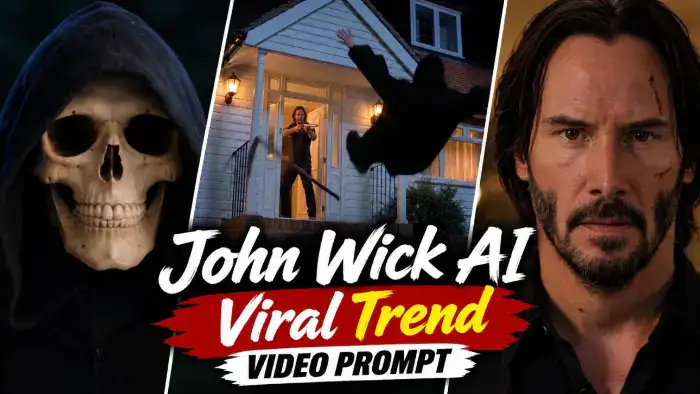
The John Wick Grim Reaper AI video is one of the funniest cinematic trends on Instagram Reels right now. A hooded skeleton knocks on the door, the man points at himself, the skeleton shakes its head and points at his dog, and the action-movie ending makes everyone replay the Reel.
In this post you get the original video and a free, tested Google Flow prompt to make the same cinematic action video with your own face. You only need one clear photo. No reference video, no editing app and no paid AI video generator is needed.
Watch the John Wick Grim Reaper AI Video Trend
John Wick Grim Reaper AI Video Prompt for Google Flow (Free)
Before You Paste This Prompt, Check These 5 Things
- Only one photo: this is an image-only prompt. Upload just your photo, no reference video is needed.
- Clear face: a sharp, front-facing photo in good light, no sunglasses, mask or heavy filter. Boys and girls can both use it.
- Outfit: the black shirt look is added automatically, so any normal photo works.
- Settings: tag your photo as @image1, choose 9:16, 10 seconds and 1 output in Google Flow.
- Generate 2 or 3 times: AI video results change a little every time, so keep the best one.
THE MAN: the person from @image1. Same face, face shape, eyes, nose, lips, jawline, facial hair, skin tone, hair and body as @image1 in every shot, never a different face. Outfit in every shot: plain black button-up shirt, black trousers. Mouth closed in every shot, never speaks.
THE VISITOR: a tall figure in a long black hooded robe with a white skull mask, white gloves and a long wooden staff with a curved silver blade on top, like a Halloween costume.
PROP: a black pump-action shotgun, seen only in the man's hands in shot 9 (in shot 8 only its flash from the doorway is seen).
THE DOG: one adult beagle dog.
LOCATION: a white two-storey wooden house at dusk with a small porch, brick steps, two porch lamps, a lawn in front; inside a warm hallway and a cosy living room with leather sofas and a red patterned rug.
SHOT 1 (0.0-0.8s): over-the-shoulder from behind the man standing at the open front door: the visitor stands on the porch facing him, gloved hands folded in front, staff in one hand.
SHOT 2 (0.8-1.8s): medium shot of the man in the warm doorway facing the camera, calm, he raises his right index finger and points at his own chest with a puzzled look, as if asking whether the visitor came for him. No words or text appear on screen.
SHOT 3 (1.8-3.0s): close-up of the skull mask inside the dark hood, facing the camera: the visitor shakes its head "no" TWO full times: turns left, back to the centre, turns right, back to the centre, turns left, turns right, ending facing the camera. A clear, readable "no" (not a nod, not up and down, not one single turn).
SHOT 4 (3.0-3.4s): medium shot of the man, calm, one eyebrow raised.
SHOT 5 (3.4-4.2s): over-the-shoulder from behind the visitor: the man in the hallway, the visitor's gloved hand rises and points past him into the living room.
SHOT 6 (4.2-5.1s): the living room: the adult beagle sniffs a small ball on the red rug and looks up at the camera.
SHOT 7 (5.1-6.0s): tight close-up of the man's face: the calm look turns cool and unimpressed, eyes fixed on the visitor, mouth closed.
SHOT 8 (6.0-8.0s): wide low shot from the front lawn looking up at the house. The visitor stands ALONE at the top of the brick porch steps, right in front of the open front door, seen from the side, facing INTO the doorway, staff in one hand. The man is NOT visible: he is inside the house, hidden in the doorway. Nobody is on the lawn. At about 6.7s a bright muzzle flash and a puff of smoke burst from inside the open doorway, and the visitor is thrown backward off the top of the steps in a big cartoon flip and lands on its back on the lawn in the bottom-right foreground, the staff landing on the grass beside it. Action-comedy movie moment, no blood.
SHOT 9 (8.0-10.0s): same wide shot: only now the man steps OUT of the doorway onto the top of the porch steps, holding the black pump-action shotgun across his body, stands there calm and cool, racks it once, light smoke drifts in the porch light, the visitor lies on the lawn in the foreground. Then the man turns around and walks back in through the open front door and disappears inside, the doorway stays lit and empty. He never walks down onto the lawn and never leaves through the side of the frame.
AUDIO: soft cinematic music only, no voice, no dialogue.
NEGATIVES: on-screen text or captions, speech bubbles, words written on the shirt, a different face from @image1, talking, open mouth, extra characters, more than one dog, nodding up and down or only one head turn in shot 3, the man visible in shot 8, the man and the visitor standing side by side, anyone standing on the lawn before the shot in shot 8, the man walking out of the side of the frame, blood, distorted faces, extra limbs, extra fingers, flickering, subtitles, text, logos, watermarks.
How to Make the John Wick Grim Reaper AI Video in Google Flow
- Open Google Flow and start a new project.
- Upload one clear photo of yourself and tag it as @image1.
- Set the video to 9:16, 10 seconds and 1 output.
- Copy the full prompt from the box above, paste it and click generate.
- Download the video, add the trending audio in CapCut or VN and post your Reel.
Why This Cinematic Action Trend Is Going Viral
The video has a full movie story in only 10 seconds: a surprise visitor, a funny “no” moment, a twist with the dog and an action-movie ending. That story keeps people watching till the last second and makes them share it. The John Wick style also makes every creator look like the hero of a Hollywood action film.
Best Free AI Video Generator for This Trend
This prompt is made for Google Flow, which uses the Veo video model and gives realistic cinematic shots from a single photo. Flow handles multi-shot stories, camera angles and face consistency better than most free AI video generator apps, which is why this prompt works there in one try. You can use the same prompt in other AI video tools that support photo-to-video, but the shot timing may change.
Tips for the Best Result
- Use a recent daylight photo with your full face visible.
- Do not edit the prompt. It already locks your face, the outfit, the skeleton’s “no” and the ending.
- If the skeleton nods instead of shaking its head, simply generate again.
- Post it with a hook like “Death came for the wrong dog” to get more comments and shares.
Frequently Asked Questions
Is this John Wick AI video prompt free?
Yes. The prompt is completely free. You only need a Google Flow account to generate the video.
Do I need the original video as a reference?
No. This is an image-only prompt. Only your photo is needed, which also avoids the policy errors that reference videos with action scenes often get.
Why did Google Flow show a policy error?
Use the prompt exactly as given and do not add words about violence. If you still see an error, generate once more with the same photo.
Can girls use this prompt?
Yes. The prompt takes the face and hair from your photo, so it works for both boys and girls.
Want more cinematic trends? Try the Luxury CEO Entry Video and the Turn Around Transition Viral Trend prompts.