
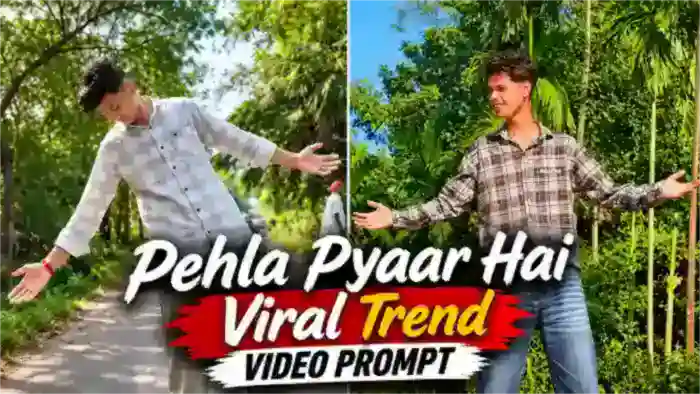
The Pehla Pyaar Hai viral trend is one of the most loved Instagram Reels trends right now. A boy dances toward the camera with full swag, a quick zoom-blur transition hits, and then everything goes into a dreamy slow motion while he opens his arms wide in the famous Shah Rukh Khan signature pose on the song “Pehla Pyaar Hai”.
In this post you get the original viral video, the 10-second muted reference video, the song audio, a free step-by-step PDF guide and a tested Google Flow prompt. With one clear photo you can make the same cinematic slow motion AI video with your own face. It works for both boys and girls.
Watch the Pehla Pyaar Hai Viral Trend Video
The download folder has 3 files: the 10-second muted reference video for Google Flow, the “Pehla Pyaar Hai” song audio and a short PDF guide that explains every step.
Pehla Pyaar Hai Viral Trend Prompt for Google Flow (Free)
Before You Paste This Prompt, Check These 5 Things
- Muted reference video: upload the 10-second muted video from the download folder. It becomes @video1.
- Clear selfie: a sharp, front-facing photo in good light, no sunglasses or heavy filter. It becomes @image1. Boys and girls can both use it.
- Settings: Ingredients mode, 16:9 landscape, 10 seconds, 1 output. Turn ON “Return silent video” in Flow settings.
- Generate 2 times: AI video results change a little every run, so keep the one where your face matches best.
- Add the song: after generating, add the “Pehla Pyaar Hai” audio in CapCut or VN, or pick the trending audio while uploading the Reel on Instagram.
Replace ONLY the person dancing in the field with @image1. @image1 is the ONLY face reference.
FACE LOCK (most important): the face must be an exact match of @image1 in every single frame, the same real person, instantly recognizable: same face shape, jawline, chin, cheekbones, forehead, eyebrows, eye shape and eye colour, nose, lips, ears, skin tone, skin texture, facial hair or no facial hair, moles and marks exactly as in @image1. Same age and same gender as @image1, boy or girl. The camera is CLOSE in every shot (medium shot, waist or thigh up), so the face is large and clearly visible. Keep this identity in every frame: while dancing, in the slow-motion shot, when the head is tilted or turned to the side, and when smiling. Do not beautify, slim, smooth or stylize the face. Never blend it with the original person's face from @video1, not even for one frame.
HAIR AND CLOTHES: hair exactly as in @image1, never the hair of the original person from @video1. Clothes come from @image1 in every shot: the same top and the same colours as in @image1, never the black-and-white checked shirt and light jeans from @video1. If @image1 does not show the full outfit, continue the visible clothes in the same style and colours, with plain trousers; shoulders and arms always covered by the clothing.
LOCATION (fixed, same as @video1, never changed): a dry golden-brown harvested field in bright morning sun, a low bamboo fence with green vegetable creepers behind it, and a tall dense grove of slim areca palm trees and big green trees behind the fence, clear blue sky.
In EVERY frame where the main person appears, it is @image1, never the original person:
0.0–3.4s, SHOT 1, real-time speed, MEDIUM SHOT exactly as framed in @video1: the person is seen from the waist up, large in the frame, the face big and sharp, the camera pans with the person. The person dances in from the left with a playful step, reaches the centre of the field, grooves toward the camera with loose swaggering steps, flicks one hand, points a finger at the lens with a big smile, then does a small dance bounce with knees bent.
3.2–3.4s: quick soft zoom-blur transition exactly like @video1, the full frame stays bright and clear edge to edge, no dark edges.
3.4–10.0s, SHOT 2, EXTREME SLOW MOTION exactly as in @video1, about four times slower than real time, smooth and dreamy, never sped up, no stutter. Low camera angle looking slightly up at the person, CLOSE medium shot framed from the waist up in the centre, the face large and sharp, areca palms and blue sky behind, bright natural daylight evenly across the whole frame up to every corner. The person very slowly opens both arms wide to the sides with palms open and facing up, into the signature open-arms pose, chest open, head gently tilted, a warm closed-lip smile while glancing to the side. The camera rises very slowly and tilts up a little, showing more sky above the palms. The arms stay wide open until the end, held at 10.0s. The face stays sharp and clearly visible the whole shot.
MOUTH: mouth closed or a closed-lip smile the whole video. Never talks, sings or lip-syncs.
AUDIO: Preserve the original background music and its timing from @video1 if supported. Do not add dialogue, voice-over, or unrelated sound effects.
Keep the original field, fence, palm grove, sunlight, duration, shot order, the quick zoom-blur transition and the extreme slow motion of the second shot. Change only the main person's appearance.
NEGATIVES: vignette, black corners, dark edges, black oval frame, tunnel or keyhole effect, darkened borders, wide shot, far camera, small face, full body framing, original person's face, face not matching @image1, generic face, beautified face, smoothed skin, changed face shape, blended faces, gender change, age change, original hair from @video1, checked shirt from @video1, outfit changing between shots, bare shoulders, missing clothes, identity swaps, mixed character features, appearance drift, altered actions, normal-speed second shot, fast motion, jerky slow motion, talking, lip-sync, open mouth, extra characters, distorted faces, extra limbs, flickering, new scenes, new location, subtitles, text, watermarks.
How to Make the Pehla Pyaar Hai Slow Motion AI Video
- First, download the folder above and keep the muted video and the audio file on your phone or PC.
- Next, open Google Flow, start a new project and select Ingredients mode, 16:9, 10 seconds and 1 output.
- Then upload the muted reference video (@video1) and your clear selfie (@image1).
- After that, copy the full prompt from the box above, paste it and click Generate.
- Finally, open the video in CapCut or VN and add the “Pehla Pyaar Hai” audio from the folder, or upload it to Instagram and select the trending “Pehla Pyaar Hai” song there.
Why the Pehla Pyaar Hai Viral Trend Works So Well
This trend mixes two things Indian audiences love: a romantic Bollywood song and the open-arms signature pose that every fan knows. The first part is fast and full of swag, so viewers stay. Then the zoom-blur transition and the slow motion give a cinematic movie-hero moment right when the song hits. That contrast keeps people watching till the end, replaying the Reel and sending it to friends, which is exactly what pushes a Reel into millions of views.
Because the prompt keeps your own face in a close medium shot, the result looks like you shot a real slow motion music video in a field, without a camera crew, a gimbal or any editing skills.
Best Free AI Video Generator for This Slow Motion Trend
This prompt is made for Google Flow, which runs on the Veo video model. In reference-video mode it copies the exact dance moves, the transition and the slow motion from the muted video, while your photo gives the face, hair and clothes. That makes it one of the best free AI video generator options for face-swap style trend videos, and it is much easier than paid video editing software or motion tracking apps.
Tips for the Best Result
- Use a recent daylight photo where your full face is clearly visible. A sharp photo gives the best face match.
- Do not edit the prompt. It already locks your face, the close camera, the slow motion and the bright natural look.
- If the face looks a little different, generate one more time. Flow gives a slightly different result on every run.
- Wear the outfit you want in the video in your photo, because the prompt takes your clothes from the photo.
- Post it with a romantic caption and the “Pehla Pyaar Hai” audio so your Reel joins the trending sound page.
Frequently Asked Questions
Is the Pehla Pyaar Hai viral trend prompt free?
Yes. The prompt, the muted reference video, the audio and the PDF guide are all free. You only need a Google Flow account to generate the video.
Can girls make this trend too?
Yes. The prompt takes the face, hair and clothes from your own photo, so it works for boys and girls.
Why is the reference video muted?
Google Flow can fail when the reference video has a song with vocals. So you upload the muted file, and add the song afterwards in CapCut, VN or directly on Instagram.
Why does my video have no sound?
The video is generated silent on purpose. Add the “Pehla Pyaar Hai” audio from the download folder, or select the trending song while uploading your Reel.
Want more trends like this? Try the Candle Transition Viral Trend, the Turn Around Transition Viral Trend and the Luxury CEO Entry Video prompts.