
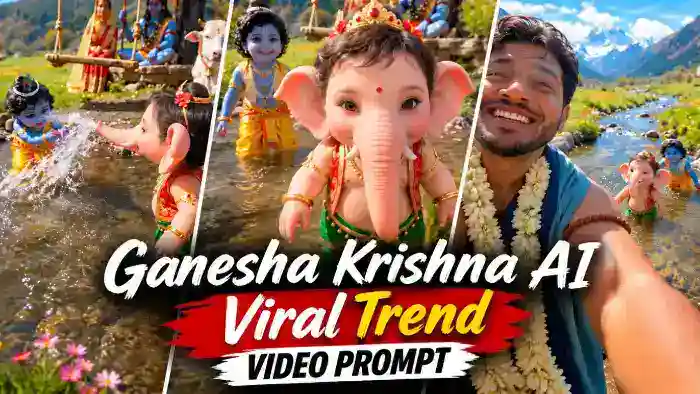
The Ganesha Krishna AI video is one of the cutest devotional trends on Instagram Reels right now. Little Ganesha and little Krishna splash water in a Himalayan stream, Ganesha sprays water straight at the camera, and then you appear in a selfie and walk them to Shiva and Parvati on a swing.
In this post you get the original viral video and a free, tested Google Flow prompt to make the same cinematic AI video with your own face. You only need one clear photo. It works for both boys and girls, and no reference video or editing app is needed.
Watch the Ganesha Krishna AI Video Trend
Ganesha Krishna AI Video Prompt for Google Flow (Free)
Before You Paste This Prompt, Check These 5 Things
- Only one photo: this is an image-only prompt. Upload just your photo, no reference video is needed.
- Clear face: a sharp, front-facing photo in good light, no sunglasses or heavy filter. Boys and girls can both use it.
- Outfit: your own clothes from the photo are used, with a jasmine garland added automatically.
- Settings: tag your photo as @image1, choose 16:9 (or 9:16 for Reels), 10 seconds and 1 output in Google Flow.
- Generate 2 or 3 times: AI video results change a little every time, so keep the best one.
THE PERSON IS A REAL HUMAN: photorealistic, live-action, exactly like a real photo of the person in @image1, the SAME AGE as in @image1 (an adult stays an adult). Never animated, never cartoon, never 3D-stylized, never made younger, never a child, never big cartoon eyes. Only one photo is used: @image1.
THE PERSON: EXACTLY the person in @image1, whether a boy or a girl. Same face, face shape, eyes, nose, lips, skin tone, hairstyle, hair length and body as @image1 in every shot. Never create a different person, never change the gender. This person is the one filming the selfie, and the same person later walks into the stream.
OUTFIT: the same clothes the person wears in @image1, plus a white jasmine flower garland around the neck. If the clothes in @image1 are not clearly visible, a simple white traditional kurta. The outfit is exactly the same in the selfie and in the wide shot, it never changes. Mouth closed or a soft smile, never speaks.
LITTLE KRISHNA: small, chubby, cute deity figure with soft blue skin, black curly hair tied in a topknot with a thin gold band and a peacock feather, a yellow dhoti, gold necklace and bangles, giggling.
LITTLE GANESHA: small, chubby, cute deity figure with a soft pink elephant face and trunk, big curious eyes, small tusks, a red bindi. On his head: soft black baby hair tied in a small topknot, with a thin gold headband and a red hibiscus flower on the side. A sleeveless red top with a gold border, a green dhoti, a gold necklace and gold bangles. Ganesha always has this black hair and headband, never bald, never a plain elephant head.
CAST COUNT: in every shot there is exactly ONE little Krishna and exactly ONE little Ganesha, never two Krishnas, never two Ganeshas, no other little ones. Exactly one person from @image1, never two.
SHIVA AND PARVATI: sitting together on a wooden swing hanging from a big pink blossom tree on the right bank, a white Nandi bull lying beside them. They stay sitting on the swing for the whole video.
LOCATION: a green Himalayan valley, a clear shallow stream over round stones, wildflowers, a few white swans, snowy mountains and blue sky.
THE CAMERA IS THE PERSON'S PHONE in shots 1 to 3. The phone itself is NEVER visible in the video. Nobody holds a phone in front of the camera.
SHOT 1 (0.0-3.3s): one continuous handheld take, low, just above the water, slightly shaky like a real phone. Little Krishna and little Ganesha are knee-deep in the stream splashing water at each other; Shiva and Parvati on the swing and Nandi in the background. Ganesha lifts his trunk and sprays a jet of water straight at the camera, droplets sparkling in slow motion, then walks right up to the lens until his face fills the frame, looking into the camera with a playful wink, water drops running down the lens.
SHOT 2 (3.3-4.6s): same take, no cut: the camera lifts and turns into a front selfie: the person's smiling face appears big on the left side of the frame, their arm stretched towards the camera, Krishna and Ganesha playing in the stream right behind them. The person is already there holding the camera; they do not walk in.
SHOT 3 (4.6-5.4s): same take, no cut: the camera turns away from the person to the right and shows the valley, the blossom tree, Shiva and Parvati on the swing, Nandi and the mountains; only the person's stretched arm is at the left edge of the frame.
SHOT 4 (5.4-10.0s): cut to one wide shot of the valley from the left bank; the camera does not move. No equipment of any kind is visible in the scene. Krishna and Ganesha are playing in the middle of the stream. The person walks in once from the left edge of the frame and steps into the water; Krishna and Ganesha run to the person, laughing. The person bends down, takes Krishna's hand in one hand and Ganesha's hand in the other, and all three walk together out of the stream and across the grass to Shiva and Parvati on the swing. Krishna and Ganesha go to Shiva and Parvati, and the person stands beside them, smiling. The two little ones walking with the person are the SAME two from the stream; nobody else stays behind in the water or on the grass. The person appears only once, from the left, and holds nothing except their two little hands.
AUDIO: soft devotional flute music, no voice, no dialogue.
NEGATIVES: bald Ganesha, Ganesha without hair, headband or red top, the person as a cartoon or 3D animated character, the person made younger or child-like, big cartoon eyes on the person, tripod, camera stand, any camera equipment in the scene, duplicate Krishna or Ganesha, a second Krishna or Ganesha sitting on the bank, carrying one while another stays behind, the person ending still in the water, extra little children, outfit changing between shots, phone visible, person holding a phone in view, person appearing or popping in from random places, more than one copy of the person, a different person from @image1, changed gender, plastic toy look, studio look, Shiva and Parvati standing, extra characters, distorted faces or hands, extra fingers, flickering, subtitles, text, logos, watermarks.
How to Make the Ganesha Krishna AI Video in Google Flow
- Open Google Flow and start a new project.
- Upload one clear photo of yourself and tag it as @image1.
- Set the video to 16:9 (or 9:16 for Reels), 10 seconds and 1 output.
- Copy the full prompt from the box above, paste it and click generate.
- Download the video, add soft devotional music in CapCut or VN and post your Reel.
Why This Devotional AI Trend Is Going Viral
The video mixes cute little Ganesha and Krishna with a real person in one cinematic shot. The water spray on the lens surprises viewers, the selfie twist makes it personal, and the ending with Shiva and Parvati gives a warm devotional feeling. That mix of cute, surprise and devotion makes people watch till the end and share it with family.
Best Free AI Video Generator for This Trend
This prompt is made for Google Flow, which uses the Veo video model and can mix stylized 3D characters with a realistic human face from a single photo. It keeps your face, age and outfit consistent across shots better than most free AI video generator apps. You can try the same prompt in other photo-to-video tools, but the selfie shot and the timing may change.
Tips for the Best Result
- Use a recent daylight photo with your full face visible.
- Do not edit the prompt. It already locks your face, your age, the cute look of Ganesha and Krishna and the selfie shot.
- If Ganesha or Krishna looks different, simply generate again.
- Post it with a caption like “Bappa and Kanha came to play with me” to get more comments and shares.
Frequently Asked Questions
Is this Ganesha Krishna AI video prompt free?
Yes. The prompt is completely free. You only need a Google Flow account to generate the video.
Can a girl use this prompt?
Yes. The prompt takes the face, hair, age and clothes from your photo, so it works for both boys and girls.
Do I need the original video as a reference?
No. This is an image-only prompt. Only your photo is needed.
Why does my face look different in some results?
Flow can vary from run to run. Use a sharp front-facing photo and generate two or three times to get the best match.
Want more trends like this? Try the John Wick Grim Reaper AI Video and the Luxury CEO Entry Video prompts.