
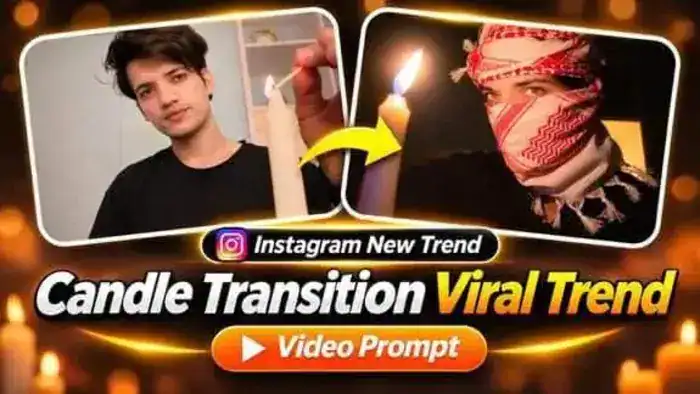
The Candle Transition Viral Trend is the new Instagram transition everyone is trying right now. A young man lights a white candle with a matchstick, picks it up and sweeps the flame right across the camera lens, and in one glowing flash he appears in a dark room with warm bokeh lights, his face wrapped in a red-and-white scarf, holding the burning candle.
Now creators are making this Candle Transition with their own face using AI. In this post you get the original video, the muted 10-second reference video for Google Flow, the audio and the exact prompt. You only need one clear photo of yourself.
Watch the Candle Transition Viral Trend Video
Tap the button below to download the muted reference video and the audio file.
Candle Transition Viral Trend Prompt for Google Flow (Free)
Before You Paste This Prompt, Check These 5 Things
- Muted reference video: download it from the button above and upload only the muted 10-second video in Flow. The original man’s face is blurred in this file on purpose, so Flow takes the face only from your photo.
- One clear photo: a sharp, front-facing photo with your full face and hair clearly visible, good light, no sunglasses or heavy filter. A boy or a girl photo both work.
- Scarf look: the prompt adds the red-and-white scarf in the second shot automatically, so you do not need it in your photo.
- Settings: Ingredients mode, 16:9 ratio, 1 output. If you see an audio error, turn ON “Return silent video” in Settings.
- Tag your photo: type @ in the prompt and pick your photo as image 1 and the video as video 1. After generating, add the audio in CapCut or VN because the result is silent.
Use @video1 as the strict reference for all actions, gestures, interactions, timing, camera movements, framing, and editing.
In @video1 the original man’s face is intentionally blurred so it cannot be copied. In the output, render a sharp, clear, fully detailed face that is exactly @image1’s face. Never show any blur on the face.
IDENTITY LOCK (most important rule): The young man in this video IS the person in @image1, 100%, in every single frame from 0.0s to 10.0s.
Take his complete facial identity ONLY from @image1: exact lips and mouth shape, lip thickness, nose, jawline, chin, cheekbones, eye shape, eyebrows, facial hair, skin tone and skin texture, face proportions, hair.
Use @video1 ONLY for body movement, hand actions, head angles, expressions, camera and timing. Completely ignore the original man in @video1 (his face is blurred on purpose): do not copy, blend or mix any of his facial features (not his lips, nose, jaw or eyes). No face blending, no morphing between two faces, no averaging of the two identities.
Replace ONLY the young man who lights the candle and then appears with the wrapped scarf with @image1. Hair stays exactly as in @image1, never the dark messy wavy hair from @video1.
Keep the man’s outfits from @video1: in the first shot a plain black crew-neck T-shirt; in the second shot a red-and-white patterned scarf wrapped over the head and across the nose and mouth with small tassels on top, only the eyes and eyebrows visible, plus a black-and-white patterned scarf around the shoulders. In the second shot the visible eyes, eyelids, eyebrows, upper nose bridge and skin around the eyes are exactly @image1’s.
There is only ONE candle in the whole video: a tall plain white candle.
In EVERY shot where the man appears, it is @image1’s exact face, never the original person and never a mix of both, not even for one frame:
0.0–1.2s: Static front-facing close-up at eye level. He is centered-left, the white candle stands upright just right of his face, a light-grey wall and a white shelf unit behind him on the right. He quickly strikes a wooden matchstick and touches it to the candle wick from the right side; the wick catches a small flame.
1.2–2.0s: He lowers the match out of frame and looks calmly into the lens, the candle burning steadily.
2.0–3.0s: His hand reaches forward toward the lens and takes hold of the lit candle.
3.0–4.6s: He lifts the lit candle and moves it to the left side of the frame, holding it upright near the lens, then brings it back toward the center, with a slight confident half-smile.
4.6–5.75s: He sweeps the candle flame straight across the lens from left to right, the flame filling the frame with a bright warm glare; this glare is the transition.
5.75–10.0s: Hard cut to a dark room with warm orange round bokeh lights and a soft warm yellow light behind him. Static close-up. He holds the lit white candle upright at the left side of the frame, the flame bright and close to the lens. He wears the wrapped red-and-white scarf, only his eyes visible, face slightly right of center, staring intensely and calmly into the lens, almost motionless with only a tiny head movement until the end.
Keep the original light-grey wall and white shelf unit in the first shot, the dark warm bokeh room in the second shot, lighting, duration, and shot order. Change only the man’s appearance. The face must look like the same person as @image1 in every frame, from the first frame to the last. Calm, peaceful mood, the flame stays small and safe, nothing catches fire.
NEGATIVES: blurred face, pixelated face, soft or smudged face, original man’s face, original man’s lips, mouth, nose, jawline or eyes, blended faces, mixed identity, morphing face, face changing between shots, generic face, dark messy wavy hair from @video1, identity swaps, mixed character features, appearance drift, altered actions, second candle, extra characters, large fire, smoke, distorted faces, extra limbs, extra fingers, flickering, slow motion, new scenes, subtitles, text, letters or logos on the T-shirt, watermarks.
How to Make the Candle Transition in Google Flow
- First, download the muted reference video from the download button above.
- Open Google Flow and choose Ingredients (video reference) mode. Set the ratio to 16:9.
- Upload the muted video. It becomes @video1.
- Next, upload one clear photo of your face. It becomes @image1.
- Copy the prompt above, paste it in Flow and tap Generate.
- When the video is ready, download it, open CapCut or VN and add the audio file from the same folder.
- Finally, post it on Instagram as a reel with a mysterious caption.
Why the Candle Transition Viral Trend Is Going Viral
This trend works because the transition is simple but very satisfying. The candle flame sweeping across the lens hides the cut perfectly, so the change from a normal room to a dark, glowing scene feels like magic. As a result, people watch it again to see how it happened.
Also, the second look is bold and mysterious: only the eyes are visible above the scarf, lit by a warm candle flame. Moreover, anyone can make their own version with just one photo, so the Candle Transition keeps spreading across Instagram Reels. You can make it too and ride the same wave.
Tips for the Best Candle Transition Result
- Use a sharp front photo with good light. A blurry selfie gives a weak face match.
- Your eyes matter most in this trend, because only the eyes show in the second shot. Pick a photo where your eyes are open and clearly visible.
- Always use the blurred muted video from the download folder. A reference with the original face can mix his face with yours.
- If the face looks a little different in one shot, simply generate again. Flow gives a slightly different result each time.
- Use a caption like “One flame, two vibes” or “Wait for the transition” to get more comments.
Frequently Asked Questions
Why is the face blurred in the reference video?
The blur stops Google Flow from copying the original man’s face. Flow then takes the face only from your photo, so the result looks like you in every frame. The prompt tells Flow to keep your face sharp and clear.
Do I need a scarf in my photo?
No. The prompt adds the red-and-white scarf in the second shot automatically. Any clear front photo works.
Can a girl use this Candle Transition prompt?
Yes. The prompt takes the face and hair from your photo, so it works for both boys and girls.
Why is the reference video only 10 seconds?
The free Google Flow plan accepts reference videos up to 10 seconds, so the full trend is cut into one 10-second clip. Every action of the original, from lighting the candle to the final look, is still there.
Is this prompt free to use?
Yes. The prompt, the muted video and the audio file are all free. You can also try the GTA 6 Viral Trend prompt on this site for another viral Google Flow edit.