
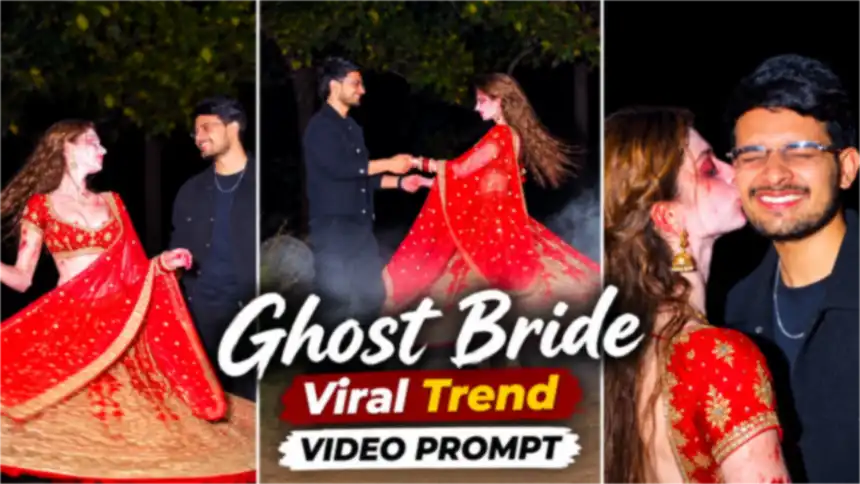
The Ghost Bride AI video is the new viral Instagram Reels trend that everyone is recreating right now. A boy walks through an old graveyard at night, a mysterious bride in a bright red bridal lehenga takes his hand, twirls with him in the fog, peeks out from behind a tree with spooky Halloween makeup and even gives him a sweet kiss on the cheek. Then he waves goodbye with a big smile, without realising who he was dancing with.
In this post you get the original viral video, two muted reference videos, the trend audio and two ready Google Flow prompts. With one clear photo you can make the same Ghost Bride AI video with your own face, while the bride stays exactly as she is in the original.
Watch the Ghost Bride AI Video Trend
The download folder has everything you need: Part 1 and Part 2 muted reference videos (11 seconds each) for Google Flow, the original trend audio and a short Video Generation Guide. The video is made in two parts because one Flow generation is about 10 to 11 seconds long.
Ghost Bride AI Video Prompt for Google Flow (Free)
Before You Paste This Prompt, Check These 4 Things
- Right muted video: use the Part 1 muted video with the Part 1 prompt, and the Part 2 muted video with the Part 2 prompt.
- Clear photo: a sharp, front-facing photo in good light, no sunglasses or heavy filter. Your clothes in the photo will appear in the video, so wear a nice casual outfit.
- Settings: Ingredients mode, 9:16 vertical, 1 output. Turn ON “Return silent video” in Flow settings.
- Join and add the sound: after generating both parts, join them in CapCut or VN and add the trend audio from the download folder.
Part 1 Prompt (0 to 11 seconds)
Part 1 covers the hand-holding point-of-view shot, the bride twirling next to you and the two of you walking hand in hand through the graveyard.
Replace ONLY the man in the black outfit (the one who holds the bride's hand) with @image1. Preserve the image reference's complete face, hair, skin tone, body proportions, height and distinctive details. Glasses only if @image1 has glasses. Hair stays exactly as in @image1, never the original man's hair from @video1. Outfit: exactly the same casual clothes as in @image1 in every shot, never the original black jacket outfit from @video1 and never wedding clothes; if @image1 shows only the upper body, continue the same top with plain dark jeans and simple sneakers; if no clothes are clear, use a plain black casual jacket over a black t-shirt and black jeans. Shoulders and body always covered.
Keep the bride in the red lehenga exactly as she is in @video1: same face, same makeup, same hair, same lehenga, jewellery, every movement and every expression. Do not change her at all.
In EVERY shot where the man appears, it is @image1, never the original man, not even for one frame:
0.0-2.8s: point-of-view shot through the man's eyes on the dark path; only his hand and wrist are visible, holding the bride's hand while she walks ahead. The hand and arm belong to the @image1 person (same skin tone), with the same sleeve as the @image1 outfit.
2.8-6.1s: medium shot, the @image1 person stands on the right holding her hand and laughs while the bride twirls on the left.
6.1-9.2s: wide shot from far away, the @image1 person and the bride walk hand in hand along the path toward the camera.
9.2-11.0s: only the bride peeking from behind the tree trunk; the man is not in this shot, keep it exactly as in @video1.
Keep the original night location, lighting, background, duration, cuts and shot order. Change only the man's appearance. Light, playful mood.
NEGATIVES: original man's face, original man's hair, original black jacket outfit, outfit changing between shots, wedding clothes, bare shoulders, changing the bride, identity swaps, mixed character features, appearance drift, altered actions, extra characters, distorted faces, extra limbs, flickering, new scenes, subtitles, text, watermarks.
Part 2 Prompt (11 to 22 seconds)
Part 2 covers the bride peeking from behind the tree, you spinning her in the fog, the cheek kiss close-up and the goodbye walk with a big smile.
Replace ONLY the man in the black outfit (the one who holds the bride's hand) with @image1. Preserve the image reference's complete face, hair, skin tone, body proportions, height and distinctive details. Glasses only if @image1 has glasses. Hair stays exactly as in @image1, never the original man's hair from @video1. Outfit: exactly the same casual clothes as in @image1 in every shot, never the original black jacket outfit from @video1 and never wedding clothes; if @image1 shows only the upper body, continue the same top with plain dark jeans and simple sneakers; if no clothes are clear, use a plain black casual jacket over a black t-shirt and black jeans. Shoulders and body always covered.
Keep the bride in the red lehenga exactly as she is in @video1: same face, same makeup, same hair, same lehenga, jewellery, every movement and every expression. Do not change her at all.
In EVERY shot where the man appears, it is @image1, never the original man, not even for one frame:
0.0-1.0s: only the bride peeking from behind the tree trunk; the man is not in this shot, keep it exactly as in @video1.
1.0-3.5s: full-body shot with low ground fog, the @image1 person holds her hand and spins her around.
3.5-6.6s: close-up of both faces, the @image1 person on the right smiles with eyes closed while the bride leans in to his cheek. The @image1 face must be fully clear and identical to the photo in this close-up.
6.6-8.0s: camera behind the @image1 person's shoulder; the @image1 person waves goodbye to the bride standing far away on the path.
8.0-11.0s: the @image1 person turns and walks toward the camera with a big happy grin, the bride small in the background. Mouth smiling, never talking.
Keep the original night location, lighting, background, duration, cuts and shot order. Change only the man's appearance. Light, playful mood.
NEGATIVES: original man's face, original man's hair, original black jacket outfit, outfit changing between shots, wedding clothes, bare shoulders, changing the bride, identity swaps, mixed character features, appearance drift, altered actions, extra characters, distorted faces, extra limbs, flickering, new scenes, subtitles, text, watermarks.
How to Make the Ghost Bride AI Video in Google Flow
- First, tap the download button above and download the Part 1 and Part 2 muted videos and the trend audio.
- Next, open Google Flow, create a new project and select Ingredients mode, 9:16 and 1 output. Turn ON Return silent video in settings.
- Then upload the Part 1 muted video and your clear photo, paste the Part 1 prompt and tap Generate.
- After that, start a new generation with the Part 2 muted video and the same photo, paste the Part 2 prompt and generate again.
- If a face or outfit does not look right, simply generate that part one or two more times and keep the best one.
- Finally, join Part 1 and Part 2 in CapCut or VN and add the Ghost Bride trend audio on top.
Join Both Parts and Add the Trend Sound
Google Flow gives a silent video, so the sound is added at the end. In CapCut or VN, put Part 1 first and Part 2 right after it, then add the trend audio and line it up with the start of the video. You can also skip the editing app: while uploading on Instagram, open the original trend reel, tap Use this sound and select your video.
Why the Ghost Bride Trend Is Going Viral
This trend mixes three things people love: a dreamy love story, a funny spooky twist and a beautiful Indian bridal look. The first seconds feel like a romantic wedding video, so viewers keep watching. Then the creepy peek and the clueless happy ending make people laugh and share it with friends. That is why Ghost Bride reels are getting millions of views on Instagram, and you can ride the same wave with your own face.
The Red Bridal Lehenga Look Explained
The bride wears a bright red bridal lehenga with heavy gold embroidery, a sheer red dupatta, red bangles, mehndi and big gold jhumkas, the classic Indian wedding look. In the tree shot she has playful Halloween makeup with white lenses, which gives the reel its ghost bride twist. The prompt keeps her look, makeup and every move exactly as in the original, and only replaces the boy with you.
Best Free AI Video Generator for Couple Face Swap Edits
Google Flow is one of the best free AI video generators for this kind of couple edit, because it follows the reference video closely and keeps the other person unchanged. You only replace one character, so the bride, the location and the camera moves stay the same. For more trends made this way, try the Flex Aura AI Video and the AI Love Story Video prompts.
Tips for the Best Result
- Use a photo where your full face is clearly visible, looking at the camera.
- Wear a plain casual outfit in your photo, because the same clothes appear in the video.
- Always use the same photo for Part 1 and Part 2, so you look the same in both parts.
- Generate each part two or three times and keep the best take before joining.
- Post quickly while the Ghost Bride trend is hot, with the same trending audio.
Frequently Asked Questions
Is the Ghost Bride AI video prompt free?
Yes. Both prompts, the muted reference videos and the trend audio are free to download and use.
Why is the video made in two parts?
One Google Flow generation is about 10 to 11 seconds long, and the full trend is longer. So it is split into Part 1 and Part 2, and you join them in CapCut or VN.
Will the bride also change?
No. Only the boy is replaced with your photo. The bride keeps her face, makeup, lehenga and moves exactly as in the original video.
Why are the reference videos muted?
Flow can show an audio error when the reference video has a song. The muted videos avoid that, and you add the trend audio after generating.
Can a girl make this trend?
Yes. Upload your photo and the prompt replaces the person holding the bride’s hand with you, with your own face and clothes.
Make your Ghost Bride AI video today and tag us when you post it. For more viral trends with free prompts, check out Luxury CEO Entry Video and Pehla Pyaar Hai Viral Trend.