

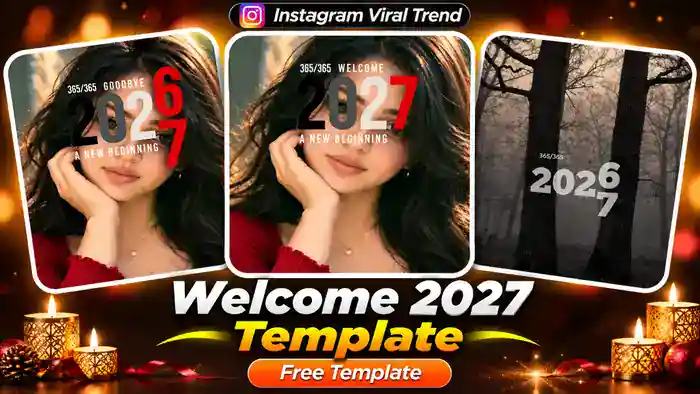
The Welcome 2027 Template is the newest New Year CapCut template trending on Instagram. In this edit, the big “2026” text on your photo slowly rolls into “2027”, with the words “Goodbye”, “Welcome” and “A New Beginning” in a clean red, black and white style.
It looks premium, and it takes less than a minute to make. You only need one photo or clip. The template adds the year animation, text and music for you, so you do not need any editing skills.
Welcome 2027 Template CapCut Link
Watch the video first to see how the template looks. Then tap the button right below it to open the template in CapCut.
How to Use the Welcome 2027 Template in CapCut
Step 1: Connect a VPN (India Only)
First, if you are in India, open any free VPN app and connect to Hong Kong or Singapore. Without a VPN, the template shows “User Not Found”. If you live outside India, skip this step.
Step 2: Open the Template
Next, tap the Use This Template button above. The template opens directly in the CapCut app.
Step 3: Select Your Photo or Clip
Then tap Use Template in CapCut and select your own photo or clip from the gallery. A clear portrait photo works best, because the 2027 text sits right over the face area. After that, tap Next, and CapCut adds the year animation and music for you.
Step 4: Export and Post
Finally, preview your video and tap Export. Your New Year reel is ready to upload on Instagram.
Why the Welcome 2027 Template Is Going Viral
Every year, New Year edits are among the most shared reels on Instagram, and this one is already picking up fast. The “Goodbye 2026, Welcome 2027” idea is simple, but it feels emotional, because everyone wants to close one year and start fresh.
Moreover, the minimal text style looks aesthetic on almost any photo: a selfie, a couple picture, a travel shot or even a plain landscape. So if you post your Welcome 2027 Template early, before 31 December, you have a real chance to ride the New Year wave and get more views.
Tips for a Better Result
Use a photo where your face is in the upper half of the frame, so the year text does not cover your eyes in a bad way. Also, pick a photo with soft or dark background colours, because the red, black and white text stands out better on it. However, you can also use a landscape photo, like the misty forest version, for a moody look.
Frequently Asked Questions
Is the Welcome 2027 Template free?
Yes. The template is free to use in the CapCut app. You only need the link and your own photo or clip.
Why does the template show “User Not Found”?
CapCut templates are blocked in India. Connect a VPN to Hong Kong or Singapore, then open the link again.
Can I use a video instead of a photo?
Yes. You can select a short clip or a photo. Both work with this template.
Can I change the year text?
The year animation is part of the template, so it always shows 2026 changing into 2027.
Liked the Welcome 2027 Template? Also try the Dilruba Dilnasheen Template and the Kale Kale Template for more trending CapCut edits.