
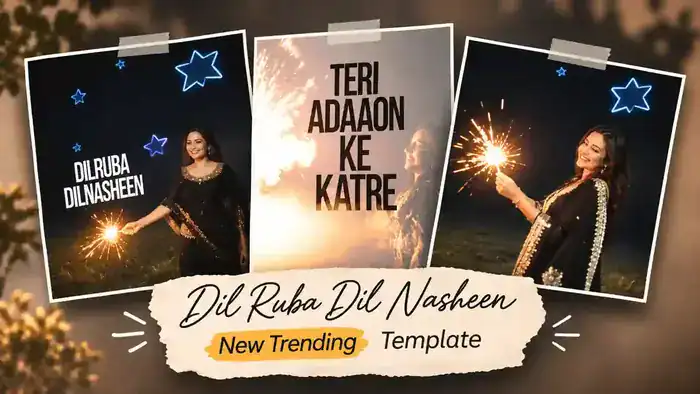
The Dilruba Dilnasheen Template is the newest trending CapCut template on Instagram. In these reels, a girl in a black embroidered suit plays with sparklers on a dark night, glowing blue neon stars pop up around her, and bold lyric text like “Dilruba Dilnasheen” and “Teri Adaaon Ke Katre” appears right on the beat of the song.
The best part is that you do not need any editing skills. You just open the template, add your own clip or photos, and CapCut makes the full edit with text, stars and effects for you. In this post, you get the free template link, the reference video and simple steps to make your reel in one minute.
Watch the Dilruba Dilnasheen Template Video
First, watch the reference video below so you know exactly how your reel will look.
Why the Dilruba Dilnasheen Template Is Going Viral
This is a new Instagram trend, and creators everywhere are posting their own version. The sparkler light, the neon stars and the big lyric text make even a simple night clip look like a music video. Also, the song is trending, so these reels keep people watching till the end.
Moreover, sparkler clips fit perfectly with Diwali, weddings and festive nights, so this edit works for many occasions. So, if you post your version while the trend is hot, your reel has a much better chance to reach new people.
Before You Start: Keep These 3 Things Ready
- VPN (India only): CapCut is banned in India, so the template shows “User Not Found”. Connect any free VPN to Hong Kong or Singapore before you tap the button. Users outside India do not need a VPN.
- CapCut App: Install or update the CapCut app on your phone.
- Your Clip: Keep a night clip of yourself with a sparkler (or a few photos) ready in your gallery. Clips with warm sparkler light look best.
Dilruba Dilnasheen Template CapCut Link
Tap the button below. After the short timer, the template opens directly in CapCut. If you are in India, connect your VPN first.
How to Use the Dilruba Dilnasheen Template in CapCut
Step 1: Connect a VPN (India Only)
First, if you are in India, open any free VPN app and connect to Hong Kong or Singapore. Without a VPN, the template shows “User Not Found”. If you live outside India, skip this step.
Step 2: Open the Template
Next, tap the Use This Template button above. The template opens directly in the CapCut app.
Step 3: Select Your Clip or Photos
Then tap Use Template in CapCut and select your own clip or photos from the gallery. After that, tap Next, and CapCut adds the lyric text, neon stars and effects for you.
Step 4: Export and Post
Finally, preview your video and tap Export. Your reel is ready. Upload it on Instagram with the trending “Dilruba Dilnasheen” audio.
Tips for a Better Result
- Record your clip at night, so the sparkler glow and the neon stars stand out.
- Wear dark or festive clothes, like a black suit or saree, to match the look of the trend.
- Vertical (9:16) clips look best in this template.
- If the template shows “User Not Found”, turn the VPN off and on again, then tap the button once more.
Frequently Asked Questions
Is the Dilruba Dilnasheen Template free?
Yes. The CapCut template and the CapCut app are both free to use.
Why does the template show “User Not Found”?
CapCut is banned in India. So connect a VPN to Hong Kong or Singapore, then tap the template button again.
Can I use photos instead of a video?
Yes. However, a short night clip with a sparkler gives the best result, because the template is made around that glow.
Which song is used in this template?
The template uses the trending “Dilruba Dilnasheen” song with the line “Teri Adaaon Ke Katre”, and the music is already added inside the template.
That is all you need for the Dilruba Dilnasheen Template. For more trending edits, also check the Kale Kale Template and the Viral Template Trend. You can also visit the official CapCut website.