
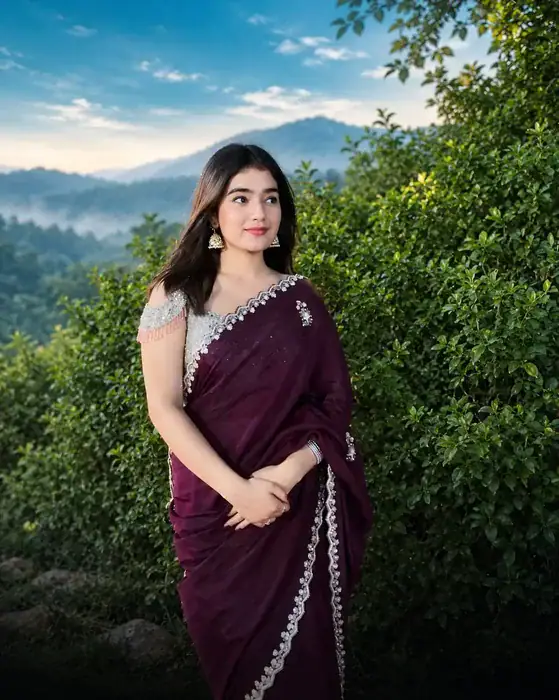
The Cinematic Photo Edit Prompt turns a normal outdoor photo into a movie-style shot with a deep teal-blue sky, soft white glow near the horizon, light mist over the mountains and a smooth black fade at the bottom. Upload your photo in ChatGPT or Gemini, paste the prompt and get a real-looking cinematic picture in seconds.
This colour grading look is everywhere on Instagram right now. Creators are taking simple phone photos from hill stations, parks and road trips and turning them into dreamy, film-like portraits. The best part is that you do not need Lightroom, presets or any editing skill. One prompt does the whole job.
What Makes This Cinematic Photo Edit Look Different
Most AI photo edits change the face, smooth the skin and make the picture look fake. This prompt works the other way. It only changes the colours and the mood, while it keeps your face, hair, pose, hands and clothes exactly as they are. As a result, the photo still looks like you, just shot by a professional cinematographer.
The look itself has three parts. First, the sky becomes a rich teal-blue with a soft white glow near the horizon. Next, the distant hills get a gentle layer of mist and cool teal shadows, while the trees keep a natural deep green. Finally, the bottom of the photo fades smoothly into black, so all the attention goes to you in the middle of the frame.
Why This Cinematic Photo Trend Is Going Viral on Instagram
Cinematic colour grading posts are getting huge reach on Instagram because they stop the scroll. The teal sky and dark bottom fade look like a still from a film, so people pause, save the post and ask “which app did you use?” in the comments. That kind of engagement pushes the photo to even more people.
It also works for almost everyone. Saree photos, couple photos, travel pictures and solo portraits all look premium with this edit. So if you have even one nice outdoor photo in your gallery, you can post this trend today and ride the wave.
How to Use the Cinematic Photo Edit Prompt in ChatGPT and Gemini
- Open ChatGPT or Gemini in your browser or app. Both work with the free version.
- Tap the plus (+) button and upload one clear outdoor photo of yourself.
- Copy the Cinematic Photo Edit Prompt from the box below.
- Paste it in the message box and send it with your photo.
- Wait a few seconds, then download the cinematic photo. If you do not like the first result, simply regenerate once more.
Cinematic Photo Edit Prompt
Before You Paste This Prompt, Check These 3 Things
- Use an outdoor photo: sky, hills, trees or open nature in the background gives the best cinematic result.
- Face clearly visible: a sharp, well-lit photo where the face is not blurry or covered.
- Upload first, then paste: attach your photo in ChatGPT or Gemini, then paste the prompt and send.
Preserve the exact original subject, face, hair, pose, hands, clothes, body proportions, and composition. Keep natural textures and realistic colours. No AI look, no face regeneration, no artificial skin smoothing, no oversaturation, no HDR, no distortion, no excessive sharpening, and no fake lighting. Make the final image look like a real cinematic.
Tips for a Better Result
- Choose a photo taken in daylight. Harsh night photos lose detail when the AI adds the teal sky.
- Keep some sky or landscape in the frame. The edit looks best when there is space above and around you.
- Use the original photo, not a screenshot. Screenshots are low quality, so the final picture also looks soft.
- If the face changes even a little, reply “keep my face exactly the same as the original photo” and generate again.
- If the colours look too strong, reply “make the grading more natural and subtle”.
Which Photos Work Best With This Edit
This edit shines on outdoor portraits with hills, trees, fields, lakes or open sky behind you. Traditional outfits like sarees, lehengas and kurtas look especially rich with the teal and green tones. However, you can also try it on travel photos, couple shots and even simple pictures from a nearby park.
Frequently Asked Questions
Is the Cinematic Photo Edit Prompt free?
Yes. The prompt is completely free. You can use it in the free version of ChatGPT and in Gemini, although free accounts have a daily image limit.
Will this prompt change my face?
No. The prompt clearly tells the AI to keep your face, hair, pose, hands and clothes exactly the same. It only changes the sky, mist, shadows and overall colour grading.
Which is better for this edit, ChatGPT or Gemini?
Both give good results. ChatGPT usually follows the colour details very closely, while Gemini is faster. Try both with the same photo and keep the one you like more.
Can I use an indoor photo?
You can, but the result will not look the same, because this look depends on the sky, mountains and greenery. For the real viral style, use an outdoor photo.
Want more free photo ideas? Try the Viral Photo Trend Prompt and the Sheru Bhai Garden Photo Prompt. Then post your Cinematic Photo Edit result on Instagram and watch how people react to your new look.