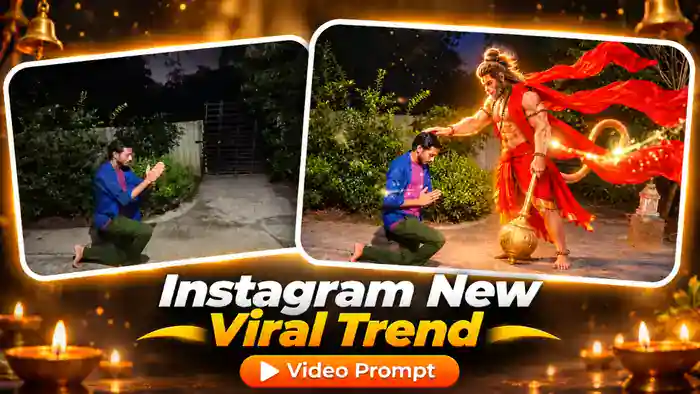
The Hanuman Ji AI Video is a new devotional trend going viral on Instagram. A person walks alone in a garden at night, kneels down and prays with folded hands. Then, with a golden flash, Lord Hanuman appears beside them, places his hand on their head and blesses them, with his golden gada in hand and his red cloth flying in the wind.
It is emotional, simple and beautiful, and you can make it with only one photo of yourself. In this post you get the tested Google Flow prompt, ready to copy and paste.
Watch the Hanuman Ji AI Video
This is the original viral video. With the prompt below, you can make the same video with your own face.
Why the Hanuman Ji AI Video Is Going Viral
Devotional reels always get huge reach in India, and this one has a strong story in just ten seconds: a sad moment, a prayer, and then a blessing. People watch it, feel it, and share it with family and friends.
Moreover, the golden reveal and the flying red cloth make the Hanuman Ji AI Video look like a film scene. So if you post your own version now, while the trend is fresh, you have a real chance to go viral.
Hanuman Ji AI Video Prompt (Free)
Copy the Hanuman Ji AI Video prompt below and paste it in Google Flow. We tested and improved it many times, so Hanuman ji appears in place with the golden flash, keeps the gada in his left hand and blesses you with his right hand, just like the original.
Before You Paste This Prompt, Check These 4 Things
One clear photo: your face fully visible, sharp and well lit. Boy or girl, both work.
No reference video needed: upload only your photo. The whole scene comes from the prompt.
Tag your photo: after pasting, check that @image1 in the prompt is linked to your uploaded photo.
DURATION: exactly 10 seconds. ASPECT RATIO: 16:9 landscape. Realistic phone-camera video at night, then a divine reveal. Real-time speed.IDENTITY: @image1 is the ONLY identity reference for THE PERSON. Exact same face, skin tone, hair, facial hair (or none), gender, age and body shape as @image1. Clothes exactly as in @image1 in every frame. Face stays identical when looking down, in profile and with eyes closed. No beautification, no jewellery added.LOCATION (same in every frame, do not change): a quiet house garden at night. A smooth grey concrete path across the bottom of the frame. Behind it, dense dark-green bushes, a pale cream metal fence on the left-centre, a tall black iron gate in the centre background, a thin bare tree on the right, and a small white stone lantern on a short brick pillar right of centre. Dark night sky at the top. No other people.CAMERA: fixed wide shot from the side at about chest height, ~4 m from THE PERSON, THE PERSON on the left third of the frame, full body visible. Shot 1 (0–4.2s): static. At 4.2s ONE quick transition (a fast 0.2s blur-flash of warm golden light) jumps to Shot 2: a slightly closer static framing that stays until the end. In Shot 2 Hanuman fills about 85% of the frame height: the top of his head near the top edge, and his bare feet, the gada head and a strip of the concrete path fully visible at the bottom; THE PERSON kneels in the lower left, full body visible including the knee and foot on the ground. Never cut anyone at the waist, knees or feet, never a torso close-up. No other cuts.DIVINE FIGURE (already present in Shot 2 from its very first frame): a giant, photorealistic (like a real person filmed on camera, NOT cartoon, NOT animated, NOT a statue) majestic Lord Hanuman, standing on the right side of THE PERSON, a towering giant about 1.5 times taller than a standing adult (more than twice THE PERSON’s kneeling height): strong muscular body with warm golden-orange skin, calm kind face with a monkey-like muzzle, long dark hair tied in a high top-knot bun wrapped with small rudraksha beads, NO crown and NO helmet, rudraksha and gold necklaces, gold armbands, red-and-saffron dhoti with a golden border, a very long, wide bright RED cloth (angavastram) over his shoulders that flies far out behind him to the right in big dramatic wind-blown waves, almost as wide as his body; a HUGE golden gada (mace) held firmly in his LEFT hand the whole time: his left fist closes tightly around the top end of the long golden handle at hip height, the handle runs diagonally down from his left hand, and the big round ribbed golden head rests on the ground just in front of his feet. The gada never stands on its own, never floats and never swings in the air — it is always in his left hand, a long tail curling up behind him in a big loop. A soft golden glow around his body, golden sparkles and firefly-like light particles floating in the air. Calm, protective and blessing, never aggressive.LIGHTING: 0–4.2s cool dim night light, bluish shadows. From 4.2s a strong warm golden light from the divine figure floods the scene: THE PERSON’s face and clothes, the path and the bushes glow warm orange-gold, cinematic film look with rich contrast; the night sky stays dark.TIMELINE:0.00–1.25 — THE PERSON walks slowly from left to right along the path, seen from the side (profile), looking down, sad and tired.1.25–2.25 — THE PERSON stops, turns slightly to the right and goes down on one knee on the path (right knee down, left foot forward), facing right.2.25–4.00 — THE PERSON joins both palms together in prayer (namaste) in front of the chest, bows the head, eyes closed, lips moving silently in prayer.4.00–4.20 — a quick blur-flash of warm golden light fills the frame (the transition).4.20 — Shot 2 starts and Lord Hanuman is ALREADY standing in place on the right, already in the final pose: RIGHT palm already resting on THE PERSON’s head, LEFT hand gripping the gada, red cloth flying. He does NOT walk in, does NOT slide in from the edge of the frame, does NOT fade or grow in, does NOT move his feet or change position — he simply is there when the shot changes.4.20–10.00 — hold: THE PERSON stays kneeling with joined palms and closed eyes, head slightly bowed, a peaceful emotional expression; Hanuman keeps his RIGHT hand on their head and his LEFT hand on the gada, looking down at them with a calm smile; only natural small motion: the red cloth keeps fluttering, his chest breathes, a slight soft blink, golden sparkles drift through the air, firefly lights float in the bushes. Smooth, real-life motion, not stop-motion or keyframe animation. End on this frame.AUDIO: soft devotional instrumental music (flute, tanpura, temple bells), a gentle wind and a soft shimmering sound at the reveal. No dialogue, no voice-over, no singing, no lip-sync.STRICT RULES: only THE PERSON’s face from @image1. The golden gada and the flying red cloth are visible in every frame after 4.2s. Right hand on the head, left hand on the gada — both at the same time. No free-standing or floating gada. Hanuman never walks, slides or animates into the frame. No crown on Hanuman. No close-up of Hanuman’s torso. Hanuman is calm, respectful and blessing; no violence, no fire, no weapons swung. No text, no captions, no logos, no watermarks. Same garden location for the whole video. No extra people. No cuts other than the single golden flash transition at 4.2s.