
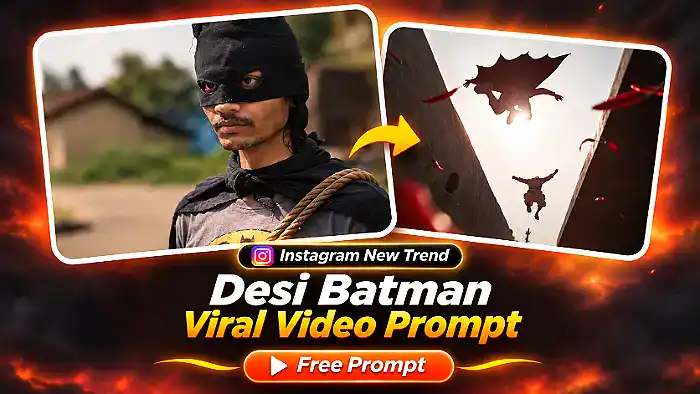
The Desi Batman Viral Video is the new Instagram trend that everyone is making right now, and the Sajan song makes it hit even harder. In this post, you get the free Google Flow prompt, both video parts and the audio file to make your own version.
If you were searching for देसी बैटमैन वायरल वीडियो प्रॉम्प्ट, you are in the right place. First, download the files. Then generate Part 1 with your face, and finally join it with Part 2 and the song.
How the Desi Batman Viral Video Works
The trend has two clips. Part 1 is a funny morning walk by a masked Desi Batman with a neem twig and a steel pot. Then, Part 2 is the epic flying scene. However, you generate only Part 1 with your own face. Part 2 is used exactly as it is, so you do not need to generate it.
Step 1: Download the Part 1 Reference Clip
Watch the muted Part 1 clip below. Then tap the button to download it. The same folder also has Part 2, the Sajan audio file and a short PDF guide.
Desi Batman Viral Video Prompt for Google Flow (Free)
Open Google Flow, upload the Part 1 clip and your selfie, and paste this prompt. In short, it replaces only the masked man with you and keeps every shot, cut and camera move the same.
Before You Paste This Prompt, Check These 5 Things
- Muted Part 1 clip: upload only the muted Part 1 clip from the button above as your reference video in Flow.
- One clear selfie: a sharp, front-facing photo with your face and hair fully visible. Never use a blurry photo.
- Settings: Ingredients mode, 16:9 ratio, 720p and 1x output.
- Return silent video: keep this option ON in Flow.
- Tags: type @ in the prompt and select your selfie as image 1 and the clip as video 1. After generating, join Part 1 and Part 2 and add the Sajan audio in CapCut or VN.
Use @video1 as the strict reference for all actions, gestures, interactions, timing, camera movements, framing, and editing.
Replace ONLY the masked man who walks brushing his teeth with a twig and carrying a metal water pot with @image1.
Preserve the image reference's complete face, skin tone, body proportions and distinctive details. Hair stays exactly as in @image1, never the original man's hair or moustache from @video1.
Keep the black knitted mask with two small pointed ears from @video1 on the head in every shot where the head is visible, with the eye area and lower face of @image1 showing exactly as in @video1.
Clothes: the same clothes as @image1 in every shot, never the original white vest or blue checked lungi from @video1. If @image1 does not show the full outfit, continue the visible clothes in the same style and colours.
In EVERY shot where the masked man appears, it is @image1, never the original person, not even for one frame:
0.0-1.52s: Medium shot, 3/4 front, foggy morning, he stands and walks slowly beside a railway track brushing his teeth with a brown neem twig held in his right hand, a steel water pot hanging from his left hand at the bottom edge of the frame, yellow mustard flowers and misty trees behind, camera slightly handheld.
1.52-3.44s: Extreme close-up of his mouth and jaw, the twig with frayed white fibres moves back and forth in his mouth with white foam, mask covering the eye area, blurred misty field behind, camera slightly low and tilted.
3.44-4.16s: Close-up of a round silver metal water pot held by its rim from above by his hand, the lower part of his trousers at the left, golden sunrise glow blurred behind, the railway track below.
4.16-5.52s: Medium side shot, camera static, he walks from the left toward a grey wall covered with small blurred paper notices, utility pole and mud-brick pillar on the left, wheat field and orange sunrise sky behind, the water pot hanging at his side, the twig sticking out of his mouth, he stops and looks at the notices.
5.52-6.28s: Soft out-of-focus close-up, the whole frame is heavily blurred, his masked head enters from the left edge with the twig and moves across the frame to the right, his shoulder passes in front of the camera as a soft white blur, the wall behind is only blurred shapes.
6.28-7.12s: Close shot of a mud-brick wall with one blurred paper notice and barbed wire above it in the foreground, the notice is only a soft blurred shape, while far behind it he is seen from behind, small and softly blurred, walking away down a village lane between a mud house and a green wheat field, the water pot in his hand, camera static.
Keep the original environment, railway track, wall with paper notices, village lane, fog and sunrise lighting, duration, and shot order. Change only the masked man's appearance. All paper notices are heavily blurred in @video1, only soft shapes with nothing readable. Keep them blurred exactly like that in every shot, never sharp, no readable text, no clear faces on them. Calm, light comedy mood.
NEGATIVES: sharp, readable or clear notices, faces or text on the paper notices, original masked man's face, original hair, original moustache, original outfit, identity swaps, mixed character features, appearance drift, altered actions, extra characters, distorted faces, extra limbs, flickering, new scenes, subtitles, text overlays, watermarks.
Step 2: Get Part 2 and the Sajan Audio
Part 2 is a ready clip, so skip the generation for it. Simply download it from the same MediaFire folder with the download button in Step 1, and keep it for the edit.
How to Make the Desi Batman Viral Video Step by Step
- Download Part 1, Part 2 and the Sajan audio from the folder above.
- Next, open Google Flow and start a new project. Choose Ingredients mode, 16:9, 720p and 1x output, and keep Return silent video ON.
- Then upload the muted Part 1 clip as the reference video and add your clear selfie.
- After that, paste the prompt and tag the clip as video 1 and your selfie as image 1.
- Now tap Generate and wait. Then download your generated Part 1.
- After generating, open CapCut or VN. Put your generated Part 1 first on the timeline and Part 2 right after it.
- Also, add the Sajan audio, trim it to match the cuts, and export in 1080p.
- Finally, post it as a Reel with the trending Sajan sound.
Why the Desi Batman Viral Video Is Going Viral
This trend works because of the contrast. First, you see a funny village morning with a masked man brushing his teeth. Then, the video suddenly turns into an epic Batman style flying scene. That surprise keeps people watching until the end.
Also, the Sajan song adds a strong beat to the cuts. Viewers love to see their own face as the hero, so they share it with friends. As a result, the trend keeps growing every day, and you can make it in a few minutes.
Tips for the Best Desi Batman Video Result
- Use a bright, front-facing selfie with no filter and no blur.
- Also, generate two or three times and pick the best Part 1.
- Besides, keep the Flow output at 1x so the clip matches the original length.
- Finally, cut your Part 1 so the last frame flows into the first frame of Part 2.
- Above all, use AI videos only for fun and never to mislead anyone.
Frequently Asked Questions
Do I need to generate Part 2?
No. Part 2 is a ready clip, so you only generate Part 1 with your face and then join both parts in an editing app.
Why is the Part 1 clip muted?
Google Flow can fail when the reference video has sound. That is why you upload the muted clip and add the Sajan audio later in CapCut or VN.
Why are the paper notices blurred in Part 1?
They are blurred on purpose so Flow accepts the reference clip without any policy error. So, keep the clip as it is and do not edit it.
Which settings should I use in Google Flow?
Simply use Ingredients mode, 16:9 ratio, 720p and 1x output, and keep Return silent video ON.
Where can I get the Sajan audio?
The audio file is in the same download folder as the clips, and you can download it from the Step 1 button.
Want more trends like this? Try the Sher of Arabia trend prompt, the GTA 6 viral trend or the Stone Castle viral trend, and make your next Desi Batman Viral Video even better.