
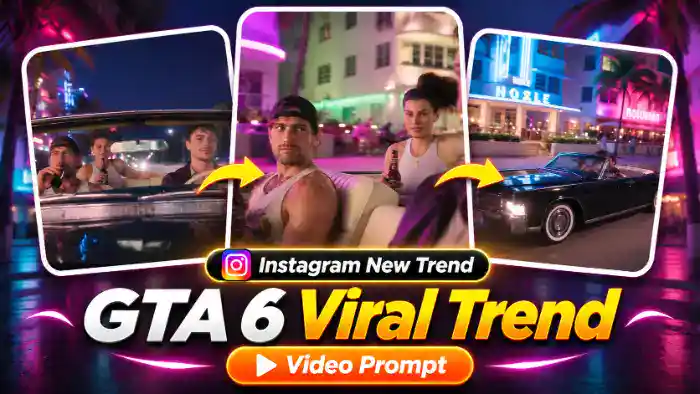
The GTA 6 Viral Trend is everywhere on Instagram right now. The video looks like a scene straight out of GTA 6: a black vintage convertible cruising at night past glowing pink and blue neon hotels and palm trees, with two friends enjoying the ride and a cool driver at the wheel.
Now creators are putting their own face in the driver seat using AI. In this post, you get the result video, the muted reference video for Google Flow, the audio file and the exact prompt. You only need one clear photo of yourself.
Watch the GTA 6 Viral Trend Video
Tap the button below to download the muted reference video and the audio file.
GTA 6 Viral Trend Prompt (Free)
Before You Paste This Prompt, Check These 5 Things
- Muted reference video: download it from the button above and upload only the muted 10-second video in Flow.
- One clear photo: a sharp, front-facing photo with your full face and hair clearly visible. A boy or a girl photo both work.
- Only the driver changes: the two friends in the car, the black convertible and the neon street stay exactly like the original video.
- Flow settings: Ingredients mode, 9:16, 1 output. If you see an audio error, turn ON “Return silent video” in Settings.
- Add the sound later: the audio file is in the same download folder. Add it in CapCut or VN after the video is ready.
Replace ONLY the driver (the person behind the steering wheel of the black vintage convertible) with @image1. Preserve the image reference’s complete face, hair, skin tone, body proportions and distinctive details. Hair stays exactly as in @image1, never the curly brown hair of the original driver. Keep the driver’s outfit from @video1 in every shot: dark burgundy leather jacket over a cream collared shirt.
Keep the two passengers exactly as they are in @video1, do not change them at all: the man in the front passenger seat (black backwards cap, light tank top, holding a drink bottle) and the woman in the back seat (white tank top, hair tied up, holding a bottle).
In EVERY shot where the driver appears, it is @image1, never the original driver, not even for one frame:
0.0–2.2s: front view through the windshield of the open convertible at night, neon hotels and palm trees behind. The two passengers on the left, the driver on the right holding the cream steering wheel, relaxed, with a soft smile.
2.2–3.2s: close-up of the driver’s hand gripping the cream steering wheel, burgundy leather sleeve, glowing dashboard.
3.2–4.5s: front close-up of the driver’s face behind the steering wheel, calm and confident, a slow smile.
4.5–6.2s: shot from the driver’s side looking at the two passengers; the driver’s shoulder and burgundy sleeve are blurred in the foreground on the left; pink and purple neon building behind; the passengers smile and enjoy the ride.
6.2–7.7s: front close-up of the driver’s face again, glancing to the side, then smiling at the camera.
7.7–10.0s: wide side shot: the black vintage convertible with white-wall tyres drives slowly past glowing pink and blue neon art-deco hotels; the driver at the wheel.
Keep the original car, street, neon lights, night lighting, duration, and shot order. Change only the driver’s appearance.
NEGATIVES: original driver’s face, curly brown hair, changing the passengers, identity swaps, mixed character features, appearance drift, altered actions, extra characters, distorted faces, extra limbs, flickering, new scenes, subtitles, text, watermarks.
How to Make the GTA 6 Viral Trend in Google Flow
- First, download the muted reference video from the download button above.
- Open Google Flow and choose Ingredients (video reference) mode. Set the ratio to 9:16.
- Upload the muted video. It becomes @video1.
- Next, upload one clear photo of your face. It becomes @image1.
- Copy the prompt above, paste it in Flow and tap Generate.
- When the video is ready, download it, open CapCut or VN and add the audio file from the same folder.
- Finally, post it on Instagram as a reel with a GTA 6 style caption.
Why the GTA 6 Viral Trend Is Going Viral
GTA 6 is one of the most awaited games in the world, and its neon Vice City look is instantly recognisable. When people see a real-looking person cruising through that world, they stop scrolling. That is why this trend gets so many views, saves and shares.
The edit is also short and cinematic: the windshield shot, the hand on the steering wheel, the confident smile and the wide neon street shot. When your own face is in the driver seat, it feels like you are the main character of the game.
Tips for the Best Result
- Use a sharp front photo with good light. Avoid sunglasses, caps and heavy filters.
- Use the same photo every time so the face stays the same in every shot.
- If the face changes in one shot, simply generate again. Flow gives a slightly different result each time.
- Keep the reference video muted. A video with sound can give an audio or speech error in Flow.
- Use a caption like “Main character of GTA 6” or “Vice City nights” to get more comments.
FAQ
Will the two friends in the car also change?
No. Only the driver is replaced with your photo. The two friends, the car and the neon street stay the same as the reference video.
Can a girl use this GTA 6 Viral Trend prompt?
Yes. The prompt takes the face and hair from your photo, so it works for both boys and girls.
Why is the reference video only 10 seconds?
The free Google Flow plan accepts a reference video of up to 10 seconds, so the full scene is cut into one 10-second clip. Every shot of the original is still there.
Is this prompt free to use?
Yes, the prompt, the reference video and the audio file are all free. Just download, paste and generate.