
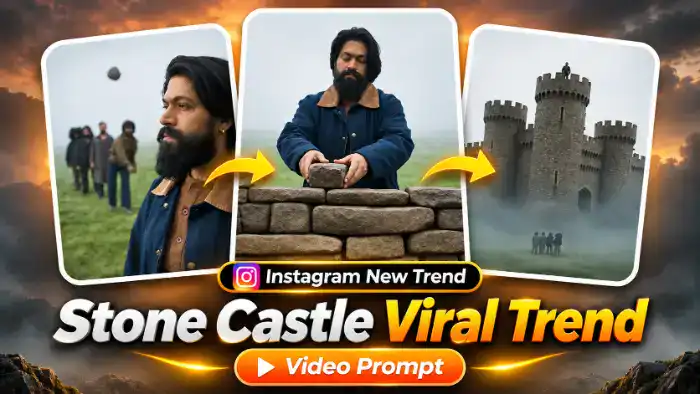
The Stone Castle Viral Trend is one of the most powerful motivational trends on Instagram right now. In the video, people throw small stones at a person standing in a foggy field. The person does not fight back. Instead, they quietly pick up every stone, lay a path, build a wall and finally stand on top of a huge stone castle while the same people look up from below.
Now creators are making this Stone Castle Viral Trend with their own face using AI. In this post, you get the reference video, the muted file for Google Flow and the exact prompt. You only need one clear photo of yourself.
Watch the Stone Castle Viral Trend Video
Tap the button below to download the muted reference video and the audio file.
Stone Castle Viral Trend Prompt (Free)
Before You Paste This Prompt, Check These 5 Things
- Muted reference video: download it from the button above and upload only the muted 10-second video in Flow.
- One clear photo: a sharp, front-facing photo with your face, hair and outfit clearly visible. Your own clothes from the photo will appear in the video. A boy or a girl photo both work.
- Only the main person changes: the people in the back, the stones, the wall and the castle stay exactly like the original video.
- Flow settings: Ingredients mode, 9:16, 1 output. If you see an audio error, turn ON “Return silent video” in Settings.
- Add the sound later: the audio file is in the same download folder. Add it in CapCut or VN after the video is ready.
Replace ONLY the main person (the one who collects the stones, builds the wall and stands on top of the castle) with @image1. Preserve the image reference’s complete face, hair, skin tone, body proportions, clothing and distinctive details. Hair stays exactly as in @image1, never the long red hair from @video1. OUTFIT: the main person wears exactly the same clothes as in @image1 (same type, colours and style), and keeps this same outfit in every shot, from the first frame to the last; never the navy jacket from @video1. If @image1 does not show the full outfit, continue the visible clothes naturally in the same style and colours.
In EVERY shot where the main person appears, it is @image1, never the original person, not even for one frame:
0.0–1.7s: side-profile close-up in a foggy green field, calm and peaceful, eyes slowly closing. A small group of people stands in a line far behind; a few small stones drop softly onto the grass around the field.
1.7–3.6s: low ground-level camera. The main person walks in, crouches and calmly collects the small stones lying on the grass, one by one; the group stands in the background, watching.
3.6–4.2s: close-up of the main person’s hands placing a stone on the grass.
4.2–5.0s: the main person kneels and lays the stones in a neat line, a stone path.
5.0–6.0s: the main person places stones on top of a growing dry-stone wall, calm and focused; the wall gets higher with each cut.
6.0–6.4s: the main person looks over the top of a tall round stone wall.
6.4–7.8s: the stone castle grows bigger with each cut, more towers and gates; the main person stands small on top of the wall.
7.8–8.9s: wide shot of the finished castle above thick fog; the main person stands tiny on top of the main tower; the small group of people stands far below on the grass.
8.9–9.4s: low-angle close-up of the main person’s face looking down at the camera, calm, proud and smiling slightly.
9.4–10.0s: top-down view from the castle: the small group of people on the grass, surrounded by fog, looking up.
Keep the group of people exactly as in @video1, do not change them. Keep the original environment, castle, fog, lighting, duration, and shot order. Change only the main person’s appearance. A calm, inspiring, peaceful mood from start to end.
NEGATIVES: original person’s face, long red hair, the original navy jacket outfit, outfit changing between shots, identity swaps, mixed character features, appearance drift, altered actions, extra characters, distorted faces, extra limbs, flickering, new scenes, subtitles, text, watermarks.
How to Make the Stone Castle Viral Trend in Google Flow
- First, download the muted reference video from the download button above.
- Open Google Flow and choose Ingredients (video reference) mode. Set the ratio to 9:16.
- Upload the muted video. It becomes @video1.
- Next, upload one clear photo of your face. It becomes @image1.
- Copy the prompt above, paste it in Flow and tap Generate.
- When the video is ready, download it, open CapCut or VN and add the audio file from the same folder.
- Finally, post it on Instagram as a reel with a motivational caption.
Why the Stone Castle Viral Trend Is Going Viral
This trend works because the story is simple and everyone feels it. People judge you and throw stones, and you use those same stones to build something big. Viewers see their own struggle in it, so they watch till the end, save the reel and share it with friends.
Also, the visuals are cinematic. The fog, the slow walk, the wall growing with every cut and the final castle shot look like a movie trailer. When your own face is in that story, the reel feels personal and gets more comments.
Tips for the Best Result
- Use a sharp front photo in daylight. Avoid sunglasses, caps and heavy filters.
- Use the same photo every time you generate so the face stays the same.
- If the face changes in one shot, simply generate again. Flow gives a slightly different result each time.
- Keep the reference video muted. A video with sound can give an audio or speech error in Flow.
- Add a strong caption like “They threw stones, I built a castle” to get more shares.
FAQ
Can a boy and a girl both use this Stone Castle Viral Trend prompt?
Yes. The prompt takes the face and hair from your photo, so it works for both boys and girls.
Will the people in the background also change?
No. Only the main person is replaced with your photo. The group of people, the stones and the castle stay the same as the reference video.
Why is the reference video only 10 seconds?
The free Google Flow plan accepts a reference video of up to 10 seconds, so the trend is compressed into one 10-second clip. The full story still fits in it.
Is this prompt free to use?
Yes, the prompt, the reference video and the audio file are all free. Just download, paste and generate.