
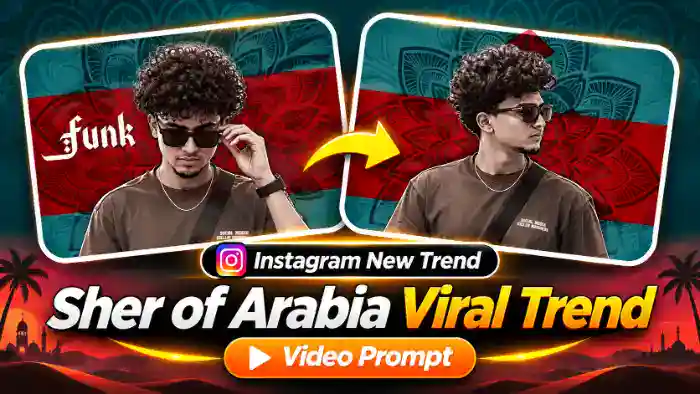
The Sher of Arabia Trend is the new Instagram viral static edit that everyone is making right now. A cool young man in sunglasses snaps between sharp poses on a red and teal mandala background while a gothic “Sher of Arabia” title and the “Funk Sirrrrrr” ending hit on every beat.
Now creators are making this Sher of Arabia Trend with their own face using AI. In this post you get the original video, the muted file for Google Flow, the audio and the exact prompt. You only need one clear photo of yourself.
Watch the Sher of Arabia Trend Video
Tap the button below to download the muted reference video and the audio file.
Sher of Arabia Trend Prompt for Google Flow (Free)
Before You Paste This Prompt, Check These 5 Things
- Muted reference video: download it from the button above and upload only the muted video in Flow, never the one with music.
- One clear photo: a sharp, front-facing photo with your face and hair clearly visible. Apply a black and white filter to the photo first for the best match.
- Sunglasses: the prompt puts black sunglasses on you in every pose, so you do not need them in your photo.
- Settings: Ingredients mode, 16:9 ratio, 720p and 1x output.
- Tag your photo: type @ in the prompt and pick your photo as image 1 and the video as video 1. After generating, add the original song in CapCut or VN because the result is silent.
Replace ONLY the person (the cut-out young man in the front) with @image1. Preserve the image reference’s complete face, hair, skin tone, body proportions, clothing and distinctive details, in every pose from the first frame to the last. Hair stays exactly as in @image1, never the curly hair from @video1. OUTFIT: he wears exactly the same clothes as in @image1 (same type and style), never the brown t-shirt and crossbody strap from @video1; if @image1 does not show the full outfit, continue the visible clothes naturally. SUNGLASSES: black sunglasses are ON his face in EVERY single pose from start to end, even if @image1 has no sunglasses. COLOUR GRADE OF THE PERSON (same as @video1): almost black-and-white, very low saturation with a faint warm grey-brown tint, moody tone, deep shadows, high contrast and a gritty, sharpened, matte poster look — applied the same way in every pose. CLOTHES COLOUR LOCK: his clothes keep the same design and style as in @image1, but in EVERY pose from the first frame to the last they look DARK CHARCOAL GREY, desaturated, like the dark t-shirt in @video1. Even if the clothes in @image1 are white, cream or any light colour, they must always appear dark grey — never white, never cream, never bright, not even for one pose. The clothes tone never changes between poses. Apply the same moody grade evenly to the whole person in every pose. He is a clean-edged cut-out layered on top of the colourful background; only the background and text stay in full colour.
ONLY ONE PERSON in the frame at any time — never two copies of him, never a second smaller figure. In EVERY pose the person is @image1, never the original person, not even for one frame. Each pose is a still cut-out that holds, then snaps instantly (hard cut, no morphing) to the next pose at a new position and size. Positions are given as where the centre of his head is, from the left edge of the frame. Sizes: SMALL = head about 1/4 of the frame height, MEDIUM = about 1/3, LARGE = about 1/2.
IDENTITY LOCK FOR THE WHOLE VIDEO (very important): the replacement must last until the very last frame. From 3.80s to 7.73s — the “Arabia” zoom, all the “fa” poses, the “Funk” and “Sirrrrrr” poses and the fade out — the person is STILL @image1 with the face and hair of @image1 and the dark grade of his own clothes. The original curly-haired man from @video1 must NEVER come back, not in the second half and not in the last pose. Check points: at 1.0s, 3.0s, 4.0s, 5.0s, 6.0s, 7.0s and 7.6s the face is @image1.
CLOTHES CHECK POINTS: at 0.1s, 0.5s, 0.8s, 1.1s, 1.5s, 1.8s, 2.4s, 3.3s, 3.9s, 4.3s, 4.7s, 5.0s, 5.5s, 5.9s, 6.2s, 6.8s, 7.3s and 7.6s his clothes are the same dark charcoal grey — identical tone in every single pose, never white or cream at the start, middle or end.
HARDEST MOMENTS (the original man came back here before — he must NOT): 4.16–4.83s and 5.41–5.83s. In these pointing and head-bowed poses the person is still @image1, with @image1’s hairstyle seen from above, never the original curly hair, never the original face.
POSE A = right hand raised to his right temple holding the side of the sunglasses, head turned to screen-left.
POSE B = chin up, side profile looking up to screen-left, no hands.
POSE C = pointing one index finger straight at the camera, hand in front of his chest.
POSE D = head bowed, looking down — STILL @image1: the top of the head shows exactly the hair of @image1 (never curly hair), same dark grey clothes.
POSE E = three-quarter view, looking to screen-left, shoulders square.
POSE F = almost facing the camera, eyes slightly to screen-left, cool look.
TIMELINE (seconds):
0.00–0.08: no person, only the background.
0.08–0.33: POSE A at 60% from left, MEDIUM.
0.33–0.66: POSE B at 55%, MEDIUM.
0.66–1.00: POSE C at 45%, MEDIUM.
1.00–1.33: POSE D at 45%, MEDIUM-LARGE.
1.33–1.66: POSE E at 35%, MEDIUM, small jump to 40% at 1.50.
1.66–2.00: POSE F at 45%, LARGE.
2.00–2.83: POSE A, SMALL, sliding smoothly from 55% to 75% (the only sliding move).
2.83–3.83: POSE B at 70%, SMALL, behind-right of the big “Arabia” title.
3.83–4.00: POSE B at 70%, LARGE (sudden zoom-in).
4.00–4.16: POSE E at 25%, LARGE.
4.16–4.50: POSE C at 65%, MEDIUM.
4.50–4.66: POSE D at 70%, LARGE.
4.66–4.83: POSE D at 65%, MEDIUM.
4.83–5.16: POSE F at 45%, MEDIUM.
5.16–5.33: POSE F at 55%, MEDIUM.
5.33–5.41: POSE E at 25%, MEDIUM.
5.41–5.58: POSE C at 70%, MEDIUM.
5.58–5.66: POSE C at 50%, MEDIUM.
5.66–5.75: POSE E at 55%, MEDIUM.
5.75–5.83: POSE D with head tilted, at 45%, LARGE.
5.83–6.00: POSE D at 35%, LARGE.
6.00–6.08: no person, only the background and text.
6.08–6.33: POSE F at 45%, MEDIUM.
6.33–6.41: POSE F at 55%, MEDIUM.
6.41–7.73: POSE A at 55%, MEDIUM, drifting slowly to 65%; from 7.50 the whole frame darkens (fade out).
BACKGROUND AND TEXT: keep exactly as in @video1, at the same times and positions. RED BAND (must be there): a deep-red horizontal band with a darker red mandala pattern inside runs across the middle of the frame for the WHOLE video from 0.08s to the end, behind the person and behind the text, over the teal background with the dark mandala pattern. It is about one third of the frame height at 0.16–2.00s, about half of the frame at 2.00–3.90s and 6.40–7.73s, and about two thirds of the frame at 4.00–6.33s, pulsing slightly on each cut. Never remove the red band and never show only the teal background. White gothic-style text: thin red line only (0.00–0.08); “fa” at the left (0.16–0.41); “fa fa” at the left (0.41–1.66) plus “fa fa” at the right (0.66–1.41); “fa” left and right (1.66–2.00); “Sher of” typing in letter by letter at the left (2.00–2.83) — show “Sher of” here, not “fa”; big “Sher of Arabia” title across the left two-thirds (2.83–3.91), the person in front of it; “fa” at the left, sometimes with more “fa” to the right (4.00–6.25); no text (6.33); small “Funk” at the left (6.41–6.75); big “Sirrrrrr” across the whole frame with small “Funk” above it (6.83–7.73), the person in front of it. Same font, white colour, spelling and layering.
Keep the original duration, aspect ratio, and the order of every cut. Change only the person’s appearance.
NEGATIVES: the original curly-haired man returning in the second half, switching back to the original person after 3.8s, missing red band, teal-only background, two people or a duplicate smaller person, poses without sunglasses, white clothes, cream clothes, bright or light clothes in any pose, clothes changing tone between poses, original person’s face, curly hair from @video1, the original brown t-shirt and strap, face changing between poses, identity swaps, mixed character features, smooth morphing between poses, changed or misspelled text, new text, missing overlay, bright or colourful person, normal saturated skin or clothes, grade changing between poses, extra people, distorted faces, extra fingers, flickering, new scenes, watermarks.
How to Make the Sher of Arabia Trend in Google Flow
- First, download the muted reference video from the download button above.
- Open Google Flow and choose Ingredients (video reference) mode. Set the ratio to 16:9.
- Upload the muted video and your own clear photo. Apply a black and white filter to your photo before uploading.
- Paste the prompt above. Type @ and select your photo as image 1 and the video as video 1.
- Click Generate. Then generate two or three times and pick the best result.
- Finally, open CapCut or VN, add the Sher of Arabia song from the audio file and post your reel.
Why the Sher of Arabia Trend Is Going Viral
This trend works because the edit is sharp and instantly recognisable. Every pose lands exactly on the beat, so the video feels like a premium poster that moves. As a result, viewers watch it again and again.
Also, the black and white person on a bold red and teal background stops the scroll in the first second. Moreover, anyone can make their own version with one photo, so the Sher of Arabia Trend keeps spreading across Instagram Reels. You can make it too and ride the same wave.
Tips for the Best Sher of Arabia Trend Result
- Use a clear front-facing photo with good light. A blurry selfie gives a weak face match.
- Apply a black and white filter to your photo first. It helps Flow keep the dark grey look of the original.
- The gothic text is the hardest part for AI. If a word looks broken, generate again two or three times.
- Keep the muted video and the prompt unchanged. Only your photo should change.
- Always add the original song at the end, because Flow makes a silent video.
Frequently Asked Questions
Do I need sunglasses in my photo?
No. The prompt puts black sunglasses on you in every pose, so any clear photo works.
Why does my result show white clothes or the original man?
Generate again and check that you uploaded only the muted video and one clear photo. The prompt already locks dark grey clothes and your face, so a second try usually fixes it.
Why is the reference video only about 8 seconds?
The original Sher of Arabia static edit is short. The free Google Flow plan accepts reference videos up to 10 seconds, so it fits perfectly.
Is this prompt free to use?
Yes. The prompt, the muted video and the audio file are free. You can also try the Stone Castle Viral Trend prompt on this site for another viral Google Flow edit.