
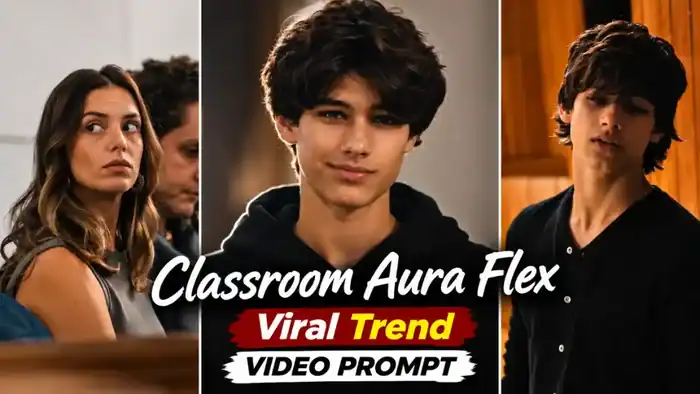
The Classroom Aura Flex is the newest viral aura edit on Instagram Reels. A young guy pushes open a big wooden door and walks into a full hall, everyone turns around to look at him, he dips his fingers in a brass bowl of water, walks in slowly with pure main-character energy and gives a confident smile to the camera. Then the edit hits the beat with a dark black-shirt aura shot and a cool convertible car ending. It is the same luxury rich-boy vibe that made the Flex Aura and Patrick Jane style edits blow up.
In this post you get the original viral video, a 10 second muted reference video, the beat-synced trend audio and a ready Google Flow prompt. Upload one clear photo, paste the prompt and you can make the Classroom Aura Flex video with your own face and your own clothes.
Watch the Classroom Aura Flex Viral Trend
The download folder has the 10 second muted reference video for Google Flow, the beat-synced trend audio and a short Video Generation Guide.
Classroom Aura Flex Video Prompt for Google Flow (Free)
Before You Paste This Prompt, Check These 4 Things
- Muted video: use the Classroom Aura Flex muted video from the download folder as the reference video, never the original video with music.
- Clear photo: a sharp, front-facing photo in good light, no sunglasses or heavy filter. Your clothes in the photo will appear in the video, and the wood room shot gets a black shirt for the aura look.
- Settings: Ingredients mode, 16:9, 1 output. Turn ON “Return silent video” in Flow settings.
- Add the sound: after generating, put the Classroom Aura Flex audio on your video in CapCut or VN and export.
Copy the full prompt below. It locks all eleven shots with their exact timing, so every cut lands on the beat of the trend audio.
The other people in the hall are NOT me: keep the seated woman with long wavy hair and the seated young man in the dark jacket (short straight dark hair) exactly as they are in the reference video, do not change their faces and do not give them curly hair. Only the person who walks in is replaced.
The video has exactly ELEVEN shots in 10 seconds, separated by HARD CUTS that land on the music beats. Do not skip any shot, do not merge two shots into one, do not stretch or shorten any shot. Each shot lasts EXACTLY the time given below, not more and not less. Hard cuts happen at exactly: 1.0s, 1.75s, 2.35s, 3.3s, 4.5s, 5.5s, 6.45s, 8.2s, 8.75s and 9.25s.
SHOT 1 (0.0-1.0s, 1.0 second): wide shot from inside the bright hall: I push open the tall wooden door and walk in, backlit by the bright doorway, rows of seated people on wooden benches in the foreground, my own outfit from the photo, my face and my hair from frame 1.
SHOT 2 (1.0-1.75s, 0.75 second): the seated woman with long wavy hair turns her head and looks back toward the door. I am not in this shot.
SHOT 3 (1.75-2.35s, 0.6 second): the seated young man in the dark jacket turns around on the bench and looks back over his shoulder. He is not me, keep him exactly as in the reference.
SHOT 4 (2.35-3.3s, 0.95 second): close-up of my hand dipping the fingertips into a shallow brass basin of water, then quickly lifting the open hand up and out of the frame, exactly like the reference, no pinching or dripping. The sleeve is the sleeve of my own outfit from the photo and the hand has my skin tone.
SHOT 5 (3.3-4.5s, 1.2 seconds): medium shot, I walk past a wooden stand with a small brass bowl in front of the bright open doorway, glancing to the side, my face and my hair, my own outfit from the photo.
SHOT 6 (4.5-5.5s, 1.0 second): new angle, I walk slowly toward the camera, looking down, and raise my hand to touch my forehead, my face and my hair, my own outfit.
SHOT 7 (5.5-6.45s, 0.95 second): closer, still walking, my right hand rests on my chest, head slightly down, my face and my hair, my own outfit.
SHOT 8 (6.45-8.2s, 1.75 seconds): close-up of my face in soft light, eyes to the camera, a slow confident smile and a small head tilt. MOST IMPORTANT SHOT: this close-up is me, my face, my hair and my skin tone from the photo, never the slim boy with the curly mop haircut. My own outfit from the photo.
SHOT 9 (8.2-8.75s, 0.55 second, very short): warm wood-panelled room: I tilt my head and look down at the camera, my face clearly visible, NO sunglasses, my hair, wearing a black buttoned shirt like the reference. Hard cut at 8.75s.
SHOT 10 (8.75-9.25s, 0.5 second, very short): black vintage open convertible with black leather seats, camera in the back seat behind me, my seat back in the foreground: I sit in the driver seat wearing dark sunglasses, head down, looking down. My own outfit from the photo. Hard cut at 9.25s.
SHOT 11 (9.25-10.0s, 0.75 second, LAST SHOT, must be in the video): a NEW separate shot after the hard cut, same car, camera a little closer, my face bigger in frame. NO sunglasses in this shot at all - no glasses on my face, eyes fully visible. I am already turned back over my shoulder toward the camera and give a confident smile with direct eye contact, my own outfit from the photo. The video ends on this smile without sunglasses.
Shots 9, 10 and 11 are three different shots that must all appear, each with its own hard cut on the beat: wood room (black shirt, no sunglasses) -> car with sunglasses looking down -> car without sunglasses smiling at the camera.
Change the face, hair and clothes of the walking person as described above. The same person (me) appears in every one of his shots, from the door shot to the last car shot. The face in the close-up, the wood-room shot and the car shot must match the face in the walking shots. Make it ultra-realistic, seamless and consistent in every frame, with the same warm cinematic aura grade. No face distortion or flickering. Mouth closed or smiling, never talking. No original face in any shot, not even during a transition between shots.
How to Make the Classroom Aura Flex Video in Google Flow
- First, tap the download button above and download the muted reference video, the trend audio and the guide.
- Next, open Google Flow, create a new project, select Ingredients mode, 16:9 and 1 output, and turn ON Return silent video in settings.
- Then upload the Classroom Aura Flex muted video and your clear photo.
- After that, copy the prompt from this post, paste it in Flow and tap Generate.
- If one shot does not look right, simply generate once or twice more and keep the best result.
- Finally, add the Classroom Aura Flex audio in any editing app and export. Your video is ready.
Add the Beat-Synced Trend Audio
Google Flow gives a silent video, so the sound is added at the end. The audio in the download folder is already synced to the cuts of this edit. Open CapCut or VN, add your generated video, place the audio at the very start and export. You can also skip the editing app: while uploading on Instagram, open the original trend reel, tap Use this sound and select your video.
Why the Classroom Aura Flex Trend Is Going Viral
This aura edit works because it turns a simple entry into a main-character moment. Everyone in the hall turns to look, the music builds, and then the fast beat cuts show a confident smile, a dark aura shot and a luxury car ending. Viewers love that rich-boy confidence, they replay it to catch every cut, and creators share it as their own flex. That is why aura edits like this are pulling millions of views on Instagram, and you can join the wave with your own face.
The Aura Edit Look: Black Shirt and Convertible Ending
The last three shots are what make this a true aura edit. First comes a short shot in a warm wood-panelled room where you wear an all-black formal shirt for a dark, classy look. Then a quick cut to a black vintage convertible with dark sunglasses, and finally the sunglasses come off for a slow smile over the shoulder. The prompt keeps these three beat shots separate with exact timing, so your video hits every beat just like the original luxury lifestyle edit.
Best Free AI Video Generator for Aura Edit Face Swap
Google Flow is one of the best free AI video generators for aura edits like this, because it follows the reference video closely and keeps the camera angles, cuts and timing. You only replace one person, so the hall, the people reacting and the car stay the same. For more luxury aura trends, try the Flex Aura AI Video prompt and the Luxury CEO Entry Video prompt.
Tips for the Best Result
- Use a photo where your full face is clearly visible, looking at the camera.
- Wear the outfit you want in the video, because the same clothes appear in every shot except the black-shirt aura shot.
- Always use the 10 second muted video, not the original video with music.
- Generate two or three times and keep the take where all the last three shots appear.
- Post quickly while the Classroom Aura Flex trend is hot, with the same trending audio.
Frequently Asked Questions
Is the Classroom Aura Flex prompt free?
Yes. The prompt, the muted reference video and the beat-synced audio are free to download and use.
Why is the reference video only 10 seconds?
Google Flow makes about 10 seconds per generation. The original was shortened shot by shot to 10 seconds, so no shot is dropped and the last car shots stay in the video.
Will my own clothes appear in the video?
Yes. Your outfit from the photo appears in every shot. Only the short wood room shot uses a black shirt for the dark aura look.
Why is the reference video muted?
Flow can show an audio error when the reference video has a song. The muted video avoids that, and you add the trend audio after generating.
Can a girl make this trend?
Yes. Upload your photo and the prompt replaces the person who walks in with you, with your own face, hair and clothes.
Make your Classroom Aura Flex video today and tag us when you post it. For more viral edits with free prompts, check out the Turn Around Transition Viral Trend and the Ghost Bride AI Video.