
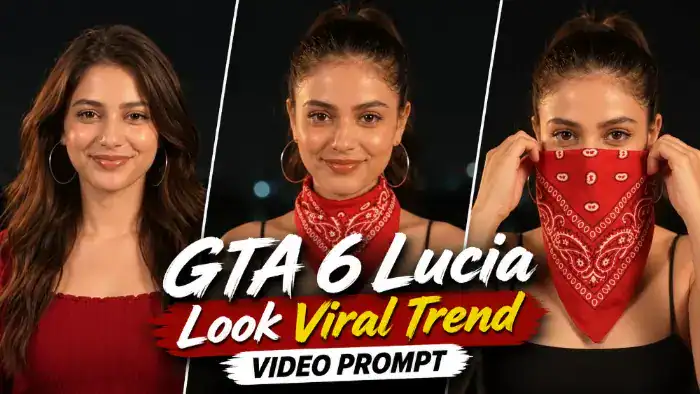
The GTA 6 Lucia Look is the new red bandana transformation taking over Instagram Reels. First, a person looks normal. Then one hand sweep changes everything, and suddenly they appear in a bold, game-inspired Lucia style with a ponytail, big hoops and a red paisley bandana.
The best part is that you do not need any reference video. Upload one clear photo of yourself in Google Flow, paste the free prompt below, and generate your own GTA 6 Lucia Look video in 10 seconds. Moreover, the face in the video stays yours in every shot.
Watch the GTA 6 Lucia Look Video
This is how the trend looks. Notice the quick wink, the hand sweep over the lens, and then the bandana covering the mouth for a full second. Below the video, you can also download the trend audio and add it to your reel.
Download the trend audio from the button below. Then add it in CapCut or VN after your video is generated.
GTA 6 Lucia Look Prompt for Google Flow
Copy the master prompt below and paste it in Google Flow together with your photo. Do not change anything in the prompt, because only your photo should change the face.
Before You Paste This Prompt, Check These 5 Things
- No reference video: this trend needs only ONE photo. Do not upload any video in Flow.
- One clear photo: a sharp, front-facing photo where your face is fully visible. No sunglasses, no heavy filter, no blur. Your face and your hair come from this photo.
- Settings: 9:16 ratio, 10 seconds, 1 output. Add your photo as the image ingredient and tag it as @image1 in the prompt.
- Do not edit the prompt: paste it exactly as it is. Only your photo changes the face.
- Add the sound after: download the trend audio from the button above the prompt and add it in CapCut or VN once the video is ready.
REFERENCE LOCK
@image1 is the ONLY identity reference. The face, skin tone, facial structure and expression style in EVERY frame of the video come from @image1, in both looks and in every close-up. No other face appears at any time, and the face never changes between shots. Real skin texture, no beautification, no face morphing.
CHARACTER
One single person only. Look 1 (0.0 to 2.9 s): hair and clothes exactly as in @image1, a plain dark-red top if the photo does not show the clothes. Look 2 (2.9 to 10.0 s): hair tied in a high ponytail, a red paisley-print bandana worn as a neckerchief (a triangle hanging over the chest, white paisley pattern, plain cotton). The bandana stays on the neck for the WHOLE of look 2, from 2.90 s to 10.00 s, in every shot including the last two, and the large hoops stay in both ears the whole time, LARGE thin silver hoop earrings (about 5 cm across, the hoops hang clearly below the jawline and are easy to see in every shot, never small studs or small rings), a black thin-strap top, soft winged eyeliner, glossy nude-brown lips, glowing skin. The same face from @image1 stays in look 2.
LOCATION
Dark night rooftop, almost black background, a few tiny out-of-focus city lights low in the frame, no people, no buildings in focus, no sky details. The same place in every shot.
SHOT 1 - LOOK 1, eye-level front medium close-up, head and shoulders, camera steady (0.00 to 2.90 s). Motion from the very first frame, never a frozen pose.
0.00 to 0.25: soft one-eye squint and smile, head tilted slightly to one side.
0.25 to 0.75: eyes slide sideways with a cheeky smirk, head still tilted.
0.75 to 1.00: eyes come back to the lens.
1.00 to 1.25: a slow playful wink at the camera.
1.25 to 1.50: head tilts the other way with a small smile, eyes on the lens.
1.50 to 2.00: head straightens, calm confident smile, looking into the lens.
2.00 to 2.50: both hands rise from below the frame, forearms cross and rub together once, quick and relaxed.
2.50 to 2.90: one arm swings up and sweeps across the lens and the face, motion-blurred, covering the face for a split second.
SHOT 2 - LOOK 2 begins as the arm clears (2.90 to 10.00 s). Every shot below has a different camera angle. The red paisley bandana stays on the neck and the large silver hoops stay in both ears in every shot.
2.90 to 3.60: eye-level front medium close-up, soft smile, small head tilt, looking at the lens.
3.60 to 4.50: camera slightly lower and closer, chin lifts, both palms pressed together in a steeple under the chin, mouth slightly open, eyes closing slowly.
4.50 to 5.20: side profile from the right, head turned away and looking down, ponytail clearly visible.
5.20 to 6.00: tight close-up from slightly above, face turned three-quarter toward the camera, head tilted, sultry look into the lens, the bandana filling the lower frame.
6.00 to 6.50: camera pulls back to a medium close-up, three-quarter left, both hands rise and take hold of the bandana at the neck.
6.50 to 6.80: both hands pull the bandana up in one smooth motion.
6.80 to 8.30: DEDICATED BANDANA-OVER-MOUTH SHOT, held for a full 1.5 seconds. Tight front medium close-up at eye level. The bandana stays pulled up over the nose and mouth the entire time, both hands hold it up steady at the sides of the face, only the eyes and forehead are visible above it, eyes locked on the lens with one slow confident blink and a tiny head tilt. The bandana does NOT drop, slip or move down during this shot.
8.30 to 8.55: only now the hands lower the bandana back down onto the neck as a neckerchief, smooth and quick. It stays on the neck until the end.
8.55 to 9.20: low-angle big close-up of the face, head tilted, glossy lips, eyes move from the side to the lens, the red paisley bandana on the neck, large silver hoop clearly visible.
9.20 to 10.00: front medium shot, bandana on the neck, both hands clasped in a loose fist under the chin, eyes close for a moment then open and look into the lens with a soft confident smile, tiny natural head movement.
AUDIO
Soft cinematic instrumental only, no voice, no speech, no singing, no lip-sync.
STRICT RULES
Only one person. The face is always from @image1, never another face, no face change after the hand sweep. No text, no logos, no game titles, no watermarks, no sparkle icons, no subtitles. No frozen opening frame. Do not repeat the same camera angle in two shots of look 2. The bandana never drops from the face before 8.30 s. The bandana is never removed, never missing, never taken off in any shot after 2.90 s. No small earrings, no studs, no gold earrings. No extra people, no extra limbs, no distorted hands, no flickering.
FINAL RESULT
A smooth 10 second night portrait reel: a playful wink and smirk, a hand sweep over the lens, then the red bandana look with large silver hoops, steepled hands, side profile, bandana pulled up over the mouth and back down, big close-up, and a final fist-under-chin smile, with the bandana on the neck until the last frame, all with the same face from @image1.
How to Make the GTA 6 Lucia Look in Google Flow
- First, open Google Flow and start a new project with the Ingredients mode.
- Next, set the ratio to 9:16, the length to 10 seconds, and the outputs to 1.
- Then upload one clear, front-facing photo of yourself as the image ingredient.
- After that, copy the prompt above and paste it in the prompt box. Tag your photo as @image1 when Flow asks.
- Now press Generate and wait for the video.
- Finally, download the video, add the trend audio in CapCut or VN, and post it as a Reel.
Why the GTA 6 Lucia Look Trend Is Going Viral
Everyone loves a quick transformation, and this one delivers it in just ten seconds. The look changes with a single hand sweep, so viewers stay until the end to see the final bandana shot. As a result, the trend gets high watch time and plenty of replays.
Also, the GTA 6 hype keeps growing, so anything linked to Lucia gets extra attention. Therefore, if you post this trend now, your Reel has a better chance to reach new viewers. You can make it too, and you only need one photo.
Tips for the Best GTA 6 Lucia Look Result
- Use a bright, sharp, front-facing photo with your full face visible.
- Generate 2 or 3 times, because Flow gives a slightly different result every time.
- Do not use sunglasses, a cap or a mask in your photo.
- Keep the prompt exactly as it is, since small edits can change the beats.
- Add the trend audio after generating, and cut on the beat for a cleaner Reel.
Frequently Asked Questions
Do I need a reference video for the GTA 6 Lucia Look?
No. You only need one clear photo of yourself and the prompt. Flow makes the whole video from them.
Which photo works best for the GTA 6 Lucia Look?
A sharp, front-facing photo with good light works best. Your face should be fully visible, without sunglasses or filters.
Is the GTA 6 Lucia Look prompt free?
Yes, the prompt is free to copy. Google Flow credits depend on your plan, so check your account before you generate.
What if the bandana or earrings look wrong?
Generate again, because every run is slightly different. The prompt already locks the large silver hoops and keeps the bandana on the neck from start to end.
For more viral AI video trends, also try the Luxury Mafia Viral Trend and the Snake AI Video Prompt. Finally, share your GTA 6 Lucia Look Reel with your friends.