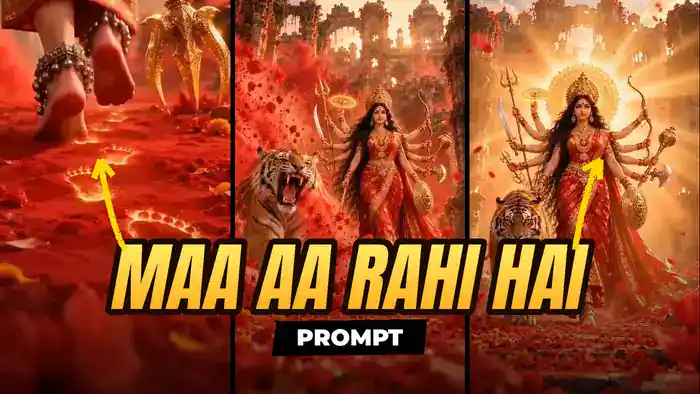
The Maa Aa Rahi Hai prompt lets you make the most viral Navratri AI video of the season with Google Flow. The video starts with glowing golden footsteps in red kumkum. Then a roaring tiger appears, and Maa Durga walks out with a blazing halo. Best of all, you can make the same video with your own photo. In this post you get the exact prompt, the reference video and the full step-by-step Google Flow process.
Why the Maa Aa Rahi Hai Trend Is Going Viral This Navratri
Every year before Navratri, people start posting “Maa aa rahi hai” reels to welcome Maa Durga. This year, AI has taken the trend to a new level. This cinematic Durga video, with glowing footprints, a roaring tiger, falling hibiscus petals and a golden halo, is spreading fast on Instagram Reels, YouTube Shorts and WhatsApp Status.
So why does it work so well? First, it is devotional, so people watch it till the end and share it with family groups. Second, the first two seconds (the glowing footsteps) create instant curiosity. Finally, the timing is perfect, because everyone is searching for Navratri content right now.
That is why this is the right moment to make your own version. A new trend plus a festival wave is the easiest way to get views and new followers. And since the face in the video is yours, your reel will stand out from everyone who just reposts the original.
Watch the Original Video
First, watch the original video below so you know exactly what result you are making.
Download the Muted Reference Video
Next, download the reference video for Google Flow from the button below. This file is muted on purpose. If you upload a reference video with sound, Google Flow shows a speech-related error and does not generate the video. So always use this muted file.
What You Need
- The muted reference video (download above)
- One clear, front-facing photo of yourself (good light, face fully visible)
- A Google account to open Google Flow
- The Maa Aa Rahi Hai prompt given below
How to Make the Maa Aa Rahi Hai Video in Google Flow
- First, open Google Flow and create a New project.
- Then upload the muted reference video you downloaded above.
- After that, upload your own photo. The prompt uses it only for the face.
- Next, copy the prompt below and paste it into the prompt box.
- Set the ratio to 9:16 and the length to 10 seconds.
- Finally, click Generate, wait a few minutes and download your video.
Maa Aa Rahi Hai Prompt (Copy and Paste)
Copy the full prompt below. Do not cut any part of it. Every line controls a shot, a camera move or a screen direction, and that is what makes the result match the original.
FIXED RULES FOR THE WHOLE VIDEO (never break):
– The tiger is ALWAYS on SCREEN-LEFT of her (her right side) in every shot where she faces camera.
– The golden trishul is held in her RIGHT hand.
– Ten arms visible at all times from 2.5s onward, five on each side, never fewer.
– From 7.5s to the end the camera NEVER moves closer than full body: head-to-feet always in frame, NO face close-up.
– The ground is red kumkum powder covered with red hibiscus and orange marigold petals: never brown dirt, never plain stone floor except on the staircase.
– Saree: red Banarasi silk fully covered in dense gold zari brocade with a wide gold border and a very long pallu trailing behind her.
LOOK:
Goddess Durga, face from the uploaded image, large kohl eyes, red bindi, golden nose ring and maang tikka, tall ornate golden crown, waist-length wavy black hair, layered heavy gold temple jewellery.
Weapons: right-side hands hold a trishul, sword, small trident and a glowing spinning golden chakra raised high; left-side hands hold a golden bow with arrow, golden mace, axe and a round golden shield at hip level.
Also, bare feet with red alta, mehndi, silver toe rings, heavy silver ghungroo anklets. Background: ruined ancient Indian palace-temple, carved stone pillars and arches with red flowers and vines, sun glowing through the arches.
TIMELINE:
SHOT 1 — Glowing Footsteps (0–2.8s)
First, 0.0–0.8s — Ground-level macro, camera FACING HER FEET FROM THE FRONT. She stands still. Only her right foot is in sharp focus at center-right, the gold border of the saree hem just above the ankle. The golden three-pronged head of the trishul rests near the ground on SCREEN-LEFT, its shaft going up out of frame. A red hibiscus and marigolds blurred in the foreground. Very slow push-in.
Then, at 0.8–1.3s, she lifts her foot and starts walking. The camera, staying on the ground, smoothly ORBITS 180 degrees to the right around her feet: front → side profile (toes pointing screen-left) → directly BEHIND her.
1.3–2.5s — CRITICAL FOOTPRINT SHOT. Now the camera is now BEHIND her heels, low on the ground, looking forward in the SAME direction she walks. She walks AWAY from the camera, deeper into the frame. We see her heels, the red soles of her feet, the anklets and the swaying saree hem from behind; the trishul head moves along on SCREEN-RIGHT.
After that, each time she lifts a foot, the print left in the red powder EXACTLY where that foot was ignites with molten golden light. The glowing footprints lie BEHIND her, between her and the camera: TOES POINT AWAY FROM THE CAMERA (up the frame, toward her), HEELS POINT TOWARD THE CAMERA.
As a result, the trail of 3–4 glowing prints starts at the bottom of the frame and leads straight up to her current feet, getting smaller with distance. Footprints NEVER appear in front of her toes, beside her feet or sideways. Camera stays still while she walks away.
Next, at 2.3–2.8s, a wall of red gulal powder rolls in from screen-left and swallows the whole frame.
SHOT 2 — Tiger Roar and Staircase (2.8–5.3s)
2.8–3.8s — Then the powder clears into a WIDE LOW-ANGLE shot on flat red petal-covered ground: she walks TOWARD the camera, full body, all ten arms. On SCREEN-LEFT the tiger lunges forward mid-stride with its mouth wide open in a roar, red powder exploding off its body. Big blurred petals in the foreground.
3.8–5.0s — After that, a smooth morph: she is now descending a wide stone staircase covered in petals, coming toward the camera, the tiger calmly walking down on SCREEN-LEFT, lit diyas on stone pedestals on both sides, the pallu flowing down the steps. Camera at the bottom of the stairs, low angle, slow push-in.
5.0–5.3s — Next, a giant red hibiscus flower swings in from the RIGHT, very close to the lens, and covers the whole frame (wipe).
SHOT 3 — Petal Rain and Powder Swirl (5.3–7.4s)
5.3–6.2s — Then the flower clears: flat petal-covered ground, she walks forward with her face tilted UP to the sky, heavy red petals raining down, strong golden god rays from the top-right. The tiger on screen-left also looks up. Camera low, slowly pulling back.
6.2–6.5s — Suddenly, a fast whip-pan to the right with heavy red motion blur.
6.5–7.4s — Meanwhile, a DUTCH ANGLE tilted about 15 degrees, low camera. She strides toward the camera, full body, hair and pallu blowing, while a THICK swirling cloud-ribbon of red powder spirals in a big arc behind and around her. Tiger snarling on screen-left. Sun flare at top-right. The frame slowly rotates back toward level.
SHOT 4 — Divine Halo Hero Shot (7.4–10s)
7.4–7.7s — Then a blinding white-gold light flash fills the whole frame.
7.7–8.0s — After that, the light shrinks into a single bright point glowing on her forehead (third eye), and a large golden sun-disc halo ignites behind her crown.
8.0–10.0s — Finally, a PERFECTLY SYMMETRICAL FRONTAL HERO SHOT, FULL BODY head to feet, all ten arms spread symmetrically with weapons. She walks slowly straight toward the camera; the CAMERA DOLLIES BACKWARD AT HER SPEED so she stays exactly the same size: no zoom-in, no close-up. The tiger walks on SCREEN-LEFT staring into the lens. Red powder cloud behind her, two tall carved pillars framing left and right. In the last second, golden light rays burst outward from the halo, the whole scene warms from red to gold, and red petals fly toward the lens. End on this full-body pose.
AUDIO:
Ghungroo jingle on every step, deep drum hits, tiger roar at 3s, whoosh on each transition, conch and choir swell at the 7.5s flash, final temple bell.
DO NOT:
Put the tiger on the right; show only two arms; zoom into her face; make her walk toward camera during the footprint shot; place footprints ahead of or beside her feet; skip the tiger roar, petal rain or dutch-angle shots; use a brown dirt floor.
Tips for a Perfect Maa Aa Rahi Hai Video
- Always use the muted reference video. A video with sound fails in Google Flow.
- Use a clear front-facing photo. A blurry or side-angle photo changes the face in the final shot.
- Paste the full prompt. The footprint direction and the tiger position only stay correct when the whole prompt is used.
- Generate 2–3 times. Then pick the version where the glowing footsteps look best, because that is your hook.
- Add a bhajan or Navratri song. For example, use a trending Durga aarti in CapCut or Instagram to boost reach.
FAQs
Is the Maa Aa Rahi Hai prompt free?
Yes. The prompt and the reference video on this page are completely free. Google Flow may use your plan’s credits for each generation.
Why is Google Flow not generating my video?
Most of the time, the reference video still has sound. Download the muted file from this page and upload it again.
Can I use this video for Durga Puja and Dussehra too?
Yes. The same video works for all nine days of Navratri, Durga Puja and Dussehra posts.
That is all you need to make the Maa Aa Rahi Hai video for this Navratri. If you liked this trend, also try the Maa Durga 9 Looks Navratri AI transformation and the Casa Tupka AI video with Google Flow. Jai Mata Di!