

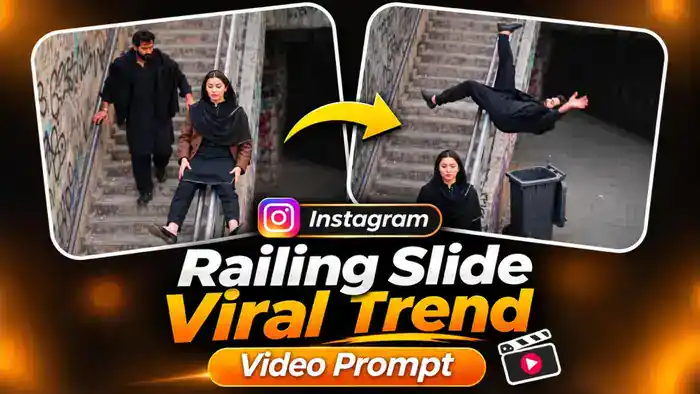
The Railing Slide Trend is a new funny Instagram viral trend that everyone is sharing right now. In the reel, a girl and a boy walk down a long staircase. The girl sits on the metal railing and slides down like a pro. Then the boy tries the same thing, loses his balance, flips in the air and lands upside down in a black dustbin. The girl just stares at the camera with a straight face.
Now you can make the same comedy video with your own face and your friend’s face using AI. In this post, you get the free prompt, the muted reference video, the original audio and simple steps for Google Flow.
Watch the Railing Slide Trend Video
First, watch the original reel below, so you know exactly what your AI video will look like.
Next, download the folder from the button below. It has the muted reference video for Google Flow and the original audio to add later.
Why the Railing Slide Trend Is Going Viral on Instagram
This trend works because of the perfect comedy timing. The girl does the slide so smoothly that everyone expects the boy to do it too. Instead, he flips and lands in the dustbin, and her calm deadpan face makes it even funnier.
Moreover, it is a two-person video, so people make it with their best friend, brother, sister or partner and tag each other. That brings more comments and shares, and Instagram pushes such reels to more people. So if you post your own version of this Instagram viral trend now, you have a good chance of getting high views.
Railing Slide Trend Video Prompt
Before You Paste This Prompt, Check These 5 Things
- Muted video: Upload the muted reference video from the folder above. A video with sound can fail in Google Flow.
- Two clear photos: One photo of the boy and one of the girl. Faces must be fully visible and not blurry.
- Correct order: Upload the boy’s photo first (@image1, the one who falls into the dustbin) and the girl’s photo second (@image2, the one who slides).
- Video settings: Select 9:16 (vertical). The muted video is 10 seconds, so it works on the free plan.
- Add the audio later: After generating, add the audio file from the folder in CapCut or VN.
Replace the man (bearded, the one who falls into the dustbin) with @image1 and the woman (the one who slides down the railing first) with @image2. Preserve each image reference’s complete character design: face, hair, body proportions, colors, clothing, and distinctive details. Reproduce the video’s expressions and emotions naturally while keeping both characters recognizable and consistent throughout.
In EVERY frame, from the first to the last, the man is @image1 and the woman is @image2 — never the original people from @video1, not even for one frame.
ACTION (follow @video1 exactly): The two walk down the long concrete stairs together. The woman sits on the metal railing and slides down it smoothly, lands on her feet next to the black dustbin and walks a little ahead. Then the man tries the same slide, loses balance on the railing, flips over head-first and lands upside down inside the black dustbin, which tips and rolls a little; only his legs and shoes stick out of the bin. The woman stands and stares at the camera with a calm, deadpan face. Light slapstick comedy, nobody gets hurt.
Keep the original stairway with graffiti walls, the black wheelie dustbin, the high camera angle and its movement, the lighting, duration and aspect ratio. Change only the two people’s appearance. No background music.
NEGATIVES: original faces, identity swaps, mixed character features, appearance drift, altered actions, extra characters, distorted faces, extra limbs, broken body poses, blood, injury, flickering, new scenes, text, subtitles, watermarks.
How to Make the Railing Slide Trend Video in Google Flow
- First, download the folder with the muted video and the audio file.
- Next, open Google Flow with the Generate Video button and choose Video with the Ingredients mode.
- After that, upload the muted video, then the boy’s photo, then the girl’s photo, in that order.
- Then paste the prompt. Make sure @video1 is the video, @image1 is the boy and @image2 is the girl. If a tag does not link, type @ and select the right file.
- Select 9:16 and click Generate.
- Finally, open the video in CapCut or VN, mute the Flow sound, add the audio file from the folder and export.
Tips for a Better Result
- Use front-facing photos with good light, because the camera is high and the faces are small in this video.
- The flip into the dustbin is a fast move. If it does not look right, generate once more with the same prompt.
- Black or dark outfits look closest to the original, but any outfit from your photo works.
- Post the Railing Slide Trend video with a funny caption like “Expectation vs reality” and tag your friend.
Frequently Asked Questions
Is the Railing Slide Trend prompt free?
Yes. The prompt, the muted video and the audio are all free. Google Flow also gives free credits.
Why is the reference video only 10 seconds?
On the free plan, Google Flow accepts a reference video of up to 10 seconds, so the muted file is cut to 10 seconds with the full action inside.
Can I make it with only one photo?
This prompt is made for two people. If you upload only one photo, Google Flow may keep the original face for the other person.
Why is my video silent?
You upload a muted video, so the result has no original sound. Add the audio file from the folder in CapCut or VN.
That is all for the Railing Slide Trend. For more funny and trending AI videos, also check the AI Love Story Video and the CID ACP Viral Video.