
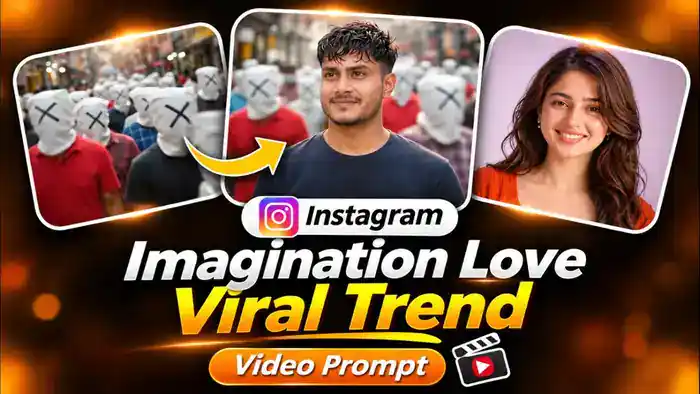
The Imagination Love trend, also called the “Bheed Mein Tum” trend, is a new romantic AI video that is going viral on Instagram. A boy closes his eyes and smiles, and suddenly he is standing in a busy crowd where nobody has a face. Every stranger has a white cloth with an X on their head, and they all rush past him. Then a white flash takes him to a dreamy lavender world, where his girl turns around with a hair flip and smiles at him. At the end, he opens his eyes.
The message is simple and very emotional: in a crowd of thousands, he only sees her. Now you can make the same AI love story with your own photo and your partner’s photo, using a free Google Flow prompt.
Watch the Imagination Love Trend Video
First, watch the original reel below to see the full story of this trend.
Why the Imagination Love Trend Is Going Viral
The Imagination Love trend works because it shows a feeling everyone knows. When you love someone, the rest of the world does not matter. The faceless crowd makes that idea easy to understand in just a few seconds, even without any words.
Moreover, couples love to share this kind of video and tag each other, so it gets a lot of comments, shares and saves. That is why reels like this reach millions of people. If you post your own version with a romantic song, it can go viral too.
Make the Imagination Love Video for Your Girlfriend or Boyfriend
The Imagination Love video is perfect as a surprise for your partner. Use your own photo as the boy and your girlfriend’s photo as the girl, or the other way around. You can send it on her birthday, on your anniversary, on Valentine’s Day or just to make her smile.
After that, post it on Instagram with a caption like “In this whole crowd, I only see you” and tag your partner. It is a small effort, but it feels like a big romantic gesture.
Imagination Love AI Video Prompt
Copy the prompt below and paste it in Google Flow with your two photos. You do not need to change anything in the prompt.
Before You Paste This Prompt, Check These 4 Things
- Two clear photos: One photo of the boy and one of the girl. Use front-facing photos where the face is big, clear and not blurry.
- Correct order: Upload the boy’s photo first (@image1) and the girl’s photo second (@image2).
- No reference video: This prompt works with photos only, so you do not need to upload any video.
- Video settings: Select 9:16 (vertical) and 10 seconds. After generating, add your favourite romantic song.
CHARACTERS (only these two real people; nobody else has a visible face):
THE MAN: the exact person in @image1. Same face, same skin tone, same hairstyle, same glasses or no glasses, same age and gender as @image1. Clothes exactly as in @image1; if they are not fully visible, a plain dark navy crew-neck T-shirt.
THE WOMAN: the exact person in @image2. Same face, same skin tone, same hairstyle and hair length, same age and gender as @image2. Clothes exactly as in @image2; if they are not fully visible, a sleeveless orange kurta with cream straight trousers and flat sandals.
Real skin texture, no beautification, no face change. Never mix the two faces. Clothes never change between shots.
FACE LOCK (most important): THE WOMAN’s face must be exactly @image2 in EVERY shot where her face is visible — in the far shots, the full-body shots and the turn with the hair flip, not only in the close-up. Same lip shape and lip size, same nose, same jawline and chin, same eye shape, same eyebrows, same face width. Her face in Shot 6 and Shot 7 must look like the same person as her close-up in Shot 9. The same rule applies to THE MAN and @image1 in every shot.
THE CROWD: Many people walking fast in a busy outdoor street, but none of them has a face — every head is covered with a plain white cloth with a simple black X drawn on it, like faceless strangers. They wear everyday colourful T-shirts and shirts (red, blue, yellow, green). They are only background and ALWAYS shown as fast time-lapse long-exposure motion blur: their bodies smear into colourful streaks of red, blue, yellow and green, the white X heads become soft white streaks. They are never sharp and never walk at normal speed. Calm and artistic, not scary.
LOOK: Real cinema camera, shallow depth of field, soft warm natural light for the man’s shots; soft pastel lavender studio light for the woman’s dream world. Smooth, emotional, slightly slow feel for the two people; fast time-lapse speed for the crowd.
SHOT TIMELINE:
SHOT 1 (0.0–1.0s): Close-up of THE MAN’s face, eyes closed, a small peaceful smile, as if he is imagining someone. Soft blurred warm background. Very slow push-in.
SHOT 2 (1.0–2.4s): The camera rushes forward through the busy crowd of faceless people with white X cloth heads; everything is in heavy speed-ramp motion blur, colourful streaks flying past the lens, only a few X heads briefly readable.
SHOT 3 (2.4–4.2s) — ONE CONTINUOUS ORBIT, NO CUT: The shot starts directly behind THE MAN, showing the back of his head and shoulders, standing still in the middle of the rushing faceless crowd. Then, in one smooth unbroken camera move, the camera circles around him at the same height and distance — moving from behind, past his side profile, to his front — a smooth 180-degree half-circle, like a steady gimbal orbit. The camera never cuts, never jumps and never fades during this move; every moment of the orbit is visible, including his side profile at about 3.2s. By 3.6s the camera is in front of him and slowly settles into a front medium shot: THE MAN stands perfectly still and perfectly sharp, a soft happy smile, while the faceless people rush past around him so fast that they become blurred colourful streaks (time-lapse long-exposure effect). He stays in the exact same spot and pose during the whole orbit; only the camera moves.
SHOT 4 (4.2–4.6s): The streaking crowd blur glows brighter and brighter until the whole frame turns into a pure white light flash (a white-out transition, no face in this shot).
SHOT 5 (4.6–5.4s): A dreamy empty pastel lavender space with a soft white glow. THE WOMAN stands far away with her back to the camera, long hair down. The camera slowly moves toward her.
SHOT 6 (5.4–6.2s): Knee-up shot (camera a little closer than full body so her face stays clear): THE WOMAN turns around toward the camera with a graceful hair flip, her hair flying in a soft wave, starting to smile. Her face is exactly @image2.
SHOT 7 (6.2–7.0s): Medium shot from the waist up: THE WOMAN stands facing the camera, hands relaxed, looking straight into the lens with a sweet, shy smile. Her face is clearly visible and exactly @image2 — same lips, nose and jaw as in her close-up.
SHOT 8 (7.0–7.8s): Close-up of THE MAN, eyes still closed, his smile grows wider, as if he can see her in his mind.
SHOT 9 (7.8–8.8s): Close-up of THE WOMAN’s face against the soft lavender background, a big bright happy smile, eyes looking into the camera.
SHOT 10 (8.8–10.0s): Extreme close-up of THE MAN’s face in the same warm street light and blurred warm background as Shot 1 (not lavender), very slow push-in, peaceful smile; at 9.6s he slowly opens his eyes and looks into the camera. End on his eyes.
AUDIO: Very soft natural ambience only (light crowd hum in the crowd shots, soft airy tone in the dream shots). No music, no dialogue, no voices.
STRICT NEGATIVE: No hard cut, jump cut or fade between the back view and the front view of the man (it must be one smooth orbit), no visible faces in the crowd, no third main character, no face change or mixing, no clothes change between shots, no text, no subtitles, no logos, no watermark, no horror or scary look, no blood, no cartoon or animated look, no fast motion on the two main characters, no different face for the woman in the wide or full-body shots, no changed lips or face shape, no sharp normal-speed crowd, no lavender background in the man’s shots.
How to Make the Imagination Love Video in Google Flow
- First, keep two clear photos ready: one of the boy and one of the girl.
- Next, open Google Flow with the Generate Video button and choose Video with the Ingredients mode.
- After that, upload the boy’s photo first and then the girl’s photo, so they become @image1 and @image2.
- Then paste the prompt. If a tag does not link, type @ and select the right photo.
- Select 9:16 and 10 seconds, and click Generate.
- Finally, download the video, add a romantic song in CapCut, VN or Instagram, and post it.
Tips for a Better Imagination Love Video
- Use a front-facing photo where the face is big and sharp. Then the face stays the same even in the far shots.
- Do not use group photos, sunglasses or heavy filters.
- If the face looks a little different in one shot, generate once more with the same photos.
- Choose a soft romantic or trending love song for your Imagination Love video, because the video itself has no music.
Frequently Asked Questions
Is the Imagination Love prompt free?
Yes. The prompt is free, and Google Flow gives free credits, so you can make this video without paying.
Do I need a reference video for Imagination Love?
No. This prompt works with only two photos. Google Flow creates the whole story from the prompt.
Can I make it with my girlfriend’s photo?
Yes, that is the most popular way to make it. Upload your photo as the boy and her photo as the girl, then post it and tag her.
Why does the video have no music?
The prompt keeps the audio quiet, so you can add any romantic song you like in CapCut, VN or directly on Instagram.
That is all for the Imagination Love trend. For more love-story AI videos, also check the AI Love Story Video and the Firework Letter Video Prompt.