
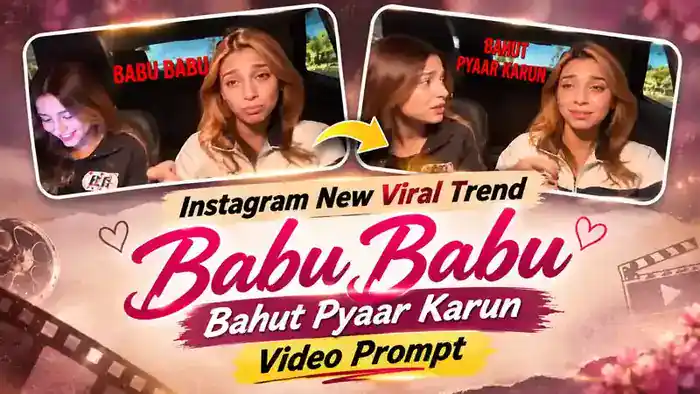
The Babu Babu Video Prompt is for the new “Babu Babu, Bahut Pyaar Karun” trend that is all over Instagram right now. In the original reel, two friends sit in a car at night and rap the song with full drama. One of them talks on the phone, the other raps straight into the camera, and the screen keeps popping up red lyric text and funny cat meme stickers like “Aji Ghanta” and “Babu Babu”.
Now you can make the same video with your own faces using AI. In this post, you get two free prompts (Part 1 and Part 2), the muted reference videos, the matching audio files and simple steps for Google Flow. The prompts also include the lyrics with timing, so the lip-sync fits when you add the original song.
Watch the Babu Babu Trend Video
First, watch the original video below, so you know exactly what your AI video will look like.
Next, download the folder from the button below. It has the Part 1 muted video, Part 2 muted video, Part 1 audio, Part 2 audio and a short PDF guide with all the steps.
Why the Babu Babu Bahut Pyaar Karun Trend Is Going Viral
This trend mixes three things that always work on Instagram: a catchy rap line, over-the-top expressions and meme stickers. As a result, the video feels funny even when you watch it without sound.
Moreover, it is made for two people. So creators make it with their best friend, sibling or partner and tag each other, which brings more comments and shares. If you post your own version while the trend is still fresh, you have a good chance of getting high views too.
Babu Babu Video Prompt: Part 1 and Part 2
On the free plan, Google Flow accepts a reference video of up to 10 seconds. That is why the first 20 seconds of this trend are split into two 10-second parts. Generate Part 1 first, then Part 2, and join them later.
Before You Paste These Prompts, Check These 5 Things
- Muted parts: Use the Part 1 and Part 2 muted videos from the folder above. A video with sound can fail in Google Flow.
- Two clear photos: One photo for the person on the left and one for the person on the right. Faces must be fully visible and not blurry. A boy or a girl photo both work.
- Correct order: Upload the left person’s photo first (@image1) and the right person’s photo second (@image2). Use the same two photos in the same order for both parts.
- Landscape size: Select 16:9 in Google Flow, because the reference video is landscape.
- Add the audio later: After generating, mute the Flow audio and add the matching Part 1 or Part 2 audio file in CapCut or VN.
Part 1 Prompt (0 to 10 seconds)
Upload the Part 1 muted video, then the left person’s photo, then the right person’s photo. After that, copy this prompt.
Replace the person sitting on the LEFT side of the frame (smaller, further from the camera, often holding a phone to the ear) with @image1. Replace the person sitting on the RIGHT side of the frame (closest to the camera, rapping toward the camera) with @image2. Preserve each image reference’s complete character design: face, hair, gender, body proportions, colors, clothing, and distinctive details. Reproduce the video’s expressions and emotions naturally while keeping both characters recognizable and consistent throughout.
IDENTITY LOCK: From the first frame to the very last frame, the left person is ALWAYS @image1 and the right person is ALWAYS @image2. Never switch back to the original people from @video1 at any moment — not at the start, not in the middle, not at the end, not even for one frame. Their faces, hair and clothes come only from @image1 and @image2, never from @video1.
LIP-SYNC (rap lyrics, matched exactly to @video1): Both people rap these words with the same mouth shapes, timing, energy and expressions as in @video1. Each line is mouthed by whoever mouths it in @video1, at the same moment.
0.0–0.8s: “Vu boli”
1.0–1.6s: “Babu babu”
2.0–3.0s: “Main toh bahut pyaar karun”
3.0–3.6s: “Main ki”
3.7–4.3s: “Ae chal jhooth bol”
4.7–5.3s: “…si tu”
5.7–6.5s: “Aib kare jaise aisa”
7.0–8.0s: “Aib kati pagal si tu”
8.2–8.8s: “Neechi harkaton mein”
9.2–10.0s: “Bahut aag se tu”
ON-SCREEN TEXT AND STICKERS: Keep every on-screen element exactly as it appears in @video1 — the big red lyric text, the white text labels, the cat meme stickers and the emoji stickers. Same words, same spelling, same font, same colors, same size, same position, and they appear and disappear at exactly the same moments as in @video1. Do not add, remove, translate or change any text or sticker.
Keep the original car interior at night, lighting, duration, and aspect ratio. Change only the two people’s appearance. No background music.
NEGATIVES: original faces, switching back to the original people, identity swaps, mixed character features, appearance drift, altered actions, wrong lip-sync, extra characters, distorted faces, extra limbs, flickering, new scenes, changed or misspelled text, missing stickers, extra text, watermarks.
Part 2 Prompt (10 to 20 seconds)
Now, for Part 2 of the Babu Babu Video Prompt, upload the Part 2 muted video with the same two photos in the same order, and copy this prompt.
Replace the person sitting on the LEFT side of the frame (smaller, further from the camera) with @image1. Replace the person sitting on the RIGHT side of the frame (closest to the camera, rapping toward the camera) with @image2. Preserve each image reference’s complete character design: face, hair, gender, body proportions, colors, clothing, and distinctive details. Reproduce the video’s expressions and emotions naturally while keeping both characters recognizable and consistent throughout.
IDENTITY LOCK: From the first frame to the very last frame, the left person is ALWAYS @image1 and the right person is ALWAYS @image2. Never switch back to the original people from @video1 at any moment — not at the start, not in the middle, not at the end, not even for one frame. Their faces, hair and clothes come only from @image1 and @image2, never from @video1.
LIP-SYNC (rap lyrics, matched exactly to @video1): Both people rap these words with the same mouth shapes, timing, energy and expressions as in @video1. Each line is mouthed by whoever mouths it in @video1, at the same moment.
0.0–0.4s: “…aag se tu”
0.5–1.0s: “Aji ghanta”
1.2–1.8s: “Babu babu”
2.2–2.8s: “Bahut pyaar karun”
3.0–3.8s: “Aji ghanta”
4.0–4.5s: “Babu babu”
5.0–5.5s: “Bahut pyaar karun”
5.7–6.3s: “Aji ghanta”
6.5–7.0s: “Babu babu”
7.2–7.8s: “Bahut pyaar karun”
8.0–8.5s: “Aji ghanta”
8.7–9.3s: “Babu babu”
9.7–10.0s: “Aji ghanta”
ON-SCREEN TEXT AND STICKERS: Keep every on-screen element exactly as it appears in @video1 — the big red lyric text, the white text labels, the cat meme stickers and the emoji stickers. Same words, same spelling, same font, same colors, same size, same position, and they appear and disappear at exactly the same moments as in @video1. Do not add, remove, translate or change any text or sticker.
Keep the original car interior at night, lighting, duration, and aspect ratio. Change only the two people’s appearance. No background music.
NEGATIVES: original faces, switching back to the original people, identity swaps, mixed character features, appearance drift, altered actions, wrong lip-sync, extra characters, distorted faces, extra limbs, flickering, new scenes, changed or misspelled text, missing stickers, extra text, watermarks.
How to Use the Babu Babu Video Prompt in Google Flow
- First, download the folder with the muted videos and audio files.
- Next, open Google Flow with the Generate Video button and choose Video with the Ingredients mode.
- After that, upload the Part 1 muted video, the left person’s photo and the right person’s photo, in that order.
- Then paste the Part 1 prompt. Make sure @video1 is the video, @image1 is the left person and @image2 is the right person. If a tag does not link, type @ and select the right file.
- Select 16:9 and click Generate.
- Finally, repeat the same steps with the Part 2 muted video, the same two photos and the Part 2 prompt.
Add the Original Audio in CapCut or VN
- Open CapCut or VN and add your Part 1 video, then your Part 2 video right after it.
- Mute the sound of both generated clips.
- Add the Part 1 audio under the Part 1 clip and the Part 2 audio under the Part 2 clip, both starting at the very beginning of the clip.
- Play it once to check the lip-sync, then export and post it on Instagram.
Tips for a Better Result
- For the Babu Babu Video Prompt, use front-facing photos with good light. A blurry or side-angle photo can change the face in some shots.
- Check the whole video once. If the original person comes back in a few frames, generate that part again with the same prompt.
- Sometimes Google Flow changes a sticker or a letter in the text. If that happens, generate again, or add the text yourself in CapCut.
- Always use the same two photos for both parts, so the joined video looks like one continuous clip.
Frequently Asked Questions
Is the Babu Babu Video Prompt free?
Yes. Both prompts and all four files are free. Google Flow also gives free credits, so you can make the video without paying.
Why are there two prompts?
On the free plan, Google Flow takes a reference video of only up to 10 seconds. So the video is split into two 10-second parts, Part 1 and Part 2, and each part has its own prompt with its own lyrics.
Can I use a boy and a girl photo?
Yes. The prompts replace the left and right person by their position, so you can use any two photos, a boy and a girl or two friends.
Why is the downloaded video muted?
A reference video with sound can give a speech error in Google Flow. That is why you upload the muted part, and then add the matching audio file in CapCut or VN.
That is all for the Babu Babu Video Prompt. For more trending AI edits, also check the AI Love Story Video and the CID ACP Viral Video.