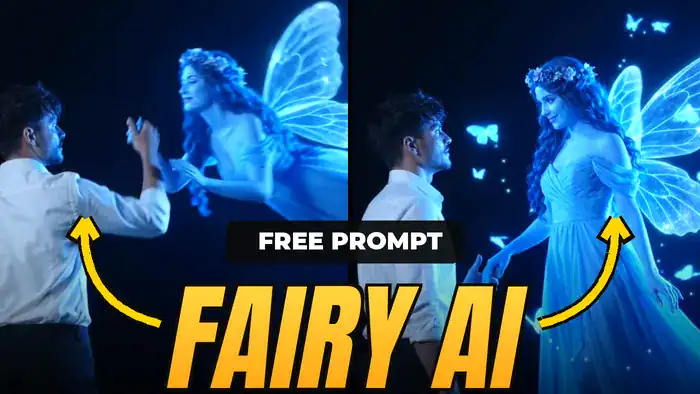
The fairy AI video is one of the most loved Instagram Reel trends right now. In it, a man stands alone in the dark and suddenly raises his hand to the sky. Then a glowing blue fairy flies down, takes his hand and smiles at him. It looks like a scene from a fantasy movie. However, you don’t need any VFX skills. With Google Flow, a reference video, your photo and one prompt, you can make it in a few minutes.
What You Need for the Fairy AI Video
- First, the reference video (download it below)
- Next, one clear photo of yourself
- Then, the prompt given in this post
- Finally, a Google account to use Google Flow
Download the Reference Video
First, watch the reference video below. It shows the exact scene, lighting and fairy style for your fairy AI video. So, download it to your phone or laptop before you start.
How to Make the Fairy AI Video in Google Flow
- First, open Google Flow with the button below and sign in with your Google account.
- Next, upload your photo and the reference video.
- Then, copy the prompt from the box below and paste it into Flow.
- After that, set these settings: Ratio 16:9, Model Omni, Quality 720p and Duration 10 seconds.
- Finally, click Generate and wait. Your fairy AI video will be ready in a few minutes.
Copy the Fairy AI Video Prompt
Next, tap the Copy button. After that, the full prompt will be copied to your clipboard. Also, keep the prompt as it is, because it locks the dark background, the life-size blue fairy, the hand-holding moment and the formal white shirt look.
OUTFIT (important):
The man wears a stylish, well-fitted, crisp white formal shirt — slim fit, not loose, not baggy, not oversized. The shirt is neatly tucked into slim black formal trousers. Both sleeves are neatly rolled up and folded just below the elbows, with clean, even folds. Collar open at the top button. Smart, well-groomed look. The shirt fits his shoulders and back properly with clean lines and no extra fabric.
BACKGROUND (LOCKED, must stay identical in every frame):
– Almost completely pitch-black night.
– Left third of the frame: a dense cluster of dark leafy bushes and small shrubs, seen only as black silhouettes. When the fairy glows, their leaf edges catch a faint blue rim light.
– Center and right side: empty pure black darkness.
– Far bottom-right: one tiny, dim, distant light point.
– No sky detail, no moon, no stars, no tall trees, no forest, no fog, no mist, no ground visible.
– Real night-footage look: low light, slight grain.
– Do not add, remove or change any background element at any time.
ACTION AND CAMERA:
0–2.5s: The man stands still with his back to the camera, slightly left of center, both arms relaxed down at his sides. He is quietly looking up at the dark sky. The camera slowly and smoothly pushes in toward him from behind. It is dark and calm, a moment of waiting.
2.5–3.2s: The camera stops and becomes static. Suddenly, the man raises his right hand high toward the upper right, reaching into the dark sky, as if calling for something.
3.2–4.2s: The moment his hand goes up, a soft burst of bright blue light appears in the upper right. A life-size fairy swoops down diagonally toward him, her body almost horizontal, her long dress and wings trailing behind her to the right. She reaches down and gently takes his raised right hand in her right hand.
4.2s to end: She slowly rights herself into an upright floating pose, hovering slightly above the ground, clearly taller than the man (about 1.5 times his height). They keep holding hands the entire time and never let go. She tilts her head down and looks at him with a soft, loving smile. He looks up at her, facing her. Neither of them turns away or toward the camera. The camera stays completely still, with no orbit and no zoom. Only gentle, slow, natural movement.
FAIRY LOOK:
– Life-size adult woman, not small, not a tiny pixie.
– Her whole body radiates an intense glowing electric neon cobalt-blue light, deeply saturated blue, not white and not pale.
– Luminous blue-white skin that glows from within.
– Long, thick, wavy blue-black hair with a small flower crown.
– Off-shoulder, sheer, layered chiffon gown in glowing neon blue that flows long and trails to the right.
– Large translucent butterfly wings with bright glowing neon-blue edges that gently flutter.
– Many small glowing neon-blue butterflies and sparkles float around her.
LIGHTING AND COLOR:
– The fairy is the only light source.
– Before she appears, the scene is very dark, lit only by faint cool light on the man’s back.
– When she appears, an intense, saturated electric-blue glow floods the right side of the frame and lights his hair, face, shoulder and white shirt in blue from the right.
– His left side and the background stay in deep black shadow.
– Deep blacks, vivid neon-blue highlights, high contrast, strong blue color grade.
MOOD:
A calm, waiting, silent beginning. Then a sudden magical moment when he raises his hand and she arrives. Emotional, romantic fantasy-film feel.
AVOID:
No loose or baggy shirt, no untucked shirt, no hand raised at the start, no camera movement after 2.5s, no background change, no trees or forest, no small fairy, no pale or white fairy glow, no letting go of hands, no turning around, no morphing, no face flicker, no extra people, no extra hands. No text, captions or watermark.
After you paste this prompt, your fairy AI video will follow the same timing: first the calm wait, then the hand raise, and then the fairy arrives.
Tips for a Better Result
- First, use a sharp photo where your full face is visible. Also, avoid heavy filters.
- However, if the face in your fairy AI video doesn’t match well, simply try again with a different photo.
- Also, don’t change the prompt. Each part controls something, like the fairy size, the blue colour and the timing of the hand raise.
- Then, add trending romantic music in CapCut or Instagram after you download the video.
- Finally, only use your own photo, or a photo of someone who has given you permission.
That’s it. Your fairy AI video is ready to post as a Reel. If you liked this trend, also try the Toyota car jump AI video and the Casa Tupka AI video. For more ideas, see our Google Flow + ChatGPT commands list.