

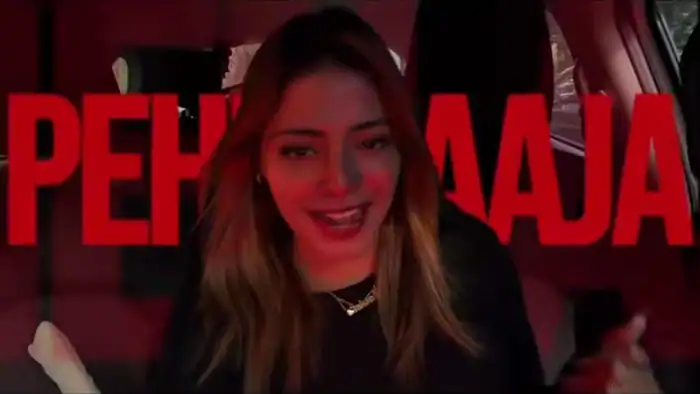
The Casa Tupka AI video trend is all over Instagram Reels right now. In these videos, people sing Yo Yo Honey Singh’s song inside a car, with deep red lighting, playful expressions and fast hand moves. The good news? You don’t need to shoot anything. With Google Flow, one reference video, your photo and a prompt, you can make the same video with your own face.
What You Need for the Casa Tupka AI Video
- First, the reference video (download it below)
- One clear front-facing photo of yourself
- The free prompt given in this post
- Finally, a Google account to use Google Flow
Download the Reference Video
First, watch the reference video below. This is the video that Google Flow will copy for your Casa Tupka AI video. So, download it to your phone or laptop before you start.
How to Make the Casa Tupka AI Video in Google Flow
- First, open Google Flow using the button below and sign in with your Google account.
- Next, create a new project.
- Then, upload the reference video you downloaded above.
- After that, upload one clear photo of yourself. A front-facing photo with good light gives the best result.
- Now, copy the prompt from the box below and paste it into Flow.
- Finally, click Generate and wait. Your video will be ready in a few minutes.
Copy the Prompt
Next, tap the Copy button. After that, the full prompt will be copied to your clipboard. Also, keep the prompt as it is, because it is written specially for the Casa Tupka AI video trend.
Match the same overall performance, camera framing, body movements, facial expressions, hand gestures, head movements, timing and energy of the reference video. Keep the scene inside a car with the same intimate front-facing camera perspective and cinematic composition.
Use dramatic deep red ambient lighting inside the car, with realistic shadows and subtle natural light coming through the windows. I should look directly into the camera while lip-syncing/performing naturally, with expressive eyes, confident playful expressions, occasional smiles, eyebrow movements and natural mouth movements.
Recreate the hand gestures and playful head/hair movements from the reference, including moments where my hands move near the camera and my head moves rhythmically. Keep my face consistent and recognizable throughout the entire video.
Preserve realistic skin texture, natural hair movement, realistic hands and fingers, accurate facial expressions and physically believable motion. The result should feel like I personally filmed the same style of video, not like an AI face swap. Maintain realistic cinematic video quality, natural motion, subtle camera movement and the same fast-paced expressive energy as the reference.
Tips for a Better Result
- First, use a sharp photo where your full face is visible. Also, avoid sunglasses and heavy filters.
- However, if the face doesn’t match well, simply try again with a different photo.
- Then, add the original song in CapCut or Instagram after you download your Casa Tupka AI video.
- Finally, only use your own photo, or a photo of someone who has given you permission.
That’s it. Your Casa Tupka AI video is ready to post as a Reel. If you liked this trend, also try the Thalapathy Vijay helicopter entry AI video and the viral Mercedes car AI video prompt. For more ideas, see our Google Flow + ChatGPT commands list.

