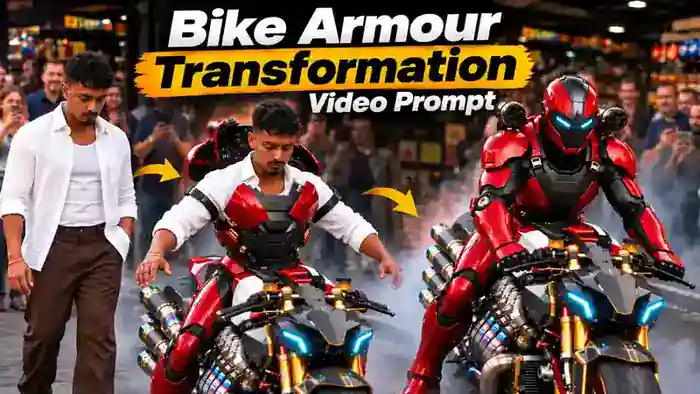
The Bike Armour Transformation video is the newest AI trend on Instagram. In this reel, a person walks up to a huge custom motorcycle, sits on it and presses one button. Then red-and-black mechanical armour comes out of the bike and closes around the body piece by piece, while a crowd films everything on their phones. Finally, the helmet closes and the eyes glow blue.
The best part is that you can make this Bike Armour Transformation video with your own face for free using Google Flow. You only need the reference video, one clear photo and the two prompts given below. In this article, you get everything, plus the simple step-by-step process.
Watch the Bike Armour Transformation Reference Video
First, watch the reference video below. Then download it using the button, because you will upload it in Google Flow.
Why the Bike Armour Transformation Trend Is Going Viral
Superhero-style transformations always grab attention, and this one feels real because it is shot like a normal phone video in a crowded street. The bike looks like a monster machine, the armour builds up step by step, and the crowd reacts in the background. So viewers watch till the end to see the helmet close.
Right now, reels in this format are getting millions of views. Because the face in the video is your own, people share it and tag their friends. That is why it is a perfect trend to post on your page while it is still fresh.
How to Make the Bike Armour Transformation Video in Google Flow
Google Flow can make a maximum of about 10 seconds in one generation, but the reference video is 15 seconds long. So you will make the video in two parts and join them at the end. Follow these steps:
- First, download the reference video from the button above.
- Next, open CapCut or VN and cut the reference video into two clips: Part 1 = 0 to 10 seconds and Part 2 = 10 to 15 seconds. Export both clips.
- Then open Google Flow and select Ingredients mode. Set the format to 9:16, quality 720p and 1 output.
- After that, upload the Part 1 clip and your clear selfie. Paste the Part 1 prompt and click Generate.
- Now upload the Part 2 clip and the same selfie. Paste the Part 2 prompt and click Generate. If you want a smoother join, also upload the last frame of your Part 1 video as a second image.
- Finally, join both generated clips in CapCut or VN, and your 15-second video is ready.
Before You Paste the Prompts, Check These 4 Things
- Reference Video Parts: Cut the reference video into Part 1 (0–10 sec) and Part 2 (10–15 sec). Upload the matching part with each prompt.
- Clear Selfie: Use one clear photo with your full face visible. It should not be blurry, and do not wear sunglasses or a cap.
- Flow Settings: Ingredients mode, 9:16, 720p, 1 output. Tag the video as @video1 and your photo as @image1 in the prompt.
- Audio Error Fix: If Flow shows an audio error, open Flow Settings and turn ON “Return silent video”. Then add the original sound in CapCut or VN after joining the parts.
Bike Armour Transformation Prompt – Part 1 (0–10 Seconds)
Copy this prompt for the first part. It keeps the bike, crowd, camera and armour exactly like the reference video, and only puts your face on the main person.
10 seconds, the same length as @video1.
ASPECT RATIO:
9:16 vertical.
IDENTITY:
@image1 is the ONLY identity reference for the main person. Use the exact face, face shape, skin tone, eyes, nose, lips, beard/stubble, hairstyle, hair colour, body build, gender and age from @image1. Do not copy the original person’s face or hair from @video1. Only the main person changes — nothing else.
REFERENCE VIDEO:
@video1 is the MASTER reference. Recreate everything from @video1 exactly as it is: the same camera angle, framing, camera distance, handheld movement, timing, location, shop front, crowd, lighting, colours, motorcycle, smoke, and the armour pieces with the same design, colours and order. Keep the clothes the same as in @video1 (open white shirt over white vest, brown trousers, dark shoes). One continuous shot exactly like @video1. Do not invent additional scenes, do not add or remove anything, do not change the location.
ACTION AND TIMING (exactly as in @video1):
The person stands beside the motorcycle with both hands on the tank, swings a leg over and sits. Touches the console, the headlights glow cyan. Spreads both arms out to the sides; the tank cover lifts, light smoke drifts low. Red-and-black armour closes around both legs, then black straps and the chest plate, then red shoulder plates appear — at the same moments as in @video1. The clip ends at the same moment as @video1, mid-transformation, with the face clearly visible.
REMOVE ALL NAMES / TEXT (very important):
@video1 shows a written brand name in two places — gold letters on the white panel of the motorcycle’s fuel tank, and a small nameplate with letters on the armour’s chest. REMOVE both completely in the result: The fuel tank’s white panel is plain clean white — no letters, no word, no logo, no outline of letters. The armour chest is plain black — no nameplate, no badge, no small plate, no letters. Copy everything else from @video1, but never copy any writing from it. No name, word, letters, numbers, logos, captions or watermarks anywhere in the video — not on the motorcycle, not on the armour, not on the helmet, not on the pods, not in any frame corner.
REALISM:
Photorealistic phone footage, natural daylight, real skin and fabric, believable metal, natural crowd movement.
AUDIO:
Preserve the original background sound and its timing from @video1 if supported. Do not add dialogue, voice-over, narration or unrelated sound effects.
STRICT RULES:
Replace ONLY the main person’s face and hair with @image1 — everything else stays identical to @video1. Do not copy the original person’s face from @video1. Do not create new scenes or shots absent from @video1. No name or text on the fuel tank, no nameplate or text on the armour chest — remove the writing seen in @video1. No text, names, logos or watermarks anywhere. No extra people in front of the camera. The motorcycle never moves and never changes design.
FINAL RESULT:
The exact same video as @video1, but the main person is the person from @image1.
Bike Armour Transformation Prompt – Part 2 (10–15 Seconds)
Now copy this prompt for the second part. Here the shoulder pods rise, the helmet closes over your face and the eyes glow blue.
5 seconds, the same length as @video1.
ASPECT RATIO:
9:16 vertical.
IDENTITY:
@image1 is the ONLY identity reference for the main person’s face. Use the exact face, face shape, skin tone, eyes, nose, lips, beard/stubble, hairstyle, hair colour, gender and age from @image1. Do not copy the original person’s face or hair from @video1. Only the face changes — nothing else.
CONTINUITY (only if @image2 is uploaded):
@image2 is the last frame of the previous clip — the first frame must match it: same armour, same pose, same camera angle, same crowd and location.
REFERENCE VIDEO:
@video1 is the MASTER reference. Recreate everything from @video1 exactly as it is: the same camera angle, framing, handheld movement and upward tilt, timing, location, shop front, crowd, lighting, motorcycle, smoke and the same red-and-black armour. One continuous shot exactly like @video1. Do not invent additional scenes, do not add or remove anything, do not change the location.
ACTION AND TIMING (exactly as in @video1):
The fully armoured person leans forward holding the handlebars; the face is visible. Two black cylindrical pods rise behind the shoulders, then turn forward and settle above the shoulders; the camera tilts up and back down like @video1. Smoke spreads low around the tyres. The helmet closes over the head from behind, the faceplate covers the face last. The helmet’s eye slits glow cyan. Ends on the same final frame as @video1.
REMOVE ALL NAMES / TEXT (very important):
@video1 shows a written brand name in two places — gold letters on the white panel of the motorcycle’s fuel tank, and a small nameplate with letters on the armour’s chest. REMOVE both completely in the result: The fuel tank’s white panel is plain clean white — no letters, no word, no logo, no outline of letters. The armour chest is plain black — no nameplate, no badge, no small plate, no letters. Copy everything else from @video1, but never copy any writing from it. No name, word, letters, numbers, logos, captions or watermarks anywhere in the video — not on the motorcycle, not on the armour, not on the helmet, not on the pods, not in any frame corner.
REALISM:
Photorealistic phone footage, natural daylight, believable metal, natural crowd movement.
AUDIO:
Preserve the original background sound and its timing from @video1 if supported. Do not add dialogue, voice-over, narration or unrelated sound effects.
STRICT RULES:
Replace ONLY the main person’s face with @image1 — everything else stays identical to @video1. Do not copy the original person’s face from @video1. Do not create new scenes or shots absent from @video1. The pods never fire; no fire, no explosions. No name or text on the fuel tank, no nameplate or text on the armour chest — remove the writing seen in @video1. No text, names, logos or watermarks anywhere. The motorcycle never moves and never changes design.
FINAL RESULT:
The exact same video as @video1, but the face before the helmet closes is the person from @image1.
Better Result in One Go: Bike Armour Transformation with Higgsfield Seedance 2.5
If you want a better Bike Armour Transformation video in a single generation, use Higgsfield with the Seedance 2.5 model. This method makes the full 15-second video at once, so you do not need to cut the reference video or join parts. It also adds the engine start sound and tyre smoke at the end. However, Higgsfield uses credits, so this method is paid.
In this method, you do not upload any reference video. Instead, you upload three images and one prompt.
What You Need for the Higgsfield Method
- Your Character Sheet (@Image1): One image showing you in normal clothes and in the armour, made with the prompt in Step 1.
- Motorcycle Image (@Image2): Download it from Step 2 below.
- Location Image (@Image3): Download it from Step 3 below.
- Settings: Seedance 2.5, reference images, 15 seconds, 9:16, audio ON.
Step 1: Make Your Character Sheet
First, open an image generator that accepts reference photos (for example Higgsfield image generation or Gemini). Then upload 2 to 4 clear photos of yourself: a front face photo, a side profile and one full-body photo. Do not wear a cap or sunglasses. After that, paste this prompt and generate your character sheet.
Layout — 4 columns, left to right, all standing full body on the same floor line, slight 3/4 angle facing left:
1. CIVILIAN: the person standing relaxed with both hands in the trouser pockets, wearing an open white linen shirt with rolled sleeves over a white ribbed tank top, loose dark-brown trousers and dark-brown leather shoes. Calm, neutral expression.
2. ARMOUR — FACE OPEN: the same person in a sleek, form-fitting mechanical armour suit, same body size as in the photos (not bulky, not oversized). Glossy deep-red plates over a matte black segmented under-suit, small gold round joint caps and gold screws, black knee and elbow joints, black segmented abdomen, flat black chest plate with red side plates, rounded red shoulder shells with small tan buckle straps, red-and-black armoured gloves, chunky red boots with black soles. Two short black cylindrical pods with gold rings sit above and behind each shoulder, their round front ends with a ring of small openings. Head uncovered — the face and hair are fully visible.
3. ARMOUR — HELMET CLOSED: same pose and same armour as panel 2, now with a smooth rounded helmet: red with a black centre stripe, black faceplate and two narrow angular eye slits glowing cyan.
4. FACE CLOSE-UPS (right column, two stacked boxes): top — straight front face close-up, eyes open, neutral expression; bottom — right side profile close-up. Both wearing the white shirt collar.
Rules: the face must match the uploaded photos exactly in all panels. No text, no labels, no names, no logos, no nameplate or badge anywhere on the armour. No extra people, no props, no weapons, no background scenery.
Your character sheet should look like this example: normal outfit, armour with the face open, armour with the helmet closed, and two face close-ups.

Step 2: Download the Motorcycle Image
Next, download this motorcycle character sheet. Upload it exactly as it is, so the same bike appears in your video.

Step 3: Download the Location Image
Then download this location image. It gives Higgsfield the shop, the street and the crowd filming with phones.

Step 4: Generate the Video in Higgsfield
- Open Higgsfield, go to Video and select the Seedance 2.5 model.
- Choose the reference images mode.
- Upload the images in this order: your character sheet as @Image1, the motorcycle as @Image2 and the location as @Image3.
- Leave the start frame and end frame empty. Do not upload any video.
- Copy the 15-second prompt below and paste it as it is. Do not shorten it.
- Set duration to 15 seconds, aspect ratio 9:16, audio ON and 1 output.
- Finally, check the credit cost and click Generate.
Bike Armour Transformation Prompt for Higgsfield (15 Seconds)
This prompt controls every second of the video: mounting the bike, pressing the button, the armour closing piece by piece, the helmet, and the engine start with revs and smoke.
PRIORITIES
1. Connected, believable mechanical assembly around the rider’s body. 2. Spectators visibly moving, watching and filming throughout. 3. An imperfect handheld recording by someone standing nearby. 4. Continuous identity, geometry and location. 5. A clear, loud engine start at the end with real exhaust sound and tyre smoke.
REFERENCE IMAGES
@Image1 defines the rider’s exact facial likeness, skin tone, hair, starting outfit and completed armour. Begin in the starting outfit from @Image1. No hat or sunglasses. The face remains recognizable until the helmet closes. @Image2 defines the motorcycle: enormous exposed engine, heat-discoloured headers, stacked exhaust outlets, red-white tank, gold hardware and cyan headlights. Copy it exactly. @Image3 defines the shopfront, street and mixed crowd’s appearances. Animate the people independently; their reference poses are not fixed positions they must hold. NO TEXT: no name, word, letters or logo anywhere — the fuel tank is plain and the armour chest has no nameplate. Reference-sheet layouts never appear.
HANDHELD CAMERA
One nearby spectator records the entire demonstration in one continuous take. Begin at a broad side/front-three-quarter angle, showing the rider and most of the motorcycle. The operator takes a few small steps around the front, gradually reaching an approximately head-on view. The camera has subtle irregular hand tremor, slight roll, footstep bumps and imperfect framing. Movement briefly lags behind unexpected action before the operator corrects it. Between steps, the camera settles but never becomes perfectly motionless. When the shoulder pods rise, the operator tilts upward a little late, then adjusts to include them. When the engine fires, the camera gets a small startled jolt and slight vibration from the engine noise, then holds steady on the rider. Maintain continuous perspective and natural background parallax. Include one brief autofocus slip during the first large deployment: the rider becomes slightly soft as focus catches the background, then quickly returns. Natural motion blur accompanies quick gestures and camera bumps. Keep the mechanism readable. No gimbal glide, sweeping orbit, dramatic zoom, excessive shake, slow motion, cuts or dissolves.
BACKGROUND — LIVE PEOPLE WATCHING AND FILMING
The crowd moves independently from the first frame to the last. Show actions involving their arms, shoulders, stance and phones, not just blinking or moving mouths. Three prominent spectators actively record the rider with vertical phones. Their rear cameras aim toward the rider; their eyes generally watch their screens. Other spectators look directly at the rider and track the mechanism. Give these people continuous, staggered actions: During mounting, a woman steps sideways for a clear view, raises her phone and starts filming. A man already filming leans around the person ahead and adjusts his phone framing. When the armour first unfolds, one spectator recoils half a step, briefly loses their framing, then re-aims at the rider. Another smiles in disbelief, turns briefly toward a friend, then looks back. The friend gestures toward the moving armour. During chest closure, one person lowers their phone slightly to watch directly, then raises it again. When the shoulder pods rise, people filming tilt their phones upward at different moments. During helmet closure, one spectator edges closer while recording; another reacts with raised eyebrows and an open-mouthed smile. When the engine roars, several people flinch slightly at the noise, a few step back from the smoke, some cheer with open mouths and raised phones, one covers an ear for a moment while still filming. Between these actions, maintain natural breathing, head turns, weight shifts and wrist adjustments. Keep attention centred on the rider. Reactions range from concentration to excitement and surprise. No synchronized gasps, identical gestures or constant jumping. Preserve spectator identities and believable phone grips. No frozen background, detached phones, sliding feet or people staring motionlessly into the filming camera.
EYES AND FACE RULE (very important)
The rider’s eyes are clearly OPEN at the start, closed only during the armour assembly, and OPEN again looking into the camera before the helmet closes: 0–2.1s: eyes wide open, alert, confident; face clearly visible. 2.1–10.5s: right after pressing the button, the rider calmly closes the eyes, as if concentrating, and keeps them gently closed while the armour assembles. 10.5s onward: the rider opens the eyes, lifts the chin and looks straight into the camera until the faceplate covers the face. Never keep the eyes closed or looking down for the whole video.
0–1.3 SECONDS — MOUNT
The rider holds the motorcycle with eyes open, swings one leg over and settles onto the saddle with believable balance and weight. At about 1.0s, once seated, the rider glances straight at the filming camera for a moment with eyes open and a small confident half-smile — the face is clearly recognizable — then looks down toward the console. The camera makes a small correction to follow. Spectators are already watching and filming.
1.3–2.1 SECONDS — ACTIVATE
The rider looks down with open eyes at a small recessed button on the centre console immediately ahead of the saddle. Show the right index finger physically pressing the button once. It depresses and illuminates cyan. Immediately after the press, the rider takes a calm breath and slowly closes the eyes, chin slightly lowered, focused. The rider withdraws the hand and holds the arms slightly clear of the torso. The armour starts moving only after this deliberate press, as the eyes close.
2.1–3.3 SECONDS — UNLOCK AND DEPLOY
Small latches release around the tank and saddle-side housings. The upper tank cover lifts on a compact hinge, exposing nested components. Short actuators extend and folded brackets rotate outward beside the hips. Cyan headlights and engine lighting activate. A little pale vapour vents low beside the engine without obscuring the assembly. Show rigid components moving through visible hinges, pivots and sliding rails. Include the brief autofocus slip and recovery here.
3.3–5.3 SECONDS — LEGS AND HIPS
Folded lower-leg assemblies extend from housings beside the motorcycle. Each moves outward for clearance, rotates into alignment and closes around the corresponding shin. Rear sections swing shut and meet the front shells along visible seams. Thigh plates travel into position on short guides. Hip sections rotate inward and latch at the waist. The knees remain bent in the riding position. Legs stay anatomically consistent and clear of the bike. Panels remain rigid, with flexible material only at joints.
5.3–7.7 SECONDS — ARMOUR WRAPS AROUND THE TORSO
A folded back assembly rises from behind the saddle on a short telescoping support and settles behind the rider. Two articulated side sections swing forward around the ribs. Their paths visibly clear the arms and clothing. The chest plate rotates into place and connects with the side sections. Smaller overlapping sections close the gaps. Latches engage at the seams. Make the wrapping action readable: extend, rotate, align, close, latch. The clothing becomes enclosed inside the armour. Preserve body size and seated position. Support brackets disengage only after the torso assembly is secured, then retract toward the motorcycle.
7.7–9.5 SECONDS — SHOULDERS AND ARMS
Shoulder assemblies pivot forward from the secured backplate. Upper-arm shells close first, followed by forearm sections and articulated hand plates. The rider makes small cooperative arm movements to provide clearance. Then both hands come onto the handlebars and grip them naturally. Keep every moving section mechanically connected. Nothing floats through the air or passes through the body.
9.5–10.7 SECONDS — SHOULDER PODS
Two cylindrical pods extend upward from the back assembly on short rails, pivot into their final orientation over the shoulders and lock. Show a small settling vibration after they stop. The rider’s posture responds subtly to the shifting weight. Spectators adjust their phones upward and react with surprise. The handheld operator tilts up slightly late, then corrects the composition. The tank cover closes once its deployment components have cleared.
10.7–12.2 SECONDS — HELMET CLOSES LAST
FACE TO CAMERA: At 10.5s the rider opens the eyes, lifts the chin and looks straight into the filming phone’s lens — face fully toward the camera, eyes wide open and clearly visible, eyebrows, nose and mouth well lit and in sharp focus, a confident intense expression. At the same moment the filming spectator steps in closer and frames the rider from the chest up, so the face fills about one third of the frame (a natural handheld push-in, no zoom effect, no cut). The rider holds direct eye contact with the camera through the whole helmet closure, so the face is easy to recognize until the very last moment. Do not look down, do not look sideways, do not close the eyes. A segmented collar rises around the base of the neck. Rear and side helmet sections articulate upward with clearance around the ears and hair. The upper shell closes, followed by the faceplate. The rider’s actual face, still looking straight into the camera, remains visible until the moving faceplate conceals it; once it latches shut, the narrow cyan eye apertures light up facing the camera. No face morph, instantaneous helmet replacement or early concealment of identity.
12.2–13.0 SECONDS — READY
The filming spectator steps back to the earlier distance so the whole rider and most of the motorcycle are in frame again. The fully armoured rider leans slightly forward, both hands on the handlebars, shoulder pods secured, cyan eyes and headlights glowing. The helmet keeps facing the camera. The right armoured thumb presses the starter on the right handlebar switch.
13.0–15.0 SECONDS — ENGINE START AND REVS (motorcycle stays in place)
At 13.0s the engine fires: a sharp starter whine, then a deep, loud ignition boom, and the huge engine roars to life. The whole motorcycle shakes slightly on its suspension, the exhaust stack vibrates and small heat shimmer appears at the exhaust outlets. The rider twists the throttle twice with the right hand — two aggressive revs at about 13.6s and 14.3s. Each rev makes a powerful exhaust roar with crackles and pops, the cyan headlights flicker brighter, the rider’s shoulders and the pods jolt slightly. The front brake is held, so the motorcycle does NOT move forward. The rear tyre spins in place on the asphalt, producing thick white tyre smoke that billows out from the rear wheel and rolls low across the ground around the motorcycle and toward the crowd’s feet, rising to waist height by 15s. The rider, the armour and the cyan eyes stay clearly visible through the smoke. Spectators flinch at the noise, cheer, step back from the smoke and keep filming. The camera gets a small jolt at the ignition, then keeps slight handheld movement through the final frame. End at 15.0s on the armoured rider revving on the stationary motorcycle with white smoke around it. No ride-away, no wheelie, no frozen ending, no separate beauty shot.
MECHANICAL REALISM
Treat the armour as folded machinery stored in the motorcycle’s deployment housings. Maintain consistent panel thickness, hinge axes, actuator travel and attachment points. Components clear adjacent surfaces before closing. Large parts accelerate smoothly, slow before contact and settle when locked. Show slight vibration after heavy sections stop, grounded shadows between overlapping plates and subtle suspension response as weight shifts. No liquid-metal morphing, rubbery panels, armour growing from skin, disappearing clothing, teleporting parts or smoke concealing the transformation (the tyre smoke appears only after 13.0s).
PHOTOGRAPHIC REALISM
Natural daytime street lighting with ordinary shop lights behind the crowd. Real skin pores, fabric folds, rubber, lightly worn paint, fingerprints and heat-discoloured metal. Reflections change with the handheld camera’s position. Use ordinary phone-video colour, moderate contrast, restrained sharpening and subtle digital noise in darker areas. Keep the background recognizable with gentle natural distance softness. Cyan lighting creates localized reflections. Avoid excessive bloom, extreme bokeh, heavy film grain, beauty-filter skin or glossy game-render surfaces.
AUDIO (on)
0–13s: real street ambience — crowd murmur, excited whispers and small reactions, a button click, mechanical whirrs, servo motors, metal clicks and heavy latch clunks as each piece locks, a soft vapour hiss, a low electrical hum. 13–15s: a starter whine, then a loud deep engine ignition, a heavy rumbling idle, two aggressive throttle revs with exhaust crackles and pops, the screech of the rear tyre spinning on asphalt, and the crowd cheering and shouting “wow” in the background. No music, no voice-over, no narration, the rider does not speak.
CONTINUITY
One rider, one motorcycle and one consistent crowd in the same street. Mount → visible button press → mechanism unlocks → legs and hips close → torso wraps and locks → arms close → pods deploy → helmet closes last → starter press → engine fires → revs with tyre smoke, motorcycle stays in place. One continuous handheld take. No transitions, dissolves, ghosting, duplicated limbs, background replacement or frozen spectators. No text, names, logos or watermarks anywhere.
Keep duration at 15 seconds and audio ON. With a shorter duration or audio off, the video ends at the helmet and you will not get the engine start sound.
Tips for a Better Result
- Use a bright, front-facing selfie. A clear face gives a much better face match.
- Generate 2 or 3 times and keep the best result, because every generation is a little different.
- Use the same selfie for both parts, so your face looks the same in the joined video.
- If a name or logo appears on the bike or the armour, simply generate again.
- After joining the parts, add the original sound so the transformation sounds powerful.
Frequently Asked Questions
Is the Bike Armour Transformation video free to make?
Yes. Google Flow gives free credits, so you can make this video with the reference video, your photo and the prompts on this page.
Why is the video made in two parts?
Google Flow makes about 10 seconds in one generation, and the reference video is 15 seconds. So you make Part 1 and Part 2 separately and join them in CapCut or VN.
Which photo should I upload?
Upload one clear selfie with your full face visible. Avoid blurry photos, sunglasses, caps and group photos.
What if Google Flow shows an audio error?
Open Flow Settings and turn ON “Return silent video”. Then add the original sound in CapCut or VN after joining the two parts.
Can I post this video on Instagram?
Yes. Export the joined video in 9:16, add the trending sound and post it as a Reel.
Which method gives the best result?
Google Flow is free but needs two parts. Higgsfield Seedance 2.5 is paid, but it makes the full 15-second video with the engine sound in one generation, so the result is usually better.
That is all you need to make the Bike Armour Transformation AI video. If you liked this trend, also try the Tesla Flying Car Drifting video and the Parkour Jump Trend Prompt with Google Flow.