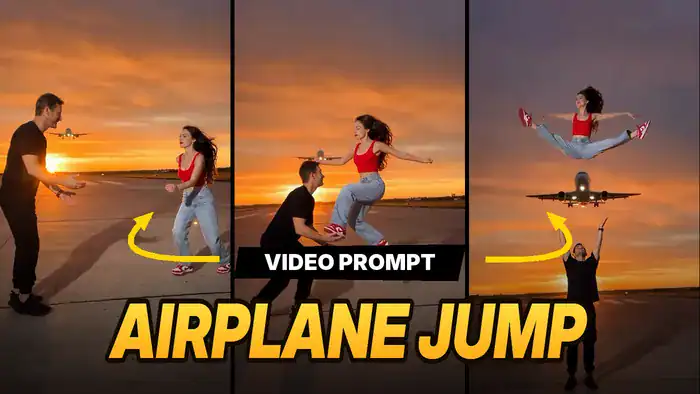
The Airplane Jump AI Video is one of the most viral couple trends on Instagram right now. In the clip, a guy throws his partner high into the sunset sky, she does a full split jump, and a plane flies right below her. Now couples are making the same video with their own faces. However, you don’t need a runway or any stunts, because Google Flow does it all.
Why This Trend Is Going Viral on Instagram
Right now, this is one of the biggest new trends on Instagram. Couples, friends and creators are all posting their own version, and together these reels have crossed hundreds of millions of views. Every day, new videos from this trend keep landing on the Explore page and in the Reels feed.
So, why does it work so well? First, the sunset sky and the plane flying right below the jump look like a big-budget movie shot. Second, the split jump makes people stop scrolling and watch again. Finally, it looks impossible to shoot in real life, so viewers share it and comment “how did you do this?”
The best part is that you can make your own Airplane Jump AI Video in a few minutes, without a runway, a plane or any stunts. If you post it while the trend is hot, your reel also has a real chance to go viral and bring you new followers.
So, in this post you will get the reference video, the full prompt, the exact Google Flow settings and the simple steps to make it yourself.
Download the Reference Video
First, watch the original clip. After that, notice how Google Flow copies every move, pose and camera angle from this video.
Next, tap the download button below and save this video. Then, you will upload it to Google Flow.
Copy the Airplane Jump AI Video Prompt
Now copy this prompt. Because it locks the motion and keeps the faces bright against the sunset, your video looks clean and realistic. Also note that @Image 1 is the man and @Image 2 is the woman.
Keep the exact same motion, timing, poses, camera movement, background and airplane as the reference video.
LIGHTING (most important): both people are front-lit by a bright camera-side flash / softbox, exactly like a professional sunset photoshoot. Faces, skin, clothes and colors are bright, well-exposed and fully detailed. The sunset sky stays in the background only. NOT a silhouette, NOT backlit, no dark faces, no shadow on faces. The sun stays low on the horizon and never sits directly behind a person.
Sharp facial detail, consistent identity, no face morphing, no identity mixing between the two characters, realistic anatomy, smooth motion.
Google Flow Settings
Before you generate, also set these options. Otherwise, the result may not match the original.
- Model: Omni Flash
- Duration: 10 seconds
- Quality: 720p
How to Make the Airplane Jump AI Video in Google Flow
Once you have the video and the prompt, follow these steps. As a result, you will get the same trend with your own faces.
- Open Google Flow: First, tap the “Open Google Flow” button below and sign in with your Google account.
- Choose the settings: Next, select Omni Flash, 10 seconds and 720p.
- Upload the reference video: Then, upload the reference video you downloaded above.
- Upload 2 photos: After that, upload 2 clear photos: one of the boy (Image 1) and one of the girl (Image 2) you want in the video.
- Paste the prompt: Now paste the prompt you copied above.
- Generate: Finally, hit Generate, wait a few minutes, and download your video.
Tips for a Better Result
Also, keep these small tips in mind. In short, better photos give you a better Airplane Jump AI Video.
- First, use clear, front-facing photos with good light for both people.
- However, avoid sunglasses, caps or group photos.
- Also, if the faces get mixed up, check the photo order (man first, woman second) and generate again.
That’s it! Now your Airplane Jump AI Video is ready to post as a Reel. Finally, if you like trends like this, also try the Aircraft Backflip Video Prompt and the Toyota Car Jump New Trend.