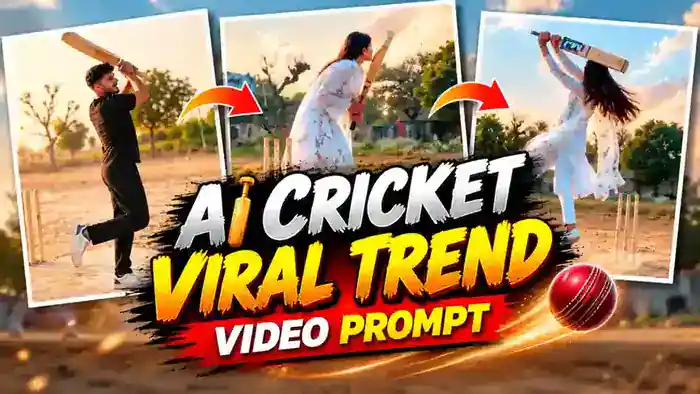
The AI Cricket Viral Trend is the hottest new trend on Instagram Reels right now. A person stands on a dusty village cricket pitch, waggles the bat, taps it once, and then smashes a stylish pull shot high into the sky. In slow motion they finish on one leg, hide their face behind the bat and walk away with a smile. The best part? You can make this exact video with your own face in Google Flow, using our free prompt and reference video.
Why the AI Cricket Viral Trend Is Blowing Up
Cricket is an emotion in India, and this trend mixes it with a cinematic village vibe. That is why these reels are pulling millions of views. First, the slow-motion pull shot looks like a movie scene. Next, the playful face-hide with the bat at the end makes people smile and replay the reel. Finally, it works for both boys and girls, so everyone wants to try it.
So if you post your own version while the trend is still fresh, you have a real chance to go viral too. It takes less than five minutes to make.
Watch the AI Cricket Viral Trend Video
Download the muted reference video below. You will upload this file in Google Flow to get the same shot, camera angle and timing.
Why Use the Reference Video for This Trend
You can try this trend with only a prompt and your photo. However, the result will not match the original. Google Flow often changes the camera angle, makes the ball bounce on the pitch and turns the pull shot into a normal swing. When you upload the muted reference video, Google Flow copies the exact camera position, the ball height, the bat swing and the slow-motion pose. It only replaces the person with your photo. So the reference video method gives a much better and more realistic result.
Also, the reference video must be the muted file we give above. A video with sound can cause an audio or speech error in Google Flow.
How to Make the AI Cricket Viral Trend Video in Google Flow
- First, download the muted reference video from the button above.
- Next, open Google Flow and create a new project.
- Then set the settings: Ingredients mode, 9:16 ratio, 720p, 1x output and 10 seconds.
- After that, upload the muted reference video. This is @video1 in the prompt.
- Now upload one clear photo of yourself. This is @image1. Your face, hair and clothes will come from this photo.
- Copy the prompt below and paste it into the prompt box. Type @ and select the video for @video1 and your photo for @image1.
- Finally, click Generate. Your video will be ready in a few minutes.
AI Cricket Viral Trend Prompt (Copy and Paste)
Copy this full prompt. It tells Google Flow to copy everything from the reference video and only replace the person with your photo.
Before You Paste This Prompt, Check These 4 Things
- Muted reference video: upload only the muted file from this page as @video1. A video with sound can give an audio error.
- Clear photo: use a sharp, front-facing photo with your face fully visible. A full-body photo works best for clothes.
- Correct settings: Ingredients mode, 9:16, 720p, 1x output, 10 seconds.
- Add music later: the result has no sound. Add any trending song in CapCut or VN before you upload.
(Upload: @video1 = cricket_reference_10s_MUTED.mp4, @image1 = your photo. Works for boy or girl. 10s, 9:16)
DURATION: 10 seconds.
ASPECT RATIO: 9:16 vertical.
REFERENCE VIDEO (MASTER)
@video1 is the master reference. Recreate it exactly, frame by frame: the same camera position, camera angle, framing, camera distance, lens look, slow motion timing and the same continuous shot. Copy every movement exactly as in @video1: the active batting stance, the bat waggles, the tap of the bat on the pitch, the backlift, the ball arriving at waist/chest height, the pull shot and the bat swing path, the ball flying up into the sky, the slow-motion one-leg finishing pose, turning to the camera, hiding the face behind the bat, the smile and walking away. Same timing as @video1.
LOCATION: Keep the location exactly as in @video1 — the same dusty village cricket ground, the same cement pitch, the same three wooden stumps in the same place next to the batter, the same sky-blue building, the same trees and the same hazy evening sky. Do not change or add anything to the location.
IDENTITY
@image1 is the ONLY identity reference. Replace the person in @video1 with the person in @image1 — same face, gender, age, skin tone, body shape and hairstyle as @image1. Do not copy the original person’s face from @video1.
Clothes and shoes come from @image1 (same colours and style), identical in every frame. If the legs or shoes are not visible in @image1, use plain trousers matching the top and white sneakers.
Only one person in the video.
BAT AND BALL: Same bat and ball movement as @video1. Plain wooden bat with no stickers, no brand name, no text.
REALISM: Photorealistic real phone video, natural skin, natural motion, same lighting as @video1.
AUDIO: Preserve the original background music and its timing from @video1 if supported. Do not add dialogue, voice-over or unrelated sound effects. No lip-sync, no speaking.
STRICT RULES
– Do not invent new scenes, do not cut to close-ups, do not change the camera angle.
– No extra people. No text, captions, logos or watermarks.
– Keep 9:16 vertical.
FINAL RESULT: The exact same video as @video1, with only the person replaced by the person from @image1.
Add Music and Post Your AI Cricket Viral Trend Video
Your generated video will be silent because the reference video is muted. So open the video in CapCut or VN, add any trending cricket song or slow-motion beat, and export it. Then post it on Instagram Reels with a catchy caption. That is it. Your viral cricket reel is ready.
Tips for a Better Result
- Use a full-body photo if you want your own clothes and shoes to appear correctly.
- If the face does not match well, try a brighter and sharper photo.
- Generate 2-3 times and pick the best result.
- However, do not change the prompt. It is tuned to copy the reference video exactly.
Frequently Asked Questions
Can girls also make this AI cricket video?
Yes. The prompt works for both boys and girls. The gender, face and hairstyle come from your own photo.
Why should I use the muted reference video?
The muted video gives Google Flow the exact shot to copy and avoids audio errors. Without it, the camera angle and the ball movement usually come out wrong.
Why is my generated video silent?
Because the reference video is muted. Simply add music in CapCut or VN before posting.
Is Google Flow free?
Google Flow gives free credits to new users, so you can try this trend for free. After that, you may need more credits.
So that is how you make the AI Cricket Viral Trend video with Google Flow. If you like viral AI trends, also try the Couple Walk AI Video, the Garba Dance AI Video and the Tesla Flying Car Drifting prompt.