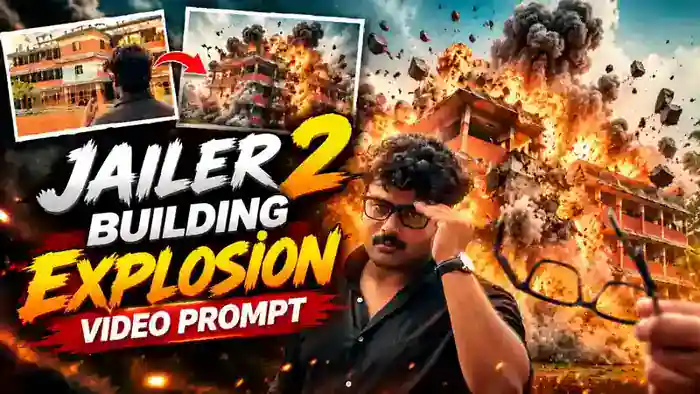
The Jailer 2 Building Explosion video is one of the most viral AI trends on Instagram right now. In this reel, you take off your glasses while looking at a big building, hold them up in front of it, and a huge cinematic fireball bursts up behind the glasses. Right after that, you face the camera, put your glasses back on and walk forward like a movie hero.
The best part is that you need only one photo. You upload your picture in Google Flow, paste the free prompt from this post, and Flow makes the full cinematic video for you. In this post, you get the reference video, the exact prompt and simple steps to make it.
Watch the Jailer 2 Building Explosion Video
First, watch the video below so you know exactly what you are going to make.
Why the Jailer 2 Building Explosion Trend Is Going Viral
This is a brand-new Instagram trend inspired by the mass-hero style of Jailer 2, and creators everywhere are posting their own version. The slow, calm glasses moment followed by a sudden giant fireball creates a big “wow” in just a few seconds, so people watch it again and again.
Also, the hero entry at the end looks like a real movie shot. So when you post your own version, your followers stop scrolling, share it with friends and ask how you made it.
How to Make the Jailer 2 Building Explosion Video
Step 1: Open Google Flow and Set It Up
First, open Google Flow and use these exact settings before you generate:
- Mode: Ingredients
- Model: Omni
- Aspect ratio: 16:9 (landscape)
- Duration: 10 seconds
Step 2: Upload Your Photo
Next, upload only one clear photo of yourself. Your face should be fully visible and not blurry. The prompt works for both boys and girls, so the character in the video is always the person in your photo.
Step 3: Paste the Prompt and Generate
Then copy the full prompt below, paste it in Flow and tap Generate. After that, your Jailer 2 Building Explosion video is ready in a few minutes.
Before You Paste This Prompt, Check These 4 Things
- One Clear Photo: Upload only one clear photo of yourself where your face is fully visible. Boy or girl, the video uses whoever is in your photo.
- Flow Settings: Ingredients mode, Omni model, 16:9 landscape.
- Full Prompt: Copy the complete prompt below and paste it as it is.
- Original Music: The AI video comes with its own sound. After generating, add the original Jailer 2 music in CapCut or VN.
Upload: @image1 = your photo
DURATION: 10 seconds. 3 shots with hard cuts.
ASPECT RATIO: 16:9 landscape, full frame edge to edge, no black bars.
STYLE: Ultra-photorealistic cinematic live-action VFX video, normal real-time speed (1x).
Use @image1 as the strict identity reference. The character can be a man or a woman — always exactly the person in @image1.
IDENTITY LOCK:
THE PERSON is exactly the person in @image1 — same gender, face, skin tone, hairstyle, hair length, hair color, facial hair (only if @image1 has it) and body in every shot, including the back of the head in Shot 1. If @image1 is a woman, THE PERSON is that same woman with her own hair; if @image1 is a man, THE PERSON is that same man. Never change the gender, never swap in a different person. No face changes, no beautification.
Outfit (same in all shots, for a man or a woman): plain black button-up shirt, top two buttons open, sleeves rolled up to just below the elbows, dark trousers. A silver square metal wristwatch on their RIGHT wrist. Thick black rectangular-frame glasses with clear lenses (they takes them off in Shot 1 and wears them in Shot 3).
LOCATION (same in all shots):
Daytime, soft overcast sky. A quiet urban roadside with reddish-brown ground. In the background stands a large multi-storey residential building with orange-brown and cream walls, a light-blue central section, rectangular windows, recessed balconies with railings and grey sloping roof edges. Green trees and coconut palms around it. Natural daylight and natural shadows. No people anywhere except THE PERSON.
LOOK:
Cinematic, slightly warm color grade, high contrast, soft film grain, realistic. Real-time speed.
SHOT 1 — 0.00s to 2.50s — OVER-THE-SHOULDER (back of their head)
Camera directly behind THE PERSON at their head height, very close: the back of their head and shoulders fill the lower-right part of the frame, the building sharp in the background. Camera holds still with a very slow push-in.
0.00–1.00s: They stand still, looking at the building, wearing their black glasses.
1.00–1.80s: They raise their RIGHT hand to the right side of their face and slowly take the glasses off by the right arm (temple) of the frame.
1.80–2.50s: They lower the glasses down to chest level and stretch their right arm forward toward the building, holding the glasses by one arm.
SHOT 2 — 2.50s to 6.00s — HAND + GLASSES, FIREBALL (hard cut)
Low camera near ground level, 16:9. Their RIGHT forearm comes in from the RIGHT edge of the frame, the silver watch on the wrist clearly visible. They hold the black glasses by the right arm (temple) so the glasses hang in the center of the frame, lenses facing the camera, with the building seen behind and through the lenses. The building is slightly soft in focus, the hand and glasses sharp. Camera very slowly pushes in. The glasses swing a little, then become still.
2.50–4.80s: Calm. The hand holds the glasses steady in front of the building.
4.80–6.00s: A sudden bright orange-white cinematic VFX burst appears in the background behind the glasses. A bright flash expands into a large orange fireball with yellow-white highlights, followed by thick grey-black smoke and white dust rolling outward along the ground. The effect expands across the whole background, covering the building. A brief subtle camera shake only at the first flash, then the close-up is steady again. The hand, fingers, watch and glasses stay sharp, intact and perfectly still in front of the effect; the glasses never break, bend, fall or change shape. The VFX stays behind the foreground and causes no harm to anyone.
SHOT 3 — 6.00s to 10.00s — FRONT FACE ENTRY (hard cut, right after the fireball)
Camera now in FRONT of THE PERSON at chest height, medium shot (head to waist), they are slightly right of center. Behind them the background VFX still fills the frame: a huge glowing orange fireball, rolling grey-black smoke and white dust clouds low on the ground. The smoke and flames never cover their face.
6.00–7.00s: They are facing the camera and put the black glasses on with their RIGHT hand.
7.00–10.00s: They walk slowly and confidently toward the camera, their RIGHT hand stays at the right side of the glasses (two fingers on the frame near their temple, watch visible), adjusting them. Serious, cool expression, a very small smirk at the end. The camera moves slowly backward with them, keeping them in a medium shot. Warm orange light glows on their face and shirt.
End on THE PERSON walking toward the camera with the orange fireball behind them.
AUDIO:
Deep cinematic bass hit and a big boom sound at 4.80s, then heavy dramatic music. No speech, no singing, no lip-sync.
STRICT RULES:
– Only ONE person: the person from @image1. No other people in any shot.
– Same face, black shirt, silver watch and black glasses in all 3 shots.
– The fireball starts at 4.80s and the front shot starts at 6.00s — exactly right after the fireball.
– In Shot 2 the hand and glasses never move when the fireball appears.
– NON-VIOLENT VFX ONLY: the fireball is a fictional background visual effect. No injuries, no blood, no weapons, no attacks, no harmed people, no graphic violence. Nothing hits the person or their glasses.
– No other cuts, transitions, slow motion, speed ramps or freeze frames.
– No text, no captions, no subtitles, no logos, no watermarks, no black bars.
FINAL RESULT:
A 10-second 16:9 cinematic video: the person from @image1 takes off the glasses while looking at a big building, holds them up in front of it, a giant movie-style fireball bursts up behind the still glasses, and right after it they face the camera, put the glasses on and walk forward with the orange glow behind them.
Step 4: Add the Original Music
Finally, add the original song to make your reel hit harder. You can do it in two easy ways:
- Editing app: open CapCut or VN, add your generated video, add the original Jailer 2 music under it and match the boom with the fireball. Then export.
- Instagram: upload your video as a reel and pick the original audio from the trending reel with Use audio.
Tips for a Better Result
- Use a sharp, well-lit front photo with your face fully visible.
- Do not edit or shorten the prompt. The timing of the fireball and the front shot depends on it.
- If the first result is not perfect, generate 2 or 3 times and keep the best one.
- Keep the video in 16:9, because the whole scene is made for a wide cinematic frame.
Frequently Asked Questions
Is the Jailer 2 Building Explosion prompt free?
Yes. The prompt is completely free, and Google Flow lets you generate with its free credits.
Can a girl make this video too?
Yes. Upload a girl’s photo and the video shows that same girl. The prompt never changes the person in your photo.
Do I need a reference video?
No. You only need one photo and the prompt. Flow creates the whole scene by itself.
Why is there no music in my video?
Flow adds only basic sound. So add the original Jailer 2 music in CapCut or VN, or use the original audio on Instagram.
That is all you need for the Jailer 2 Building Explosion video. For more viral AI reels, also try the Open Gangnam Style Trend and the Instagram Profile Jump Trend.