
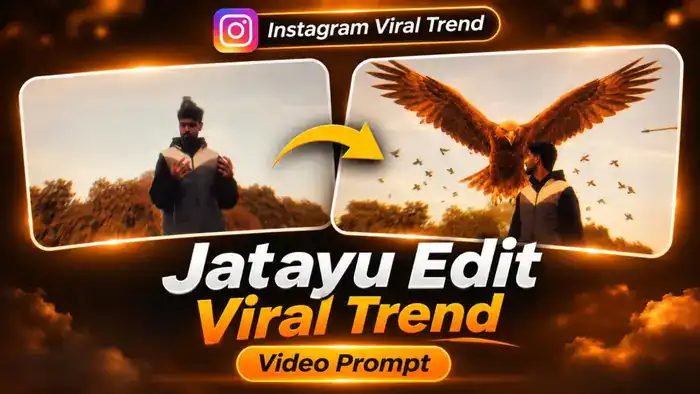
The Jatayu Edit is the new Instagram viral trend that everyone is talking about. In the reel, a man stands calmly under a golden sky. Then a giant reddish-brown eagle, just like Jatayu from the Ramayana, rises up behind him with its huge wings spread wide, while a flock of birds flies all around. It looks like a scene from a big-budget movie.
The good news is that you can make this exact Jatayu edit with your own face, for free, using Google Flow. In this post, you get the free video prompt, the muted reference video, the original audio and simple step-by-step instructions.
Watch the Jatayu Edit Viral Trend Video
First, watch the original reel below, so you know exactly what your AI video will look like.
Next, download the folder from the button below. It has two files: the muted reference video (no sound, no text) that you upload in Google Flow, and the audio file of the same 10 seconds that you add to your video later.
Why the Jatayu Edit Is Going Viral on Instagram
Jatayu is a hero that every Indian knows from the Ramayana. When people see a giant Jatayu rising behind a normal person, it gives a powerful, emotional, goosebumps feeling. That is why viewers watch the reel again and again, and share it with friends.
Also, most people still do not know how to make this kind of VFX edit. So if you post your own Jatayu edit now, while the trend is fresh, you have a good chance of getting high views and new followers.
Jatayu Edit Video Prompt
Before You Paste This Prompt, Check These 4 Things
- Muted video: Upload only the muted reference video from the folder above. A video with sound can fail in Google Flow.
- One clear photo: Use a front-facing photo where your face is fully visible and not blurry.
- Order: The reference video is @video1 and your photo is @image1.
- 16:9 landscape: The reference video is horizontal, so keep the aspect ratio at 16:9.
Replace the man in @video1 with @image1. Preserve the complete character design from @image1: face, hair, beard, skin tone, body proportions, clothing and distinctive details. His face must be clearly visible and exactly @image1 in every frame, from the first frame to the last — never the original man’s face, never blended or morphed.
Keep the giant reddish-brown eagle (Jatayu) exactly as in @video1: the same huge size, the same golden-brown glowing feathers, the same moment it rises up behind him with wings spread wide, the same slow powerful wingbeats and the same flock of small birds flying around. Keep the original sky, clouds, dry bushes, lamp posts, warm golden color grade, low camera angle, duration and aspect ratio. Change only the man’s appearance.
No text anywhere: do not copy or create any words, letters, titles or captions from @video1. The sky stays clean.
NEGATIVES: any text, letters, words, titles, captions, subtitles, original man’s face, identity swap, face morphing, appearance drift, altered actions, smaller eagle, missing eagle, extra characters, distorted faces, extra limbs, distorted wings, flickering, new scenes, logos, watermarks.
How to Make the Jatayu Edit Video in Google Flow
- Download the folder from the button above. It has the muted video and the audio file.
- Open Google Flow (labs.google/flow) and sign in with your Google account.
- Create a new project and select Video with Ingredients.
- Upload the muted reference video first, then upload your clear photo.
- Set the aspect ratio to 16:9 and the length to 10 seconds.
- Copy the prompt above, paste it in the prompt box and click Generate.
- Check the result. If the face does not match well, generate again with a clearer front photo.
How to Add Music and Post Your Jatayu Edit
- Download your generated video from Google Flow.
- Open it in CapCut or VN and add the “Jatayu Audio” file from the folder. It is the same 10 seconds, so it fits your video. You can also post directly on Instagram and pick the song with “Use audio”.
- Add a short caption and the trending hashtags, then post it as a Reel.
Tips for the Best Jatayu Edit Result
- Use a sharp photo taken in daylight, with your face looking at the camera.
- Avoid photos with sunglasses, caps or hands covering your face.
- Do not upload the original reel with sound in Flow. Always use the muted file.
- If the eagle looks small, simply generate again. Flow gives a slightly different result each time.
Frequently Asked Questions
Is the Jatayu Edit prompt free?
Yes. The prompt and the muted reference video are completely free. You only need a Google account to use Google Flow.
Can girls also make the Jatayu Edit?
Yes. Upload your own photo as @image1 and the person in the video will be replaced with you. The eagle and the effects stay the same.
Why does Google Flow show an error with my video?
This usually happens when the video has sound or is longer than 10 seconds. Use the muted reference video from this post, which is already 10 seconds and has no sound.
Will the text from the original reel come in my video?
No. The muted reference video has no text, and the prompt also tells Flow not to add any text, so your sky stays clean.