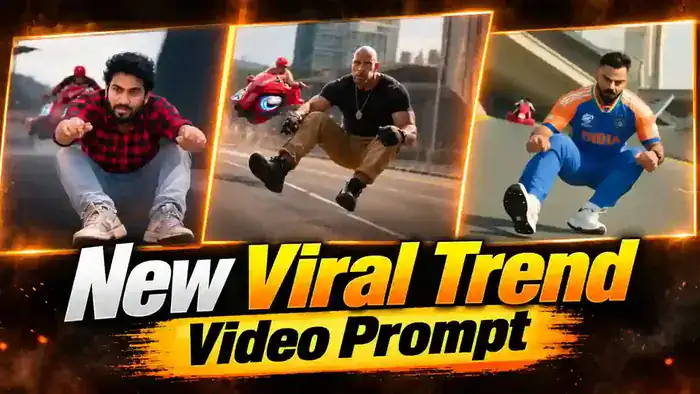
The Frog Viral Trend is one of the craziest AI videos on Instagram right now. In this video, a person rides tiny hover skates in a deep frog squat on a futuristic sky road, grooving and pointing at the camera. Suddenly, a red motorbike comes up from behind, the person gets scared, and then jumps forward like a flying frog to escape. The low camera angle and the funny frog pose make everyone watch it again and again.
The good news is that you can make this Frog Viral Trend video with your own photo for free using Google Flow. In this article, you get the reference video, the full Frog Viral Trend prompt for Google Flow and the simple step-by-step process. In addition, if you want an even more accurate result, you also get a second prompt for Higgsfield Genjutsu at the end.
Watch the Frog Viral Trend Reference Video
First, watch the reference video below. You will upload this same video in Google Flow, because Flow copies its exact camera angle, timing and frog moves from it. Download it with the button below.
How to Make the Frog Viral Trend Video in Google Flow
The process is very simple. Google Flow takes the movement from the reference video and puts your face on the frog rider. So, just follow these steps.
Step 1: First, download the reference video from above.
Step 2: Next, open Google Flow and select Ingredients mode. Set the ratio to 9:16, quality to 720p and output to 1x.
Step 3: Then, upload the reference video and one clear selfie of yourself. Your face must be fully visible and not blurry.
Step 4: After that, copy the Frog Viral Trend prompt below and paste it into Flow. Type @ and tag the reference video as video 1 and your photo as image 1.
Step 5: Now click Generate. In a few minutes, your frog hover skate video is ready with your face.
Step 6: Finally, open the video in CapCut or VN, add the trending sound and export it. Your viral video is ready, completely free.
Before You Paste This Prompt, Check These 5 Things
- Reference Video: Upload the reference video from above in Flow. If Flow shows an audio error, turn ON “Return silent video” in Flow Settings (on mobile, switch your browser to Desktop site first).
- Clear Selfie: Use one clear, well-lit photo where your full face is visible. A blurry photo gives a different face.
- Settings: Ingredients mode, 9:16, 720p, 1x output.
- @ Tags: Type @ in the prompt and tag the video as video 1 and your photo as image 1.
- Original Sound: The generated video is silent. After it is ready, add the trending sound in CapCut or VN.
Frog Viral Trend Prompt for Google Flow
Copy the full prompt below. It tells Flow the exact camera height, the deep frog squat, the red motorbike chase and the flying frog leap, second by second. Your face comes from your photo.
VISUAL STYLE:
Live-action cinematic photography inside a stylized futuristic city, like a high-end animated sci-fi film made photoreal. Wide-angle lens, very close to the subject. Shallow depth of field. Strong natural motion blur on the road and background to show high speed. Soft natural film grain. Realistic skin texture. Soft hazy overcast daylight. Muted cool color palette: dark blue-grey asphalt, slate-blue and grey buildings, pale hazy sky. Vertical 9:16 aspect ratio. If a reference video is supplied, follow its exact camera height, camera angle, framing, timing and body movement.
THE PERSON is the ONLY main character. THE RIDER is a background character with a generic face. Only THE PERSON’s face must match the reference image.
THE PERSON:
Use reference @image1. Preserve the exact facial identity throughout the entire video: same face shape, same eye color, same eyebrows, same nose, same jaw, same lips, same skin tone. Preserve the exact hairstyle from the reference image throughout the entire video: same hair length, same hair texture, same hair color, same hair style. Do not change, lengthen, shorten or braid the hair at any point.
THE PERSON’S WARDROBE — MUST REMAIN IDENTICAL IN EVERY SHOT:
Dark aviator sunglasses with thin metal frames. Oversized dark green varsity-style jacket with wide white and black stripes on the sleeves and shoulders, a small embroidered emblem on the chest with no readable text. Light-wash baggy wide-leg blue jeans. Chunky grey sneakers. No jewelry. No wardrobe changes.
THE HOVER SKATES (VERY SMALL, ONE ON EACH FOOT):
THE PERSON wears two tiny futuristic hover-skate shells, one on each sneaker. Each shell is a small, low, glossy white-and-black casing clipped around the front and sole of the sneaker, almost like part of the shoe. A thin white glowing light line runs along the side of each shell. The two feet are completely separate: there is NOTHING connecting them. There is NO board, NO deck, NO hoverboard, NO skateboard and NO wheels under the feet. The shoes glide just above the road with no visible support, as if floating.
THE RIDER AND THE RED BIKE:
THE RIDER wears a red baseball cap pulled low, a glossy dark navy puffer jacket and dark gloves. THE RIDER rides a chunky, retro-futuristic red motorbike with a rounded, boxy glossy red body, small side vents, a short dark tinted windscreen and wide handlebars. It is NOT a racing sport bike and has no fairing badges. The bike has two REAL thick black rubber tyres that stay ON the road at all times, rolling on the asphalt like a normal motorbike. The tyres touch the road, cast shadows on the road and kick up a little road spray.
The only light is a thin curved white LED strip low on the front of the bike. No glowing rings, no floating, no hover effect on the bike. Light grey exhaust smoke trails from the rear of the bike. No logos, letters or number plates anywhere on the bike.
LOCATION — THE SKY TRACK:
A narrow, futuristic elevated sky road that twists, climbs and banks like a roller-coaster track high above a stylized city. Smooth dark blue-grey asphalt. A single solid YELLOW line runs along each edge of the road. NO white lane markings. NO dashed lines. NO normal traffic lanes. NO cars. Tall, smooth, curved concrete side walls rise up on both sides of the road like a half-pipe. Large black and yellow chevron warning panels are mounted on the walls. Tall curved streetlights lean over the road with small glowing lamps. Huge curved concrete ramps and overpasses cross above and beside the track. In the background: tall, slightly leaning slate-blue skyscrapers and wide cylindrical towers with flat disc-shaped tops. Pale hazy overcast sky. Do NOT show a normal real-world highway or a real city skyline.
CAMERA LANGUAGE — MOST IMPORTANT:
The camera is placed almost ON the road surface, only about 20–30 cm above the asphalt. The camera is tilted UPWARD at THE PERSON. The camera is very close, about 1 meter in front of THE PERSON, and moves backward at exactly the same speed as them, so they always stay close to the lens. Because of the low angle, the road bends and rushes toward the lens, the side walls tower above, and the sky is seen behind THE PERSON’s head. THE PERSON fills most of the frame: the sneakers with their small hover-skate shells at the very bottom edge, the bent knees large in the lower half, the face in the upper part of the frame. Never use an eye-level or chest-level camera. Never show THE PERSON small or far away in the middle of a wide road.
SPEED:
All shots are normal real-time speed. No speed changes within any individual shot. Every shot begins with a CLEAN HARD CUT. No dissolves. No fades. No transitions. No merged shots.
SHOT 1 — 0.0 to 4.4 seconds
THE SKY TRACK. Extremely low-angle frontal tracking shot, camera almost on the road, about 1 meter in front of THE PERSON, tilted up. From the very first frame, THE PERSON rides in a DEEP FROG-LIKE SQUAT on the two small hover-skate shells: hips dropped very low close to the feet, knees bent sharply and spread wide apart, upper body leaning forward toward the camera. They hold this deep squat for the whole shot. They never stand up straight. Both arms reach forward toward the lens with both index fingers pointing at the camera.
They groove to a beat while gliding: shoulders bounce, the pointing hands swing left and right in turn, the head bobs, and they move their lips playfully to the beat with a cool, playful, confident expression. In the first second the image is slightly out of focus as they lean to one side, then the focus snaps sharp as they glide closer and fill the frame. The road curves and banks behind them. A black and yellow chevron panel on the wall passes at frame right. In the last second, a small red motorbike with THE RIDER appears far behind them at frame left, high above their shoulder because of the low camera, approaching fast.
SHOT 2 — 4.4 to 5.6 seconds
THE SKY TRACK. Extreme close-up from directly in front of the red motorbike, camera very close to its front. The glossy, rounded red front of the bike fills the entire bottom half of the frame. THE RIDER is hunched low behind the small dark windscreen, gripping the handles with both gloved hands on both sides of the frame. Only the red cap and intense eyes are visible above the windscreen, staring straight forward. The navy puffer jacket fills the top of the frame. No glowing rings. No text on the bike. Camera moves backward at the same speed, with a tiny vibration from the speed.
SHOT 3 — 5.6 to 9.0 seconds
THE SKY TRACK. Extremely low-angle frontal tracking shot, same camera height and distance as shot 1. The camera keeps moving backward the whole time and never stops. IMPORTANT: In this whole shot THE PERSON’s chest and face stay turned TOWARD THE CAMERA. They never turn their back to the camera. They never stand up and walk. They never turn around to face the bike.
5.6 to 6.4 seconds — GROOVE:
THE PERSON rides in the same deep frog-like squat at frame center-right, arms pointing forward, grooving. The red motorbike with THE RIDER is very close behind them at frame left, its tyres rolling on the road; because the camera is so low, the rider appears at shoulder height in the frame.
6.4 to 7.0 seconds — LOOK BACK:
Still in the squat and still facing the camera, THE PERSON twists only their head and shoulders to glance back over their shoulder at the motorbike, surprised.
7.0 to 7.8 seconds — STARTLED LEAN BACK:
Seeing how close the motorbike is, THE PERSON gets a big comic fright. They rise up a little from the squat and jerk their upper body BACKWARD in shock, head tilted back, mouth open, arms flailing up. For a moment they almost lose balance: one foot with its small hover-skate shell lifts and kicks forward toward the camera, very close to the lens at the bottom of the frame. This is only a startled flinch — NO flip, NO rotation, the body never turns upside down.
7.8 to 8.2 seconds — SUDDEN BURST FORWARD:
In a split second they snap forward again and explode off the road in a sudden panicked dash to escape the motorbike. The body whips from leaning back to leaning far forward, with fast motion blur.
8.2 to 9.0 seconds — FLYING FROG LEAP AWAY:
They launch forward through the air straight toward the camera in a big frog-like leap, body almost horizontal, knees bent and spread wide, arms stretched forward toward the lens with open hands, mouth wide open in a panicked, excited scream, sunglasses still on. They stay in mid-air the whole time, flying forward and away from the motorbike. Their feet do NOT touch the road. They do NOT land. The red motorbike stays right behind them at frame left, tyres on the road, chasing them.
SHOT 4 — 9.0 to 10.0 seconds
CLEAN HARD CUT to a completely new camera view. THE PERSON is not in this shot. THE SKY TRACK. Road-level forward-facing view down the empty, curving sky track, camera almost on the asphalt, moving fast. A blurred dark shape flies through the top of the frame. The red motorbike blasts past the camera very close at frame left, a huge red blur, its tyres rolling on the asphalt. It then speeds away along the curving road toward the leaning towers, becoming small in the distance, leaving a trail of grey exhaust smoke. A black and yellow chevron panel is visible on the wall at frame right. Hold on this final frame. END.
AUDIO:
No dialogue. No music. No voice. Only: rushing wind, soft electric hum of the hover skates, engine roar and tyre whoosh of the motorbike passing, a short panicked, excited scream during the leap.
STRICT NEGATIVE INSTRUCTIONS:
No extra main characters. No standing upright — THE PERSON stays in the deep frog squat except during the startled lean back and the leap. No eye-level or high camera angles. No wide shots where THE PERSON looks small. No white or dashed lane markings. No normal highway, no normal cars, no real city skyline, no famous landmark towers. No landing after the leap — the shot ends with THE PERSON flying in mid-air. No backflip, no somersault, no spinning, no upside-down moment — after the startled lean back they burst forward. No turning the back to the camera, no standing up and walking, no turning around toward the bike. No skateboard, no hoverboard, no single board under both feet. No glowing rings or hover effect on the bike — its tyres always touch the road. No racing sport bike design. No text. No subtitles. No logos. No brand names visible. No readable letters on the jacket.
No wardrobe changes. No facial identity changes. No hairstyle changes. No braids unless they are in the reference image. No wheels under the feet. No crash. No collision. No injury. No extra limbs. No distorted hands. No deformed faces. No dissolves. No fades. No artificial transitions. No merged shots. No dialogue.
Better Result: Frog Viral Trend with Higgsfield Genjutsu
Google Flow gives a very good result for free. However, if you want the moves to match the original video perfectly, use Higgsfield Genjutsu. It copies the motion directly from the reference video, and it can replace both characters: you as the frog rider and your friend as the second character. New Higgsfield accounts get one free Genjutsu video. After that, you need credits, but the process stays the same.
Step 1: First, open Higgsfield, click Genjutsu in the top menu and choose Create Video, then Motion transfer.
Step 2: Next, upload the same Frog Viral Trend reference video from above.
Step 3: Then, upload your clear photo as image 1 (the GREEN character, the frog rider). After that, upload your friend’s photo as image 2 (the YELLOW character).
Step 4: Now turn on the Prompt toggle, paste the Genjutsu prompt below and tag @Video 1, @Image 1 and @Image 2.
Step 5: Finally, click Generate. Once your Frog Viral Trend video is ready, add the trending sound in CapCut or VN.
Frog Viral Trend Prompt for Higgsfield Genjutsu
Replace the YELLOW CHARACTER in @[Video 1](video_1) completely with the character from @[Image 2](image_2).
CHARACTER ASSIGNMENT LOCK:
GREEN CHARACTER = @[Image 1](image_1) YELLOW CHARACTER = @[Image 2](image_2)
This mapping is absolute and must remain unchanged throughout the entire video.
The characters from @[Image 1](image_1) and @[Image 2](image_2) are the ONLY sources for the visual identity of the replaced characters.
For each replacement, transfer the reference character completely:
face, facial structure, skin, eyes, nose, mouth, hair, hairstyle, body, proportions, clothing, accessories, overall appearance, visual identity, facial expressions and natural mannerisms.
The original GREEN and YELLOW characters from @[Video 1](video_1) must NOT remain visible in the final result in any form.
Do not blend, morph, mix, average or combine the original characters with the reference characters.
Do not preserve any facial features, hairstyle, clothing, body appearance or visual identity from the original GREEN or YELLOW characters.
Only preserve from @[Video 1](video_1):
camera movement, framing, composition, scene, lighting interaction, character position, body movement, gestures, choreography, timing, interaction with the environment, interaction with vehicles or other objects.
The replaced characters must perform the exact same actions and occupy the exact same positions as the original characters in @[Video 1](video_1), while appearing as completely different people according to @[Image 1](image_1) and @[Image 2](image_2).
The replacement must be seamless and physically consistent with the original footage.
Maintain correct:
body-to-environment scale, perspective, depth, occlusion, contact points, shadows, lighting, reflections, motion blur, camera perspective.
The replacement must remain stable from frame to frame with no identity drift.
IMPORTANT:
Do not interpret the GREEN and YELLOW characters as characters that should be preserved. They are ONLY positional and motion references.
Their visual identity must be fully discarded and replaced.
FINAL RESULT:
There must be no recognizable visual trace of the original GREEN or YELLOW characters.
GREEN CHARACTER → fully replaced by @[Image 1](image_1). YELLOW CHARACTER → fully replaced by @[Image 2](image_2).
The result must look as if the characters from @[Image 1](image_1) and @[Image 2](image_2) were originally present in the scene and filmed naturally in @[Video 1](video_1).
Why the Frog Viral Trend Is Going Viral
This trend is exploding on Instagram Reels right now, and many versions have crossed millions of views. The reason is simple. The deep frog squat looks funny, the low camera makes it feel like a real action movie, and the sudden scare at the end makes people laugh and replay it.
Moreover, the ending is a perfect loop. The person flies toward the camera, the video cuts mid-air, and viewers watch it again to see the jump one more time. That replay value pushes the reel to more people.
Finally, anyone can make it. You do not need skates, a bike or a camera team. Just your photo, the prompt and a few minutes. So, if you post your Frog Viral Trend video now, while the trend is hot, you have a real chance to go viral too.
Tips for Better Frog Viral Trend Results
First, always use a clear, well-lit selfie where your face looks straight at the camera. Sunglasses in the photo can confuse the AI.
Next, do not change the prompt. Every line in it fixes a mistake the AI made earlier, like a standing pose, a normal highway or a bike flying in the air.
Also, if one move looks wrong on the first try, simply click Generate again. AI videos change a little every time, so a second try often fixes it.
Finally, add the trending sound and a short caption like “Bhaago!” to make the reel more fun.
Frequently Asked Questions
Is the Frog Viral Trend prompt free?
Yes. Both prompts are completely free. Google Flow is also free to use, while Higgsfield Genjutsu gives one free video on a new account.
Which method gives the best result?
Google Flow gives a very good free result. Higgsfield Genjutsu gives the most accurate motion because it copies the reference video directly, but it needs credits after the free video.
Can I add my friend in the video?
Yes. In the Higgsfield Genjutsu method, upload your friend’s photo as image 2, and they will replace the second character.
Why is my generated video silent?
The AI makes the video without sound. So, add the trending sound in CapCut or VN after you download it.
That is all you need to make the Frog Viral Trend video. If you liked this one, also try the Parkour Jump Trend Prompt, the Aura Edit Prompt and the Korean Drama Edit with AI. Make yours today and share it on Instagram.