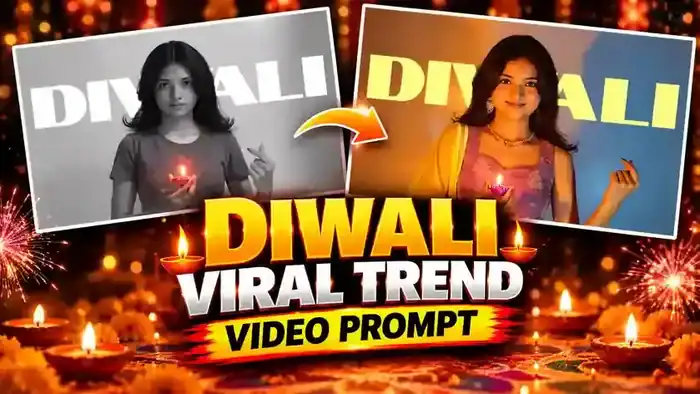
The Diwali Viral Trend is taking over Instagram Reels this festive season. The video starts in black and white – a girl in a simple T-shirt holding a small diya – and then it suddenly turns colourful as she appears in a beautiful festive look with a big DIWALI title behind her. You can make the same video with your own photo in Google Flow using our free prompt and muted reference video.
Why This Diwali Viral Trend Is Blowing Up
The “simple to festive” glow-up is a format people never get tired of. The black and white start builds curiosity, and the colour reveal with the diya feels warm and emotional – perfect for Diwali. That is why these reels get saved and shared so much.
Watch the Diwali Viral Trend Video
This is the result you can create. Tap the download button right below the video. The folder has two files: the muted reference video (upload this one in Google Flow) and the video with sound (use it later to add the original audio to your result).
How to Make the Diwali Viral Trend Video in Google Flow
- First, open the download folder above and download the muted reference video (and the one with sound for later).
- Next, open Google Flow and create a new project.
- In Flow settings, turn ON “Return silent video” (on mobile, switch your browser to Desktop site first).
- Upload the muted reference video and your own photo (this is the “target image”).
- Set the aspect ratio to 16:9 landscape, because this trend video is horizontal.
- Copy the prompt below, paste it and generate the video.
Before You Paste This Prompt, Check These 4 Things
- Muted reference video: upload only the muted file from this page. A video with sound can give an audio error.
- Clear photo: use a sharp photo where your face and upper body are clearly visible.
- Your outfit: this prompt keeps the clothes from your photo, so upload a photo in the outfit you want to show.
- Landscape ratio: keep the output 16:9 horizontal.
Diwali Viral Trend Prompt (Copy and Paste)
Copy this full prompt. It copies the motion, camera and timing from the reference video and keeps your face, hair and outfit from your photo.
Use the provided reference video ONLY as a motion, camera, timing, and performance reference, and use the provided target image as the absolute visual identity reference. Recreate the video using the person/character from the target image while accurately transferring the movement and camera behavior from the reference video. The target image must remain the source of truth for the character’s appearance. Keep the character exactly consistent throughout the entire video: same face, facial structure, eyes, eyebrows, nose, lips, jawline, skin tone, realistic skin texture, hairstyle, hair length, shape, texture, hairline, body shape, proportions, clothing, clothing colors, fabric, design, details, accessories, and overall identity. Do NOT redesign, beautify, replace, modify, age, de-age, or reinterpret the person. Do not change the outfit or hairstyle when the body moves.
Analyze the reference video frame-by-frame and reproduce its movements as accurately as possible, including head movement, facial expressions, eye direction, gaze, eyebrow movement, mouth movement, blinking, neck movement, shoulders, arms, hands, upper-body movement, walking, posture, natural weight shifting, timing, rhythm, and the exact start and end positions of movements. The target character must perform the same actions as the person in the reference video while remaining visually identical to the target image.
Copy the reference video’s camera position, angle, distance, height, movement, handheld motion, camera shake, push-in, pull-out, pan, tilt, tracking, framing, subject positioning, perspective changes, and movement speed. Do not introduce any camera movements that are not present in the reference video.
Transfer the facial performance naturally and accurately, matching the original expression intensity, smile or neutral expression, eye movement, eyebrow movement, head tilt, lip movement, and emotional timing without altering the target person’s identity. The face must remain recognizable as the exact same person from the target image in every frame.
Create highly realistic motion with natural human biomechanics. Avoid face morphing, identity drift, facial distortion, melting features, unnatural eye movement, extra or missing fingers, deformed hands, body warping, clothing changes, hair changes, artificial facial expressions, rubber-like movement, flickering, and frame-to-frame inconsistencies. Hands, arms, face, hair, and clothing must remain anatomically and visually consistent throughout the video.
Maintain strong temporal consistency so the character’s face, hair, body, clothing, accessories, and skin texture remain stable throughout the entire sequence, with no random changes between frames. Maintain the same composition and subject framing as the reference video wherever possible, adapted to a full-frame 16:9 horizontal landscape output. If the person moves closer to or farther from the camera, reproduce the same relative movement with the target character. Keep the video full-frame without black bars, letterboxing, pillarboxing, or artificial borders, and do not add unnecessary background elements.
Output: 16:9 horizontal landscape, 1920×1080 Full HD, 30 FPS, normal real-time speed (1×). Create a cinematic but natural-looking landscape video that looks like the exact person from the target image naturally performing the exact movements and camera performance from the reference video.
PRIORITY ORDER: (1) Target image identity and appearance, (2) Reference video motion and performance, (3) Reference video camera movement, (4) Natural physics and realism, (5) Visual style.
Add Music and Post Your Diwali Reel
- Open your generated video in Instagram, CapCut or VN.
- Add the original audio from the video with sound in the download folder – or any Diwali song you like.
- Post it as a Reel with a Diwali caption and trending hashtags.
Want more Diwali trends? Try our Bullet Bhi Hai Aur Ek Hi Hai Jaan prompt and the Meri Nas Nas Mein Bahe prompt too.