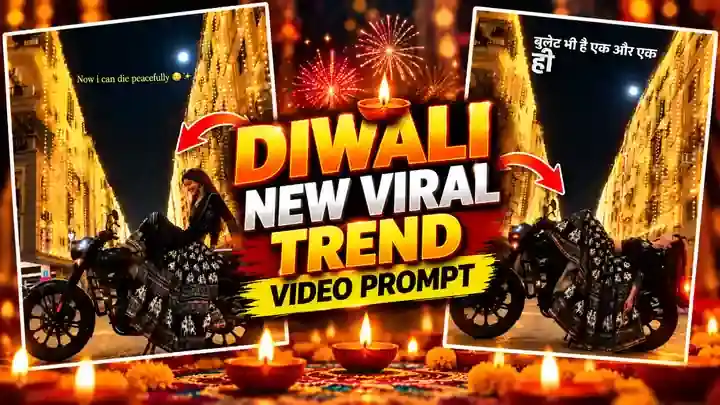
The Bullet Bhi Hai Aur Ek Hi Hai Jaan trend is one of the biggest Diwali reels on Instagram right now. A person sits on a black bike in a street full of golden Diwali lights, then lies back on the bike with a peaceful smile while the song plays. You can make this exact video with your own photo in Google Flow – just upload our muted reference video, your photo and the free prompt below.
Why the Bullet Bhi Hai Aur Ek Hi Hai Jaan Trend Is Viral
Bike lovers relate to the line instantly, and the glowing Diwali street makes every frame look like a movie poster. Also, the slow, calm lie-back moment is perfect for adding lyrics, so people watch it again and again. That is why these reels are getting huge views during the festival season.
Watch the Bullet Bhi Hai Aur Ek Hi Hai Jaan Video
This is the result you will get. Download the muted reference video from the button right below the video – you will upload it in Google Flow.
Outfit You Will Get in This Trend
You do not need special clothes in your photo. The prompt fixes the outfit automatically: girls get the same black printed lehenga as the original video, and boys get a sharp all-black formal look (black shirt, black trousers and black shoes).
How to Make the Bullet Bhi Hai Aur Ek Hi Hai Jaan Video in Google Flow
- First, download the muted reference video from the button above.
- Next, open Google Flow and create a new project.
- In Flow settings, turn ON “Return silent video” (on mobile, switch your browser to Desktop site first).
- Now upload the muted reference video as @video1 and your clear photo as @image1.
- Then copy the prompt below, paste it and keep the ratio at 9:16.
- Finally, generate the video. If the face does not match, generate once more.
Before You Paste This Prompt, Check These 4 Things
- Muted reference video: upload only the muted file from this page. A video with sound can give an audio error.
- Clear photo: use a sharp, front-facing photo where your face is clearly visible.
- Silent video setting: keep “Return silent video” ON in Flow settings.
- Ratio: keep the video vertical 9:16 so it fits Reels.
Bullet Bhi Hai Aur Ek Hi Hai Jaan Prompt (Copy and Paste)
Copy this full prompt. It tells Google Flow to copy everything from the reference video and change only the person.
DURATION: 10 seconds.
ASPECT RATIO: 9:16 vertical.
IDENTITY:
@image1 is the ONLY identity reference. The person in the video must be the exact person from @image1: same face, same facial features, same skin tone, same hairstyle and hair length, same body type, same gender and age. Do not copy the original person’s face from @video1. Replace the person in every frame, including frames where the head is tilted back, turned away or partly hidden by hair.
OUTFIT (FIXED — ignore the clothes in @image1):
Whatever clothes the person wears in @image1, do NOT use them. The outfit is fixed:
– If the person in @image1 is a woman/girl: she wears EXACTLY the same outfit as the woman in @video1 — copy it 1:1: a black lehenga / anarkali-style long dress with a very wide, flowing, floor-length flared skirt in black with the same white-grey printed elephant and floral motifs and the same printed border bands near the hem, and the same black fitted top with long sleeves. Same pattern, same colours, same flare and volume as in @video1. When she lies back, the wide printed skirt spreads and drapes over the motorcycle exactly like in @video1.
– If the person in @image1 is a man/boy: he wears an all-black formal outfit — black formal full-sleeve shirt, black formal trousers, black belt, black leather formal shoes (a black blazer is optional). Clean, sharp and elegant, fully black.
The outfit is the same in every frame of both shots. No logos, no text on the clothes.
REFERENCE VIDEO (MASTER):
@video1 is the master reference. Recreate it exactly, frame by frame: the same camera position, camera angle, framing, camera distance, lens look, timing, the same cut and the same two shots. Keep the same on-screen text overlays, the same motorcycle, the same street, the same buildings covered with warm golden fairy lights, the same night sky and moon, and the same lighting as in @video1.
ACTION AND TIMING (copy from @video1):
– 0–3 seconds: low side view of the parked black motorcycle. The person sits sideways on the seat facing the camera, one hand resting on the seat, looking down with a soft smile, relaxed.
– Around 3 seconds: the same quick dark blink transition as in @video1.
– 3–6.6 seconds: the person is now lying back across the motorcycle seat: back resting on the seat, legs stretched over the fuel tank toward the front of the bike, head tilted back over the rear of the bike, hair falling down, arms hanging relaxed, the outfit draped over the bike. They slowly settle into this peaceful pose with eyes closed, like in @video1.
– At 6.6 seconds: the same cut as in @video1 to the second, slightly lower and closer angle of the bike with the red tail light glowing.
– 6.6–10 seconds: the person stays lying back peacefully on the motorcycle in the same pose, completely calm, with only tiny natural movements (breathing, a little hair movement).
MOTORCYCLE:
Keep the motorcycle exactly as in @video1: black retro cruiser, round headlight, black spoke-pattern alloy wheels, parked on its side stand, engine off. Do not change its shape or colour. No logos, no brand names, no number plate text.
REALISM:
Photorealistic night video, real phone camera look, warm golden light from the fairy-lit buildings on the person and the bike, natural skin texture, natural body weight on the bike. The pose must look comfortable and safe — the motorcycle is parked and does not move.
AUDIO:
@video1 is silent. Keep the video silent or with only very soft night street ambience if supported. Do not add dialogue, voice-over, singing or lyrics. No lip-sync.
STRICT RULES:
– Only the person changes: face, hair and body from @image1, and ALWAYS the fixed outfit described above — for a woman the exact black printed lehenga from @video1, for a man the all-black formal outfit (never the clothes from @image1). Everything else stays exactly as in @video1.
– Do not invent additional scenes. Do not create new shots that are not in @video1.
– Only one person. No extra people.
– Keep the on-screen text exactly as in @video1: the same words, same font style, same position and same timing (the English line with the emoji in the first shot, and the Hindi lyric lines appearing word by word in the second shot). Do not add any other text. No logos or watermarks.
– Keep 9:16 vertical.
FINAL RESULT:
The exact same video as @video1 — sitting on the parked motorcycle, then lying back peacefully across it under the golden fairy-light buildings at night — with only the person replaced by the person from @image1, wearing the fixed outfit (woman: the exact black printed lehenga from @video1; man: all-black formal).
Add the Song and Post Your Reel
- Open Instagram and upload your generated video as a Reel.
- Add the “Bullet Bhi Hai Aur Ek Hi Hai Jaan” song – or any song you like.
- Turn ON captions / lyrics for that song, so the words appear on your video like in the original.
- Write a caption, add trending hashtags and post it.
Want more Diwali and viral trends? Try our Meri Nas Nas Mein Bahe prompt and the Car Smooth Transition prompt too.