

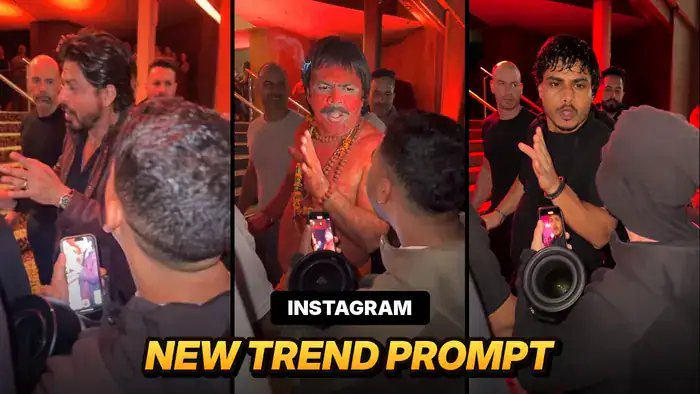
The Instagram New Trend Prompt everyone is searching for right now is this fan-cam AI video. In the original clip, a big star meets fans backstage, talks to them with funny expressions and laughs at a photo on a fan’s phone. Now creators are replacing that star with their own face, and the result looks like a real celebrity moment. In this post, you will get the free prompt and the full Google Flow process to make it yourself.
Why This Instagram New Trend Is Going Viral
This is a brand-new Instagram trend, and versions of it are pulling millions of views. First, the clip is shot like a real phone video, so viewers believe it for a second. Next, the funny contrast works: people swap in a pandit ji, a friend or themselves, and the same star-style acting suddenly becomes comedy. Finally, it is easy to make, because the Instagram New Trend Prompt below does most of the work. So if you post it early, you have a real chance to go viral too.
Watch the Reference Video
Here is the reference video made with this trend. This version has the trending sound, so watch it first. Also download it, because you will use its sound at the end. However, do not upload this file in Google Flow. For Flow, you need the muted file given below.
How to Make the Instagram New Trend Prompt Video in Google Flow
Google Flow settings (keep exactly these):
- Model: Omni
- Mode: Ingredients
- Aspect ratio: 9:16 (vertical)
- Quality: 720p
- Outputs: 1x
- First, open Google Flow and create a new project.
- Next, select Ingredients mode and set the settings above: Omni model, 9:16, 720p and 1x.
- Then upload the muted reference video and your clear selfie photo.
- After that, copy the prompt below and paste it into the prompt box.
- Now tag the files in the prompt: type @ and select the muted video as Video 1 and your photo as Image 1.
- Finally, click Generate. If the face does not look right, generate again with a sharper selfie.
Instagram New Trend Prompt (Copy Here)
⚠️ Before You Paste This Prompt, Check These 5 Things
- Upload the muted reference video (not the one with sound)
- Upload a clear selfie photo with your face fully visible, not blurry
- Settings: Ingredients, Omni, 9:16, 720p, 1x
- Tag @Video 1 = muted video and @Image 1 = your photo
- After generating the video, import it into any video editor, add the original reference video’s audio, sync it properly with the generated video, and you’re done.
Replace only the main man in the center (the one who walks in, talks to the fan and laughs) with the person from @Image 1. Use the exact face, hairstyle, skin tone, body shape and outfit from @Image 1. Do not keep the original man’s clothes, body size or appearance.
Keep all of his acting and timing exactly the same: he walks in through the people, stops in front of the fan and talks very animatedly and playfully. He makes a pinched-finger gesture near his mouth, waves an open palm while telling a story, points at the fan’s phone, leans down to look at the screen and then laughs hard, covering his forehead with his hand. Same head movements, same lip movement, same expressions.
Photorealistic, the identity from @Image 1 stays consistent in every frame, natural skin that matches the red ambient light, no face morphing, no flicker, no extra people, real iPhone fan-cam look, 9:16 vertical.
Add the Trending Sound in VN or CapCut
Your generated video will be silent, because you made it from the muted file. So the last step is to add the trending sound back. It takes only one minute.
- First, download your generated video from Google Flow.
- Next, open VN or CapCut (any editing app works) and import your video.
- Then add the sound: use “Extract audio” on the video with sound (download button above), or pick the same trending sound from your music library.
- After that, line the sound up with the start of your clip and trim the extra part.
- Finally, export the video and post it on Instagram.
Shortcut: you can also skip the editing app. Just upload the silent video on Instagram and choose this trending audio while posting the reel.
Tips for a Better Result
- Use a clear, front-facing photo. A blurry or side-angle photo makes the face change between frames.
- Pick a fun outfit. Costume looks like a pandit ji, a cop or a groom get the most comments in this trend.
- Keep your real body type. The prompt already asks Flow to use your body shape, so a full-body photo works best.
- Add the original sound. After generating, add the trending audio in Instagram or CapCut.
- Label it. Write “AI edit” in your caption, since the base clip is from a real event.
FAQs
Is this trend free to make?
Yes. Google Flow gives free credits, so you can make this Instagram new trend prompt video without paying.
Can I use a friend’s photo?
Yes, but only with their permission. Many creators swap in friends or funny characters for comedy.
Why did my body or clothes come out wrong?
Usually the photo was only a close-up. So upload a full-body photo, then generate again.
That’s it. Download the reference video, add your photo, paste the Instagram New Trend Prompt and post your version today. For more free trends, also try the Korean Drama Edit with AI and the Garba Outfit Changing Trend.

