
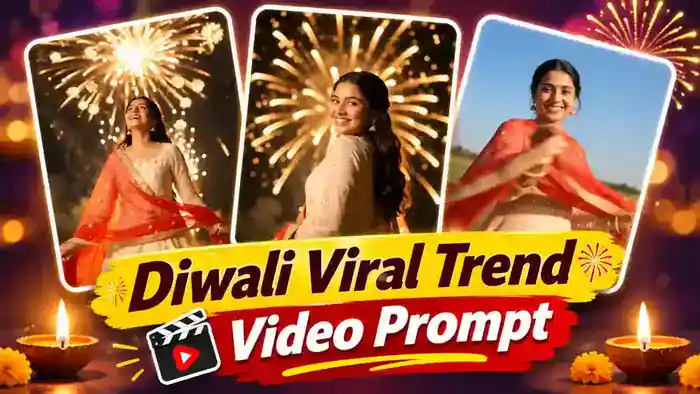
The Diwali Firecracker Trend is the most viral festive reel on Instagram right now. A girl swirls her dupatta in front of the camera, and the scene instantly turns into a night full of colourful fireworks. In this post, you get two free prompts and the full Google Flow process to make this dupatta transition video with your own face.
Why the Diwali Firecracker Trend Is Going Viral
First, the dupatta transition is simple but feels like magic. In one swirl, a sunny field becomes a festive night sky. Next, the golden fireworks, the twirl and the final smile over the shoulder make people replay the reel again and again.
So these reels are getting millions of views during Diwali. Also, festive content gets shared a lot with friends and family. Therefore, if you post your own version now, your reel has a real chance to go viral too.
Prompt 1: Diwali Firecracker Trend with Only Your Photo
This is the easiest way to make the Diwali Firecracker Trend. You do not need any reference video. Just upload one clear photo, and Google Flow makes the full dupatta swirl and fireworks video with your face. Watch the result made with this prompt:
Also, the outfit is fixed in this prompt. So whatever clothes you wear in your photo, the video always shows the same green kurta, white palazzo and cream dupatta look.
- First, open Google Flow and select Ingredients mode.
- Next, set the ratio to 9:16, length 10 seconds, quality 720p and 1x output.
- Then upload only one clear selfie.
- After that, copy the prompt below, paste it in Flow and tag your photo as @image1.
- Finally, click Generate and add the Diwali song in CapCut or VN.
Before You Paste This Prompt, Check These 4 Things
- Only your photo: no reference video is needed for this prompt. Upload just one photo.
- Clear selfie: use a clear front-facing photo with your full face visible. Never use a blurry or side-angle photo.
- Settings: Ingredients mode, 9:16, 10 seconds, 720p, 1x output.
- Original sound: after generating, add the trending Diwali song in CapCut or VN.
Prompt 1: Diwali Firecracker Trend Prompt (Copy and Paste)
IDENTITY:
@image1 is the ONLY face reference. Her face, skin tone, eyes, nose, smile and age come 100% from @image1 in every shot, including side profiles and over-the-shoulder looks. Keep the same hair colour, length and texture as in @image1. Natural real skin, no beautification, no face change between shots. Same gender and age as @image1.
OUTFIT RULE:
Take ONLY the face and hair from @image1. Completely ignore whatever clothes, jewellery or background are in @image1 (jeans, t-shirt, saree, anything). No matter what she wears in @image1, in the video she always wears this exact Diwali kurta-dupatta outfit:
OUTFIT (identical in every shot, never changes):
– Straight long lime-olive green silk kurta, three-quarter sleeves, small golden embroidered patch on the chest yoke, side slits– Plain white palazzo pants– Large soft cream-white chikankari dupatta with fine white thread embroidery, draped around her back and over her forearms– Small gold stud earrings and one thin gold bangle only. No other jewellery, no bag, no purse
CAMERA (all shots):
Phone at about knee height, 1–1.5 m from her, tilted up 30–40 degrees. She fills the lower half of the frame from waist or hips up; the sky with fireworks fills the upper half. Handheld, gently floating, small slow push-ins. Never a drone shot, never a wide shot where she looks small. Background is always an open ground at night with tiny distant city lights and stadium-style light poles at the very bottom edge.
FIREWORKS (all night shots):
Huge real aerial fireworks directly above and behind her, thick drifting firework smoke clouds lit by the colour of each burst, rocket trails rising, sparks falling. The firework light washes over her hair and shoulders as rim light. The sky colour changes in every shot exactly as written below.
SHOT 1 — 0.00 to 1.50s (DUSK, the transition):
Blue-hour evening, plain deep teal-blue sky, no fireworks yet, a few warm street lights far below. She stands facing the camera, chin slightly up, calm confident smile, arms open low holding both edges of the cream dupatta.0.00–0.50: she looks down into the lens and starts to spread the dupatta outward.0.50–1.00: she swings the dupatta wide from her right side toward the camera in one big wave.1.00–1.50: the cream fabric sweeps across the lens and fully covers the frame (soft blurred cream wipe).
SHOT 2 — 1.50 to 3.00s (MAGENTA NIGHT):
The cream dupatta slides off the lens and reveals night. Hot magenta-pink fireworks rain down like falling willow trails, pink smoke. She is now seen from behind, back to camera, mid-twirl, the dupatta swirling around her waist and flaring out to the side.1.50–2.25: dupatta pulls away from lens, she twirls slowly.2.25–3.00: she finishes the turn, standing with her back to camera, looking up at the sky.
SHOT 3 — 3.00 to 4.75s (WHITE BURSTS + GREEN SMOKE):
Big bright white chrysanthemum bursts above her, billowing smoke that turns mint-green as green fireworks explode. Back to camera, she looks up, then slowly turns her head over her right shoulder.3.00–3.75: looking up at the bursts, hair moving softly.3.75–4.75: turns her face over her shoulder toward the camera with a soft happy smile.
SHOT 4 — 4.75 to 6.25s (DARK SKY, GOLD BURSTS):
Dark night sky with grey smoke, scattered golden-white bursts. She stands back to camera, the dupatta hanging on her back, gently swaying side to side, looking up at the fireworks in wonder.
SHOT 5 — 6.25 to 7.75s (PURPLE SKY, CRISS-CROSS ROCKETS):
Lavender-purple smoky sky with many golden rocket trails shooting diagonally in a criss-cross pattern. She stands at a three-quarter angle, the dupatta over her shoulder, turns toward the camera and gives a warm wide smile, one hand lifting gracefully at her side.
SHOT 6 — 7.75 to 10.00s (DEEP RED SKY, FINAL LOOK):
Deep crimson-red sky full of glowing red sparkle bursts and red-lit smoke. Kurta and dupatta clearly visible.7.75–8.75: she lifts one hand to the side of her hair near her ear and tilts her head back, eyes half closed, smiling, hair swinging.8.75–9.50: she turns her body away and looks back over her shoulder.9.50–10.00: final frame — she looks straight into the lens over her shoulder with a radiant confident smile, red fireworks still bursting behind her. Hold this look until the end.
REALISM:
Real phone-camera footage, natural hair and fabric physics, the dupatta moves like light cotton, realistic smoke and sparks, slight lens flare from bright bursts, no CGI look.
AUDIO:
Soft festive instrumental music with real firework crackles and booms. No dialogue, no voice, no singing, no lip-sync.
STRICT RULES:
– Only one person in the whole video, the woman from @image1. No other people.– Outfit stays exactly the same in all 6 shots (green kurta, white palazzo, cream dupatta).– Never a drone or wide shot; camera always low and close, looking up.– No text, no captions, no logos, no watermarks, no brand names anywhere.– No fire on the ground, no burning, no sparklers in her hands, no danger.– Do not invent extra scenes, locations or actions beyond the 6 shots above.– Face never changes and never blurs; it always matches @image1.
Prompt 2: Diwali Firecracker Trend with Reference Video
This is the reference video used in this tutorial. Your video will copy the same dupatta swirl, twirl and camera movement.
Download the reference video from the button below:
How to Make the Dupatta Transition Firecracker Trend in Google Flow
- First, download the reference video and remove its sound in CapCut or VN.
- Next, open Google Flow and select Ingredients mode.
- Then set the model to Omni Flash, ratio 9:16, quality 720p, length 10 seconds and 1x output.
- After that, upload the muted reference video and one clear selfie.
- Now copy the prompt below and paste it in Flow. Type @ and tag the video and your photo in the prompt.
- Finally, click Generate and download your video.
Before You Paste This Prompt, Check These 4 Things
- Muted video: the reference video must have no sound, otherwise Google Flow shows an “unable to generate speech” error. Remove the audio in CapCut or VN first.
- Clear selfie: use one clear front-facing photo with your full face visible. Never use a blurry or side-angle photo.
- Settings: Ingredients mode, Omni Flash model, 9:16, 720p, 10 seconds, 1x output.
- Original sound: the generated video is silent, so add the trending Diwali song in CapCut or VN after generating.
Prompt 2: Diwali Firecracker Trend Prompt (Copy and Paste)
Copy this full prompt. It tells Google Flow to keep the same dupatta transition, fireworks and twirl, but with your face.
Seconds 0–1:
Daytime, open field with clear blue sky. A young Indian woman wearing an ivory-peach traditional anarkali dress with embroidered gold accents and a sheer bright red dupatta. She holds the edges of the red dupatta, smiling and swirling it dynamically directly in front of the camera lens, covering the frame for a smooth match-cut transition.
Seconds 1–4:
The red dupatta whips away in a seamless transition into night. She is facing away from the camera, wearing an elegant ivory/off-white anarkali gown with golden gotta-patti border, holding a matching ethnic potli purse. She twirls smoothly under a pitch-black night sky filled with spectacular, vibrant golden firework bursts and crackling sparks. Warm rim-lighting contours her back and hair.
Seconds 4–8:
Mid-twirl, she turns upwards with pure joy and laughter, looking at the dazzling fireworks exploding overhead. The intense golden embers, sparkle fountains, and bokeh lights illuminate her face from above and behind. Her red dupatta trails gracefully in the air.
Seconds 8–10:
Completing the spin, she glances back over her shoulder directly into the camera lens with a radiant, confident smile, head slightly tilted. Dense, sparkling golden fireworks continue to explode directly behind her in the dark sky, creating warm festive bokeh and realistic atmospheric haze.
Technical Specs & Style:
Photorealistic, 4K resolution, cinematic slow-motion effect (60fps feel), natural hair physics during twirl, precise face-swap from reference image with accurate micro-expressions and eye line, warm festive lighting, highly detailed fabric textures.
Add the Diwali Song in CapCut or VN
The video from Google Flow comes without sound. So open it in CapCut or VN, add the trending Diwali song from the original reel, sync it with the dupatta swirl, and export.
Tips for a Better Result
- Use a bright, clear photo with your face looking straight at the camera.
- If the face does not match well, generate 2-3 times and keep the best one.
- Keep the video at 10 seconds so the full twirl and the final smile are included.
- Post the reel before and during Diwali, because festive trends peak in those days.
Frequently Asked Questions
Is the Diwali Firecracker Trend prompt free?
Yes. The prompt is free, and Google Flow lets you generate this video with your free credits.
Can boys also make this trend?
Yes. However, the prompt describes a woman in an anarkali dress. So for a boy, change the outfit lines to a kurta and keep the rest of the prompt the same.
Why does Google Flow show a speech error?
This happens when the reference video has sound. So always remove the audio first and upload the muted video.
Which song is used in this trend?
Use the trending Diwali song from the original reel. Add it in CapCut or VN after you generate the video.
So that is the full process for the Diwali Firecracker Trend. Also try our Replace Character in Video prompt, the Garba Dance AI Video and the Maa Durga 9 Looks trend for more festive reels.