
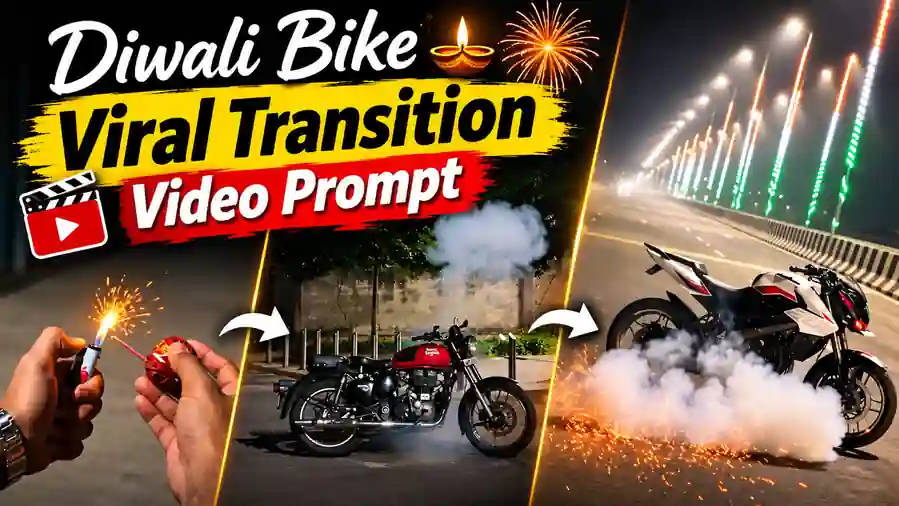
The new Diwali Bike Transition is one of the most loved bike reels on Instagram this Diwali. A hand throws a small festive cracker on an empty road, a bright flash fills the screen, and suddenly a bike appears at the same spot doing a smoky burnout. The best part is that you can make this transition with your own bike – Bullet, Classic 350, R15, Duke, Pulsar or any other – using just one bike photo and our free Google Flow prompt.
Why the Diwali Bike Transition Is Going Viral on Instagram
This is a new Diwali trend, and these bike reels are getting millions of views. First, the “wait for it” start builds curiosity, so people keep watching. Next, the flash and the sudden bike reveal give a strong wow moment. Also, every bike lover wants to see their own bike in this style, so they share it with friends and bike groups. So, if you post your version early, your reel has a very good chance to go viral too.
Watch the Diwali Bike Transition Reference Video
This is the reference video for the Diwali Bike Transition. Google Flow copies its cracker throw, flash, transition, smoke and camera moves, and only changes the bike to the one in your photo. Download the folder from the button right below the video. It has the reference video and the original sound of the trend.
How to Make the Diwali Bike Transition in Google Flow
- First, download the folder from the button above. It has the reference video and the original sound file.
- Next, open Google Flow and select Ingredients mode.
- Then upload the reference video and one clear photo of your bike.
- After that, copy the prompt below and paste it. Tag the video as @video1 and your bike photo as @image1 (type @ and select them).
- Now select the ratio 9:16, the Omni Flash model and tap Generate.
- Finally, download your video and add the original sound from the download folder in VN or CapCut.
Before You Paste This Prompt, Check These 4 Things
- Clear bike photo: use a sharp side or three-quarter photo where the full bike is visible, with nobody sitting on it.
- Right tags: @video1 is the reference video and @image1 is your bike photo.
- No editing needed: you do not have to write the bike name – the prompt takes the bike directly from your photo.
- Add the sound later: the generated video is silent, so add the original sound from the download folder in VN or CapCut.
Diwali Bike Transition Prompt (Copy and Paste)
Copy this full Diwali Bike Transition prompt. It keeps every moment of the reference video – the cracker, the flash, the whip transition and the burnout smoke – and only changes the bike. It also blocks any text or watermark from the reference video.
Recreate @video1 shot by shot, exactly the same, with just one change: the motorcycle that appears after the flash is the exact motorcycle from @image1. Completely ignore the design, shape, colour and number plate of the motorcycle in @video1 — do not copy it, do not mix it.
DURATION: same as @video1 (about 11 seconds).
ASPECT RATIO: Vertical 9:16.
THE BIKE (from the moment it appears until the last frame):
- It is the exact same motorcycle as in @image1: the same model, the same body shape, the same fuel tank, headlight, seat, handlebar, exhaust, wheels, mudguards and side panels, and the same colours, paint, graphics and badges.
- It looks like a real, stock motorcycle, instantly recognisable as the bike in @image1, not a generic bike.
- If @image1 shows the bike from one side only, keep the same real design on the other side too.
- Exactly ONE bike. Its design stays identical in every frame, with no morphing.
- The headlight is ON. The number plate is plain and blank, with no text.
- No rider, even if @image1 shows a person. Nobody sits on, stands near or touches the bike.
SEQUENCE AND TIMING (copy @video1 exactly):
- 0.0–0.75s: Handheld close-up of one hand holding a small round green festive Diwali cracker ball with a short glowing fuse. Behind it is a quiet road at dusk, with a painted mural wall and trees.
- 0.75–1.0s: The hand gently tosses the cracker forward onto the empty road. The camera follows it down to the road.
- 1.0–4.8s: Handheld, almost still view of the empty grey road, the painted mural wall, the trees, the evening sky and the street lights. The camera tilts up very slightly and slowly. A tiny orange glow appears on the road where the cracker landed.
- 4.8–5.0s: A bright pink-white festive light flash fills the whole frame. It is a harmless Diwali celebration light effect.
- 5.0–5.1s: A very fast motion-blur whip transition, exactly like @video1.
- 5.1–7.3s: The flash clears and the motorcycle from @image1 is standing on the same road, at the exact spot where the cracker landed. It is shown in a side three-quarter view, facing right, at the same position and the same size in the frame as the bike in @video1. It is now night, with the same mural wall behind. The parked bike does a stationary rear-wheel burnout: the rear wheel spins in place and thick white smoke billows out to the left, exactly like @video1. The bike does not move forward.
- 7.3–7.6s: A smooth, slow push-in toward the bike, until it fills the lower half of the frame, the same as @video1.
- 7.6–10.2s: Hold on the bike, with the headlight glowing and light white smoke slowly drifting around it.
- 10.2s–end: Blur and fade to black, the same as @video1.
REALISM:
- Cinematic, realistic night lighting.
- Real metal, chrome and paint reflections.
- Real smoke and a natural handheld phone camera feel.
- The bike looks like a real photographed motorcycle, not a toy, a cartoon or a 3D render.
AUDIO:
Silent video. No music, no voice, no sound effects.
CLEAN VIDEO — NO TEXT, NO WATERMARK (very important):
- @video1 may contain text and watermarks added on top of the video by its creator in editing. These include titles like "Wait for it...", captions, subtitles, stickers, emojis, channel names, usernames, @handles, logos, app watermarks, a corner logo and transparent text in the middle of the frame.
- These overlays are NOT part of the scene. Never copy them, never recreate them and never replace them with other text.
- Render the clean, original camera footage as if the text was never there. The areas behind the text show the normal scene: road, wall, sky, smoke or bike.
- From the first frame to the last frame, there is zero text, zero letters, zero numbers, zero logos and zero watermarks anywhere in the video, including the corners, the top, the bottom and the centre.
- Do not leave blurred, smudged or blank patches where the text was.
- Ignore any text or watermark in @image1 too.
STRICT RULES:
- Change only the bike. The road, the wall, the trees, the lighting, the camera moves, the flash, the whip transition, the smoke and the timing all stay exactly like @video1.
- Use only the motorcycle from @image1. Ignore the background, the people and any text in @image1.
- The only person in the video is the one hand at the start.
- The number plate is plain and blank, with no text.
- No new scenes that are not in @video1.
NEGATIVES: the bike from @video1, a different bike from @image1, generic bike, mixed bike designs, bike changing shape or colour between frames, extra bikes, rider, extra people, injury, violence, fire on any person, bike driving away, distorted wheels, flickering, text, letters, words, numbers, titles, captions, subtitles, stickers, emojis, usernames, @handles, channel names, logos, watermarks, corner logos, transparent overlay text, number plate text, blurred or smudged patches.
Add Music and Post Your Bike Transition Reel
The video from Google Flow comes without sound. So open it in VN or CapCut, add the original sound file from the download folder and line it up with the start of the video. You can also use any Diwali song you like. Then post it as a Reel with your Diwali wishes and tag your bike group.
Tips for a Better Result
- Use a clean, bright photo of your bike – a plain background works best.
- A side or three-quarter angle gives the most accurate bike design.
- Popular models like Bullet, Classic 350, R15, Duke and Pulsar come out most accurate.
- If the bike moves or the smoke looks weak, simply generate once more with the same prompt.
Frequently Asked Questions
Can I make the Diwali Bike Transition with any bike?
Yes. Upload a clear photo of any bike as @image1. The prompt takes the exact model, colour and design from your photo.
Do I need to write my bike name in the prompt?
No. You do not need to edit the prompt at all. Just upload your bike photo and paste the prompt as it is.
Will the text from the reference video appear in my video?
No. The prompt tells Google Flow to remove all text, captions, logos and watermarks, so you get a clean video.
Why is my video silent?
The prompt makes a silent video on purpose. Add the original sound from the download folder, or any Diwali song, in VN or CapCut.
Is the Diwali Bike Transition prompt free?
Yes. The prompt is free, and Google Flow lets you generate videos with its free credits.
Want more Diwali trends? Try our Diwali Video Trend prompt and the Diwali Firecracker Trend prompt. Save this Diwali Bike Transition page and share it with your bike-lover friends.