

Introduction
Building a successful YouTube channel takes more than uploading videos consistently. Behind every growing channel is a repeatable content system that includes topic research, scripting, thumbnail creation, SEO optimization, visual planning, and editing.
The challenge is that most creators spend countless hours figuring out these elements manually.
Today, AI tools have made it possible to analyze successful channels, understand their content frameworks, and build a similar production workflow in a fraction of the time. This process is commonly known as YouTube channel reverse engineering.
In this guide, you’ll learn how to use Claude AI to analyze a YouTube channel, generate content ideas, create scripts, build visual assets, and streamline your entire content creation process.
What Does It Mean to Clone a YouTube Channel?

Before moving forward, it’s important to understand what channel cloning actually means.
Cloning a YouTube channel does not mean copying someone else’s videos. Instead, it means studying the content system behind a successful channel and using those insights to create original content.
This includes understanding:
- Content structure
- Storytelling patterns
- Audience retention techniques
- Video pacing
- Thumbnail style
- Content topics
The goal is to replicate the process, not the content itself.
Master Prompt
Copy and paste the following master prompt into Claude AI to automate the entire workflow.
CHANNEL CLONING SYSTEM

🎯 Purpose

Analyze, model, and recreate YouTube content styles while keeping outputs 100% original.

---

⚠️ Core Behavior Rules (Strict)

- Follow steps in exact order
- Ask for ONLY ONE input at a time
- STOP after each step
- Wait for user input before continuing
- Do NOT skip steps
- Do NOT request future inputs early
- Keep replies short and direct
- No greetings, no explanations, no filler
- Never preview future steps

---

🛑 Critical Visual Rule

- Do NOT ask for images before the visual stage
- Do NOT think about visuals during script generation
- Visual processing starts ONLY AFTER script completion

---

⚙️ System Flow

STATE 1 → Channel Link

Ask:
"Please provide the YouTube channel link."
→ STOP

---

STATE 2 → Transcripts

Ask:
"Provide 2–3 FULL video transcripts from this channel."
→ STOP

---

STATE 3 → Topic / Ideas

Ask:
"Do you want me to generate video ideas or do you already have a topic?"
→ STOP

---

STATE 4 → Analysis + Style DNA

Extract:

- Niche
- Target audience
- Hook style
- Script flow
- Sentence rhythm
- Tone
- Transitions
- Curiosity gaps
- Emotional triggers
- Retention techniques
- Direct address
- Words per second
- Average word count → TARGET WORD COUNT (±5%)

⚠️ Do NOT summarize — extract HOW it works
→ STOP

---

STATE 5 → Script Generation (Style Locked)

Rules:

- Match STYLE DNA exactly
- Match pacing and rhythm
- Match emotional flow
- Hit target word count
- No generic structures
- No visual thinking

Process:

- Show target word count BEFORE writing
- Show final word count AFTER writing

→ STOP

---

STATE 6 → Visual Input + Analysis

Ask:
"Upload 3–5 sample video images (NOT thumbnails)."

Analyze:

- Art style
- Color palette
- Lighting style
- Camera style
- Composition
- Detail level
- Mood

Create: Visual Style Profile
→ STOP

---

STATE 7 → Image Prompts (3–5 sec per beat)

Rules:

- Each script beat = 3–5 seconds
- No skipping any part
- Each prompt = fully standalone
- Must follow visual style profile

Structure:

[Script Segment Text]

Image Prompt:

- Camera angle
- Lighting
- Mood
- Action
- Full environment + subject description

🔥 Every prompt must stand alone (no dependency)

---

STATE 8 → Video Prompts (Optional)

Ask:
"Do you want me to create video prompts for each image prompt?"

- YES → Generate
- NO → Continue

→ STOP

---

STATE 9 → Thumbnail Input + Analysis

Ask:
"Upload 2–3 thumbnail images from the channel."

Analyze:

- Text style
- Composition
- Color contrast
- Emotion triggers

→ STOP

---

STATE 10 → Thumbnails

Generate 5 thumbnails:

- Visual concept
- Text overlay
- Emotion trigger
- Style-matched prompt

---

STATE 11 → Meta Data

Generate:

- SEO optimized description
- 300–500 words SEO tags
- 3–5 hashtags

---

STATE 12 → Export (Optional)

Ask:
"Do you want me to export everything into a Word document?"

- YES → Export full structured file
- NO → End

---

🧠 Final Rules

- Never copy content
- Stay fully original
- Match style, not wording
- Follow state system strictly
- Each beat = 3–5 seconds

---

▶️ START

STATE 1:
"Please provide the YouTube channel link.”


BULK IMAGES PROMPT

Again write all scene image prompts you write above, every prompt separated by 1 blank like don't add(script) line in the Start of the image prompt - just write all the prompts,no heading,no number
Image Prompt Compilation?
Again write all scene image prompts you write above, every prompt separated by 1 blank like don't add(script) line in the Start of the image prompt - just write all the prompts,no heading,no numberAnalyzing the Target YouTube Channel
The next step is helping Claude understand the channel you want to study.
Start by providing the YouTube channel URL. This gives the AI context about the creator, niche, content style, and audience.
However, the real insights come from analyzing video transcripts.
Why Transcripts Matter
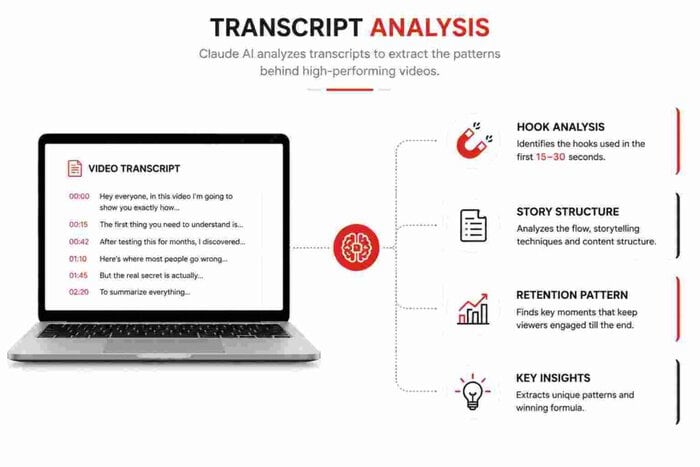
Video transcripts reveal far more than spoken words.
They help identify:
- Opening hooks
- Storytelling flow
- Retention techniques
- Transition patterns
- Call-to-action placement
The more high-quality transcripts you provide, the better the analysis becomes.
Extracting Video Transcripts
To gather accurate channel data, collect transcripts from at least two to three videos.
When selecting videos, choose content that performed well on the channel. These videos usually contain proven structures and engagement techniques.
After collecting the transcripts, upload them to Claude AI for analysis.
Once processed, Claude can identify recurring patterns that contribute to the channel’s success.
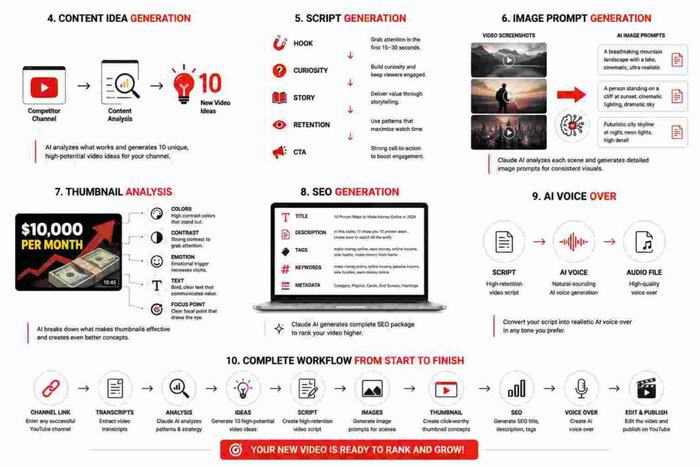
Generating Content Ideas
After analyzing the channel, the next step is content ideation.
If you already have a topic in mind, you can proceed directly to script creation.
If not, ask Claude AI to generate video ideas based on the analyzed content.
This approach often produces topics that align with audience interests because the suggestions are based on proven content frameworks rather than random brainstorming.
Benefits of AI-Powered Topic Research
- Faster idea generation
- Better content alignment
- Consistent publishing
- Reduced research time
Creating High-Retention Scripts
Scriptwriting is one of the most time-consuming parts of YouTube content creation.
After selecting a topic, Claude AI can generate a structured script based on the storytelling principles discovered during channel analysis.
A strong YouTube script typically includes:
- A compelling hook
- Curiosity-driven storytelling
- Smooth transitions
- Engagement triggers
- A strong conclusion
The result is a script designed to hold viewer attention from beginning to end.
Generating Image Prompts for Every Scene
Visual storytelling plays a major role in audience retention.
Instead of manually planning visuals, you can provide sample screenshots from the target channel.
Claude AI analyzes these screenshots and identifies:
- Visual style
- Composition patterns
- Design elements
- Scene structure
It can then generate detailed image prompts for every section of your script.
This dramatically speeds up content production.
Creating Better Thumbnail Concepts
Thumbnails often determine whether someone clicks on your video.
By uploading a few sample thumbnails from the target channel, Claude AI can identify the visual patterns that make them effective.
These may include:
- Color combinations
- Text placement
- Facial expressions
- Contrast levels
- Visual hierarchy
Based on this analysis, Claude can generate multiple thumbnail concepts and prompts.
Generating YouTube SEO Automatically
Search optimization is another area where AI can save significant time.
Instead of manually researching keywords and writing metadata, Claude AI can generate a complete SEO package.
This usually includes:
- SEO titles
- Video descriptions
- Tags
- Keywords
- Metadata suggestions
Having these elements ready helps streamline the publishing process.
Creating AI Voice Overs
Once the script is finalized, the next step is narration.
Modern AI voice generation tools can convert scripts into natural-sounding voice overs within minutes.
This is especially useful for creators who:
- Don’t want to record their own voice
- Need faster production
- Manage multiple channels
Choosing the right voice, pacing, and accent can significantly improve the final result.
Scaling Content Production with Bulk Image Generation
Generating visuals one by one can slow down production.
Instead, you can combine multiple image prompts into a batch workflow and generate all required visuals simultaneously.
This approach allows creators to:
- Save time
- Maintain consistency
- Produce content faster
- Scale production efficiently
For channels publishing frequently, this can become a major competitive advantage.
Bringing Everything Together in Editing
Once you have:
- Script
- Voice over
- Images
- Thumbnail
- SEO assets
The final step is editing.
Import all assets into your preferred video editor and synchronize visuals with the narration.
Adding transitions, motion effects, and background music can further improve viewer engagement.
At this stage, your video is ready for export and publishing.
Why More Creators Are Using AI for YouTube
The biggest advantage of AI is not replacing creativity.
Instead, it removes repetitive tasks that consume time.
Creators can focus more on:
- Strategy
- Content quality
- Audience building
- Consistency
As AI tools continue evolving, workflows that once required entire teams can now be managed by individual creators.
Conclusion
Learning how to clone any YouTube channel with Claude AI is really about understanding successful content systems and adapting them for your own channel.
By combining transcript analysis, script generation, visual planning, thumbnail creation, SEO optimization, and voice generation, creators can significantly reduce production time while maintaining quality.
The key is to use AI as a productivity tool rather than a shortcut. When used correctly, it can help you build a more efficient and scalable YouTube workflow.
Frequently Asked Questions
Is cloning a YouTube channel legal?
Yes, as long as you are analyzing the content strategy and creating original videos rather than copying someone else’s content.
How many transcripts should I provide to Claude AI?
At least two to three detailed transcripts are recommended for better pattern recognition and analysis.
Can Claude AI generate complete YouTube scripts?
Yes. Claude AI can create full scripts based on selected topics and analyzed content structures.
Does AI-generated SEO help YouTube rankings?
Good SEO can improve discoverability, but video performance still depends on audience engagement and watch time.
Can beginners use this workflow?
Absolutely. The process is beginner-friendly and can help new creators understand how successful channels structure their content.